
Freemium
Quick take Feed Them Social is a practical WordPress social-feed plugin for site owners who want Instagram, Facebook, and YouTube…

Spotlight Social Feeds is one of the cleaner choices for WordPress sites that want Instagram to function as a designed website content source rather than a basic embed. The free version is enough for a conventional Instagram gallery, while paid plans add richer layouts, hashtag and tagged feeds, visual moderation, shoppable links, filtering, and analytics. I would choose it for Instagram-first marketing where the feed itself needs to match the site and stay manageable over time.
Its main limitation is focus: Spotlight is deliberately centered on Instagram rather than acting as a broad all-network social wall. If you need Facebook, YouTube, and several review platforms from the same plugin, a multi-network product may fit better. But for an Instagram-led brand, that narrower focus creates a more coherent editing and moderation workflow.
Spotlight works for a portfolio gallery, social-proof section, creator feed, campaign hashtag wall, user-generated-content display, or shoppable Instagram block. A useful implementation is to create separate feeds by intent instead of forcing one feed to serve every page. For example, the homepage can show a tightly curated brand feed while a campaign landing page uses a hashtag or tagged-post feed. Because Spotlight stores feeds separately, each placement can have its own layout and curation rules.
| Capability | Free | Essentials | Pro | Agency |
|---|---|---|---|---|
| Basic Instagram feed | Yes | Yes | Yes | Yes |
| Unlimited connected accounts and feeds | Yes | Yes | Yes | Yes |
| Grid layout | Yes | Yes | Yes | Yes |
| Highlight, Masonry, Slider layouts | No | Yes | Yes | Yes |
| Stories, comments, likes, captions | Limited | Yes | Yes | Yes |
| Tagged feeds | No | No | Yes | Yes |
| Hashtag feeds | No | No | Yes | Yes |
| Shoppable feeds and custom links | No | No | Yes | Yes |
| Visual moderation and filtering | No | No | Yes | Yes |
| Spotlight and Instagram analytics | No | No | No | Yes |
| Image and video management | No | No | No | Yes |
| Sites | Free plugin | 1 | 1 | Up to 20 |
The plans are segmented by workflow rather than only site count. Essentials is mainly about richer presentation. Pro is where Spotlight becomes a content-curation and conversion tool. Agency adds analytics, media management, more sites, and priority support. That makes the upgrade trigger relatively clear compared with products that scatter individual features across many add-ons.
Free is enough when you need a responsive Instagram gallery, a straightforward Grid layout, and a stable way to keep the website refreshed with recent Instagram posts. Personal blogs, portfolios, and small businesses can stay free if they do not need hashtag aggregation, manual moderation, tagged-post feeds, or custom shopping links. Start by building the final page with the free design options, because a basic feed often solves the actual need without adding another annual license.
Upgrade when layout variety, campaign curation, or conversion behavior matters. Essentials adds the stronger visual layouts. Pro is the meaningful jump for marketers because tagged posts, hashtag feeds, visual moderation, filtering, and shoppable links turn Instagram from a passive gallery into controlled website content. Agency makes sense for client portfolios or larger brands that need analytics, media management, and up to 20 sites.
The live editor is a strong part of Spotlight’s workflow because layout, spacing, post count, and responsive behavior can be evaluated before embedding the feed. Treat this preview as a starting point, not the final QA environment. Theme fonts and some inherited styles can differ on the published page, so always check the actual front end after embedding. Keep the feed width aligned with the section around it and avoid oversized galleries that dominate the page.
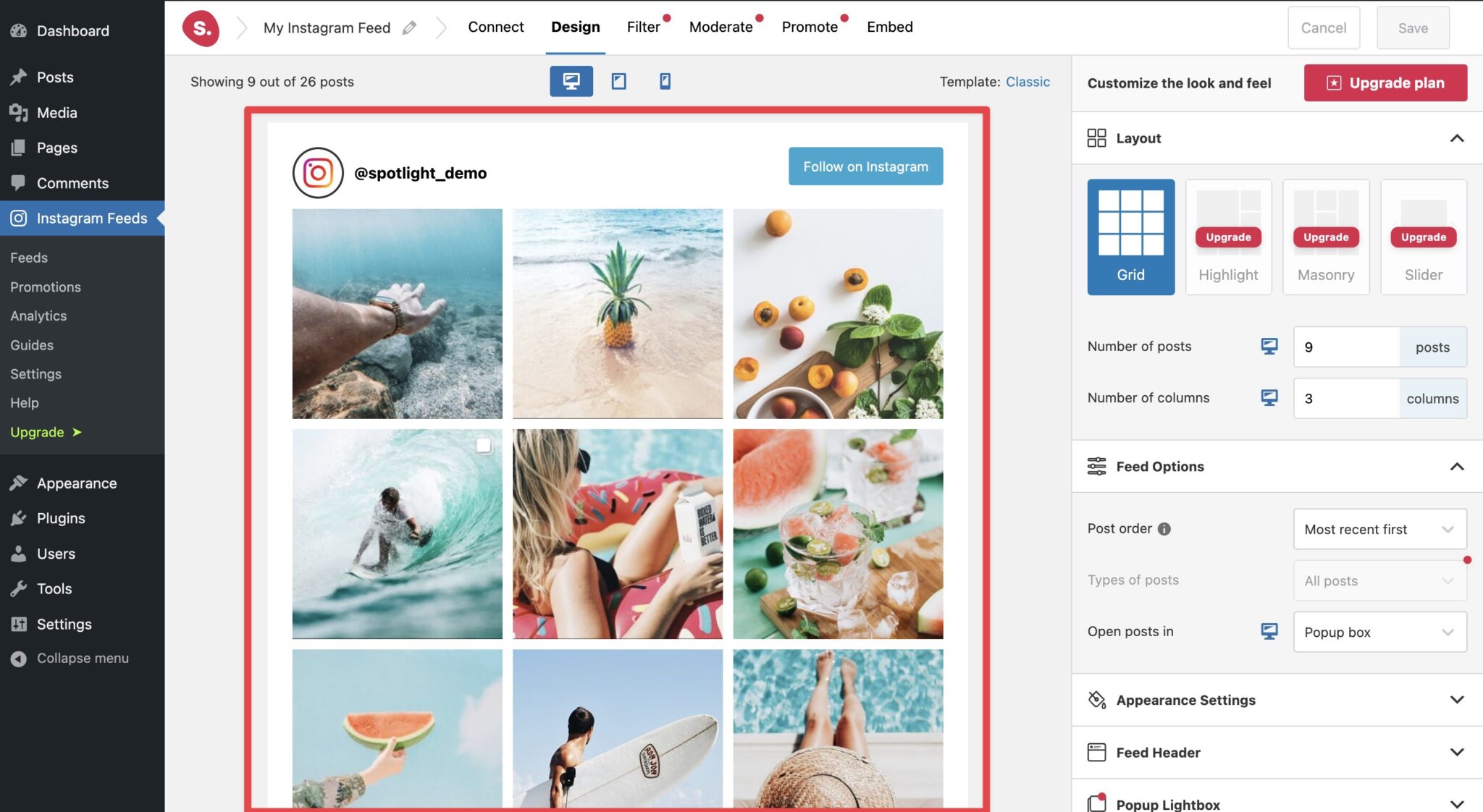
Caption and hashtag filters are useful when the source account contains a mixture of content. Instead of creating a second Instagram account just for the website, Pro users can include or exclude posts by words and hashtags. For campaigns, this can keep a feed focused on one product line or topic. Filtering should still be reviewed periodically because captions evolve and one broad keyword can hide or include more posts than intended.
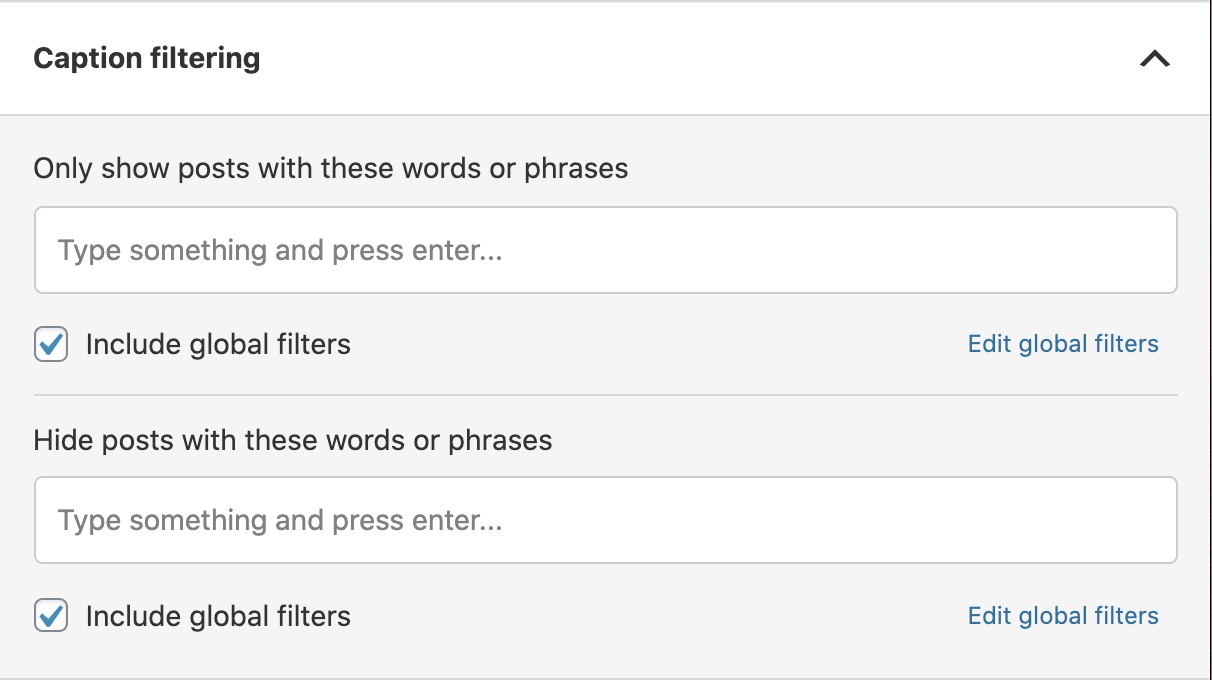
Spotlight lets the feed header and follow controls become part of the page design. The best implementation keeps those elements subordinate to the website’s own primary calls to action. A large follow button may make sense on a creator site, while an ecommerce product page may need the feed to support product discovery without competing with Add to Cart. Match spacing, button tone, and image proportions to the surrounding design instead of styling the feed as a separate mini-site.
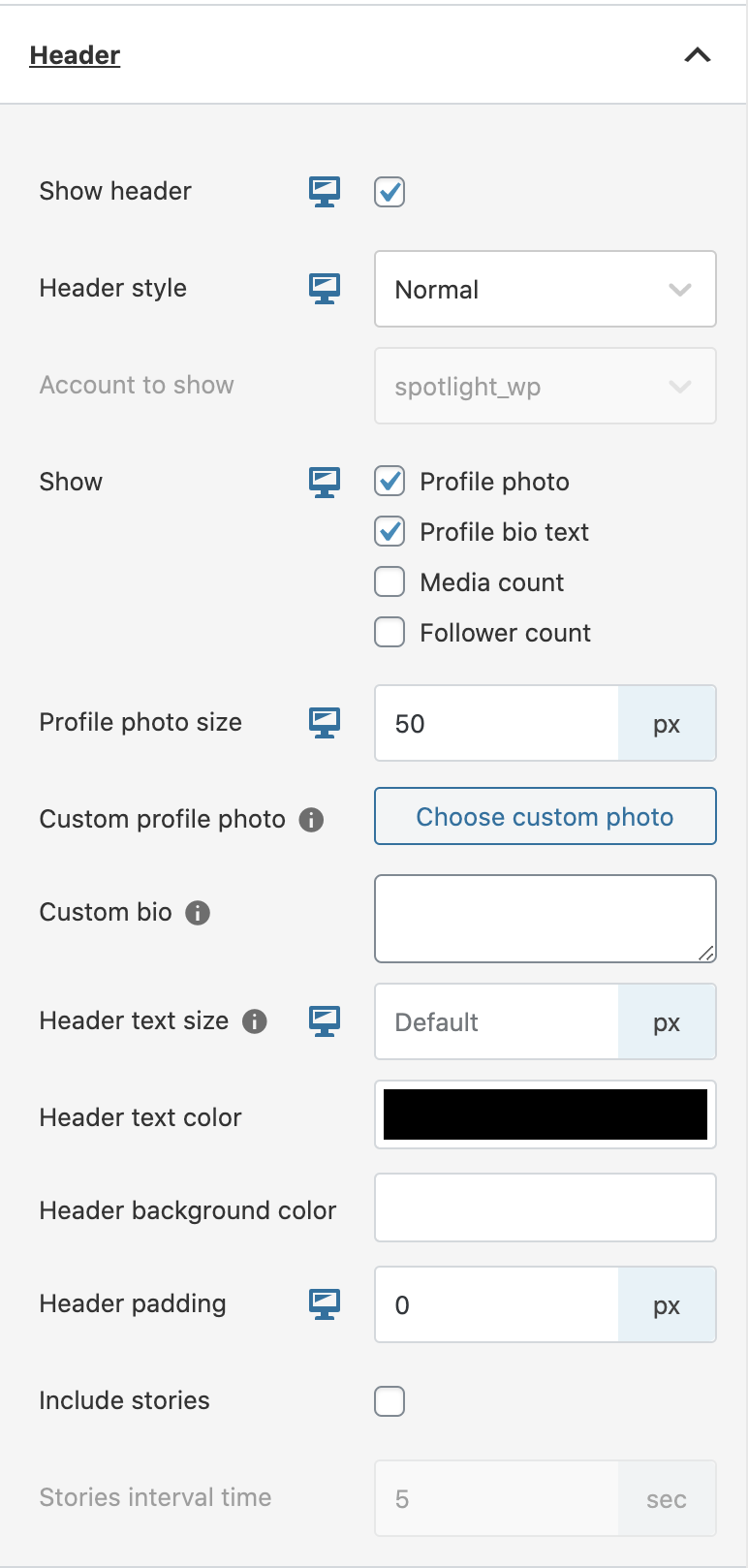
The appearance controls cover dimensions, feed padding, image padding, aspect ratios, text size, colors, and hover information. Small adjustments to image padding and ratio can change the whole character of a feed. When the source account mixes portraits, landscapes, and Reels, test whether cropping creates awkward compositions before locking a fixed ratio. The visual goal should be consistency without cutting away important content.
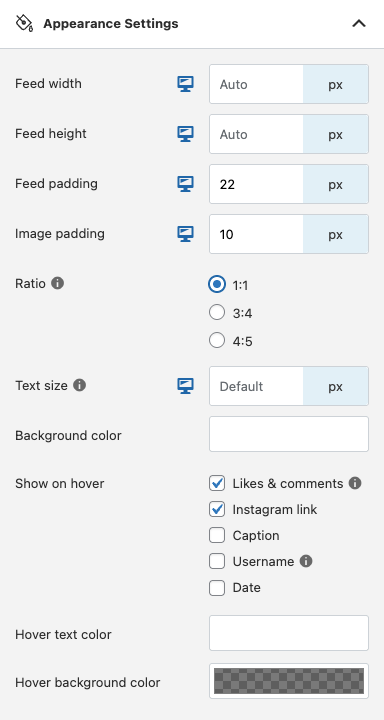
Masonry is useful when preserving original image proportions matters more than strict rows. Spotlight’s paid layouts also include Highlight and Slider options. Choose based on the content, not novelty. A masonry feed can make travel or photography content feel natural, while a slider may be more appropriate in a narrow homepage section. For product-led pages, a predictable grid is often easier to scan and less likely to create layout movement.
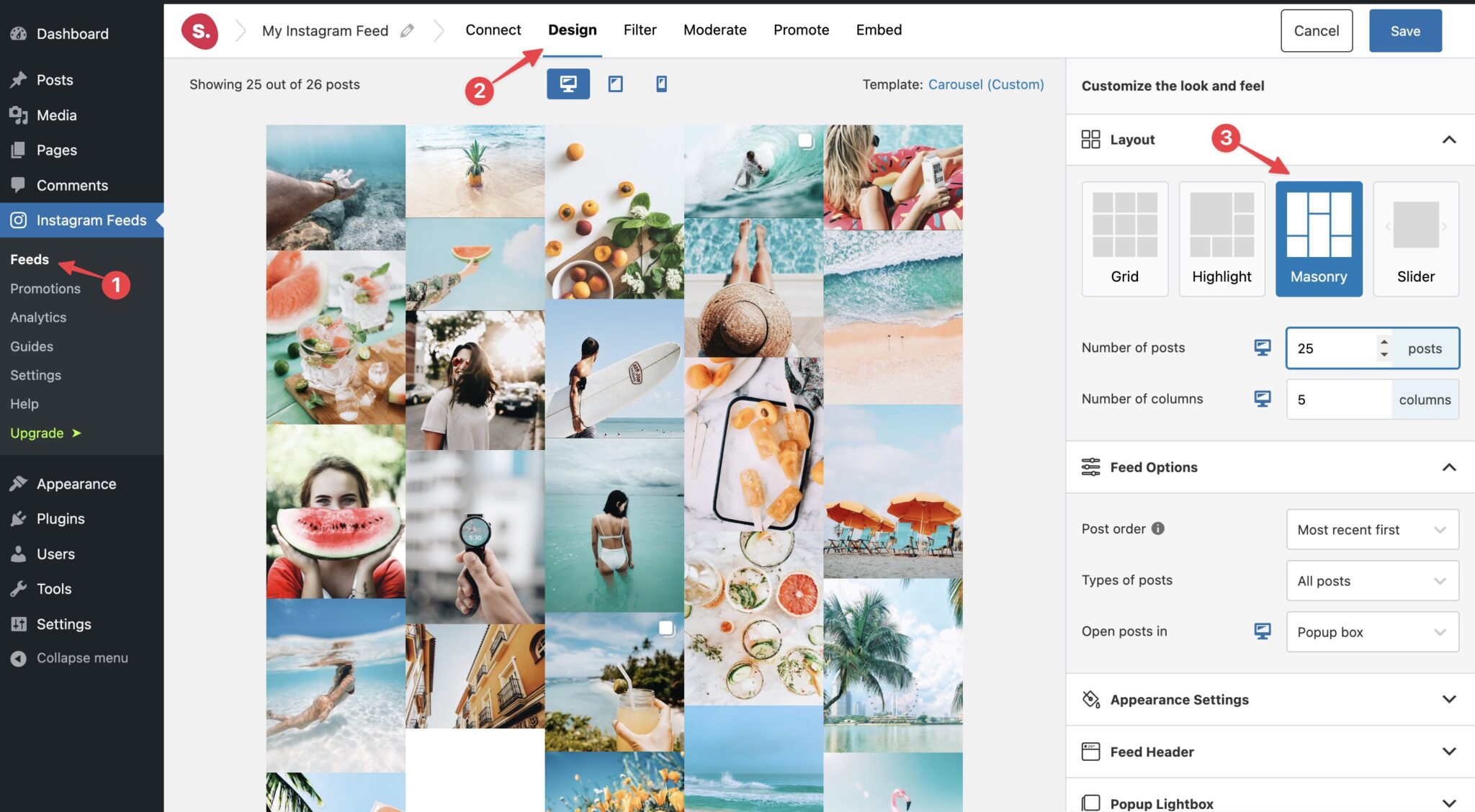
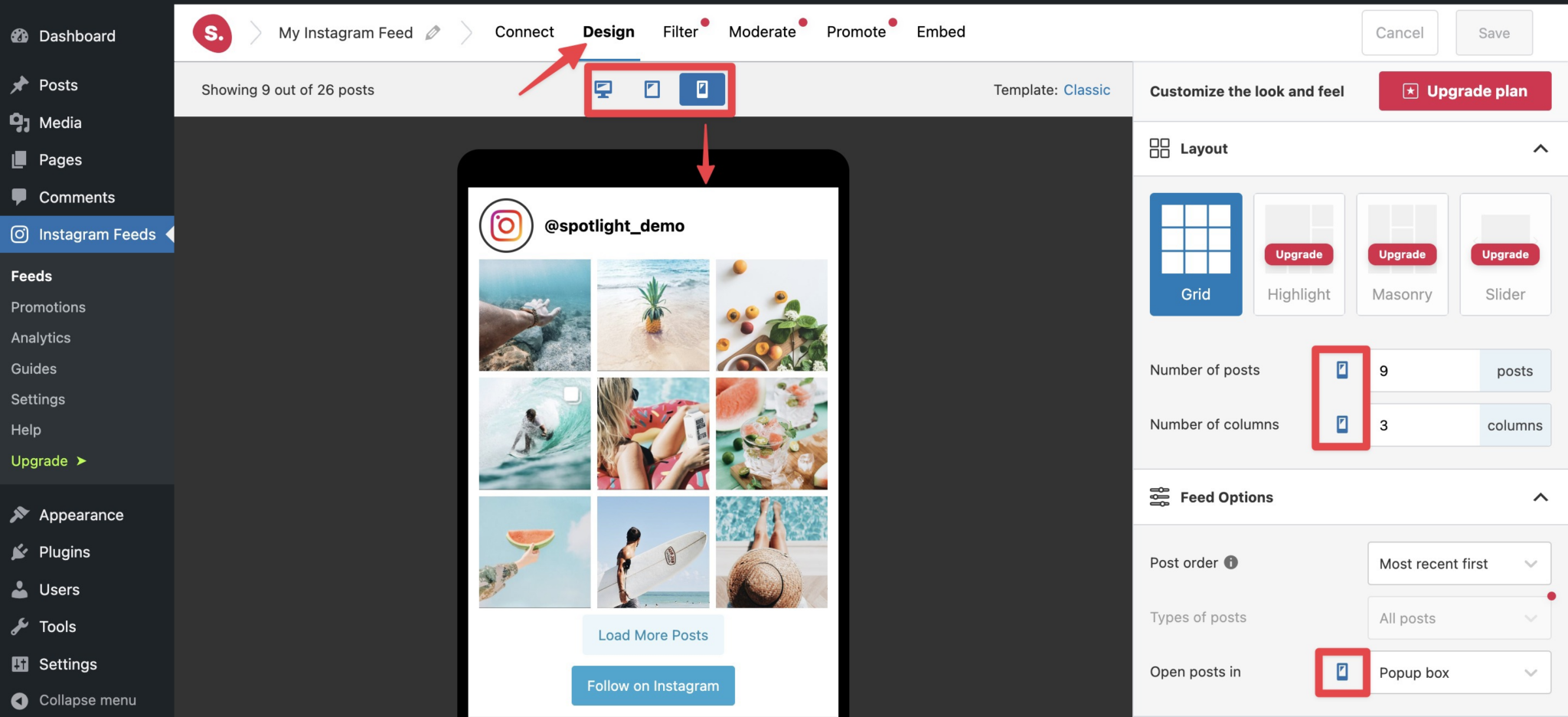
The editor includes desktop, tablet, and phone previews, and many settings can be adjusted per device. Use those controls to reduce columns and spacing on narrow screens, then verify the live page at real mobile widths. A social feed that looks polished at desktop can become a long image wall on mobile if too many posts load before the next section. Keep the initial mobile post count disciplined and test the load-more interaction with touch.
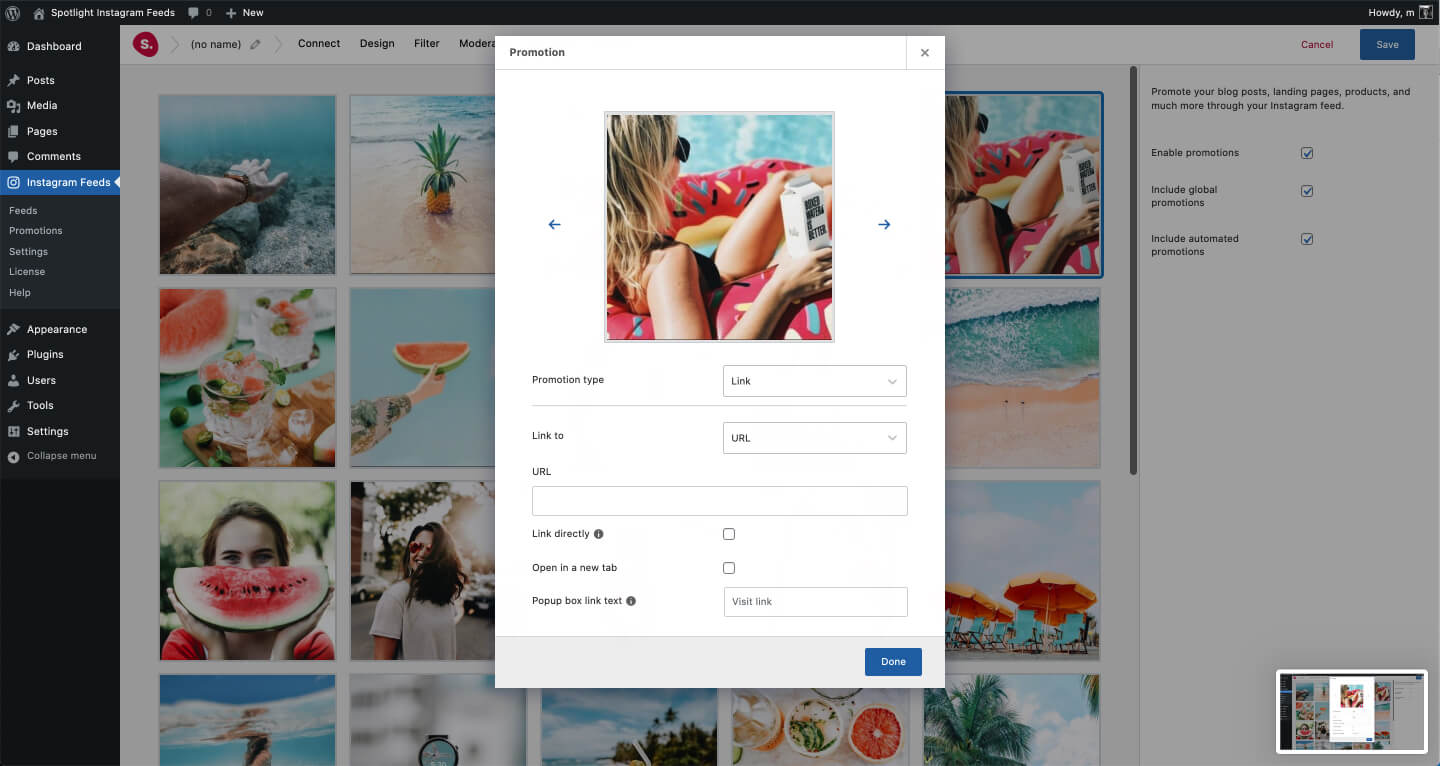
Spotlight Pro can assign custom URLs to Instagram posts so the feed can route visitors to products, articles, landing pages, or other custom post types. This is one of the clearest reasons to choose Pro for ecommerce. The link mapping needs maintenance, though. If a product is removed or a campaign URL changes, the corresponding social post should be reviewed so the feed does not send visitors to outdated destinations.
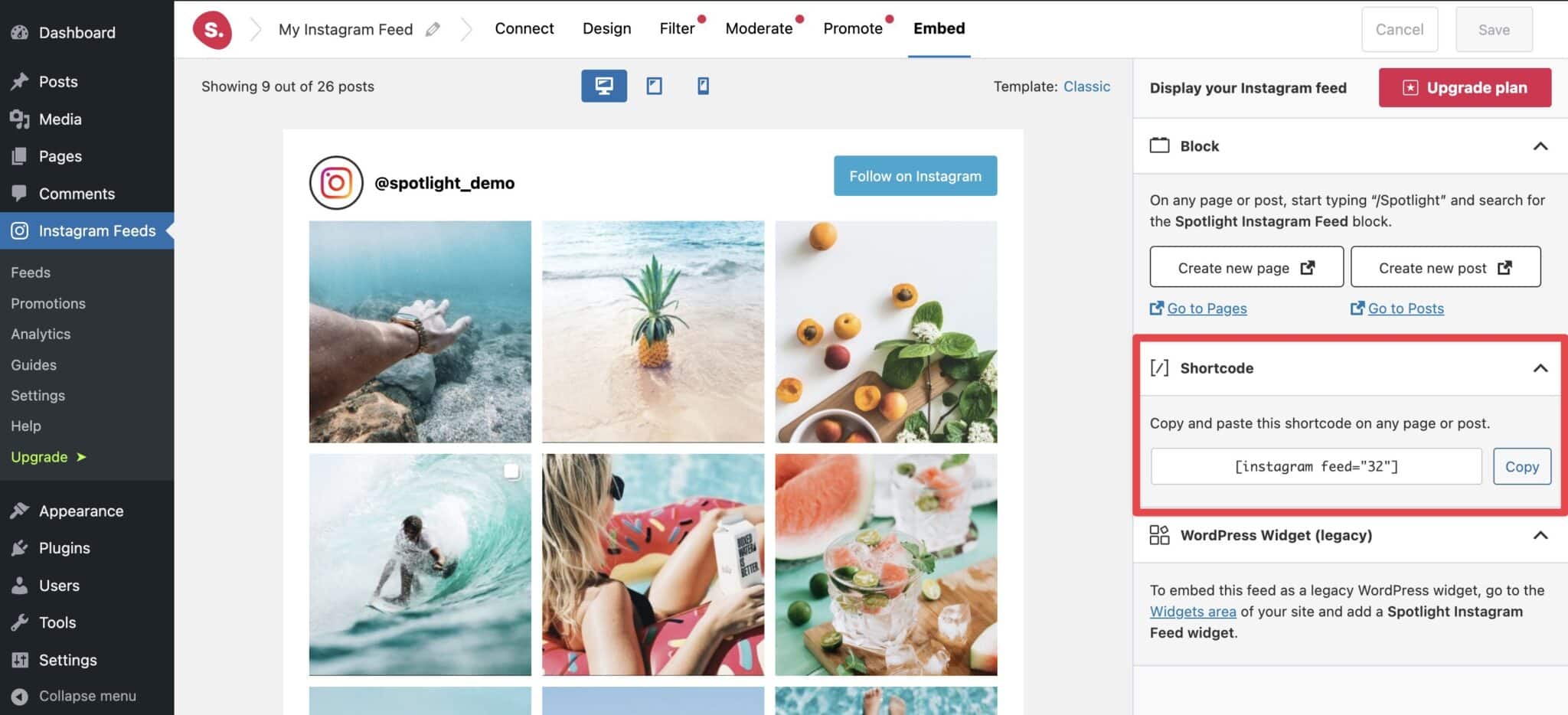
Feeds can be embedded with a shortcode, block, widget, and a premium Elementor widget. Shortcodes are convenient for reusable placements and page builders, while the block is easier for Gutenberg editors. Keep an inventory of where important feeds are embedded. Spotlight’s feed list can show instances, which is useful when an agency needs to update or retire a feed without searching the entire site manually.
Instagram discontinued the Basic Display API for personal accounts in December 2024. Spotlight now expects professional Instagram accounts, meaning Creator or Business accounts, for its supported connection methods. Basic connections can go directly through Instagram, while advanced connections through Facebook enable additional data and features. This external API dependency is a core operational consideration, so document the connected account owner and recovery path.
Spotlight imports posts into WordPress and exposes update and cache controls. More frequent refreshes create fresher feeds but also increase external requests and background work. Match the update interval to the publishing cadence of the Instagram account. A weekly publisher does not need minute-level freshness. Also limit the number of initially visible posts, because social image weight usually matters more to page performance than the feed controls themselves.
Spotlight depends on Instagram and Meta APIs, so account permissions and upstream changes can affect the feed even when WordPress is healthy. The free version is genuinely useful, but the features that matter most to campaign marketers, especially moderation, hashtag feeds, tagged posts, shoppable links, and advanced filtering, are paid. The product is also Instagram-specific, so teams that want Facebook, YouTube, TikTok, and reviews in one dashboard should compare multi-network alternatives.
Spotlight fits creators, photographers, ecommerce stores, agencies, hospitality brands, and content teams that treat Instagram as a living website content source. It is strongest when visual consistency and curation matter. It is less necessary for a site that only needs one or two individual post embeds, and it is not the broadest choice for organizations whose social strategy is spread equally across several networks.
Pricing checked October 16, 2026. Spotlight has a free version. Essentials costs $59/year for 1 site, Pro costs $99/year for 1 site, and Agency costs $199/year for up to 20 sites. The vendor states that these prices are locked for life for the license purchased, with VAT applied where relevant. Choose the plan based on workflow needs first, then site count.
The current WordPress.org version is 1.8.0. Spotlight’s current help center reflects the post-2024 Instagram API model and professional-account connection requirements. Before updating a production site, verify the connected Instagram account, feed import status, and any Pro filters or promotions that are business-critical.
Spotlight is one of the better fits when Instagram needs to look intentional inside WordPress. The free version handles a basic feed well, Essentials adds stronger layouts, and Pro is the point where curation and conversion tools become meaningful. I would choose Pro for serious campaign or ecommerce use, while simple portfolio feeds can comfortably stay free.
Yes. Spotlight has a free WordPress plugin that can display a basic Instagram feed with responsive design controls.
Pricing checked October 16, 2026. Pro costs $99/year for one site. Essentials is $59/year and Agency is $199/year for up to 20 sites.
Yes, hashtag feeds are available on the Pro plan.
Yes. Pro can assign custom links to posts for shoppable and promotional feed workflows.
Instagram discontinued the Basic Display API for personal accounts. Current Spotlight connections are built around professional Creator or Business accounts.
The current WordPress.org version is 1.8.1.
It is best for Instagram-first WordPress sites that need a designed, curated, and maintainable feed rather than a simple individual post embed.
Quick take Feed Them Social is a practical WordPress social-feed plugin for site owners who want Instagram, Facebook, and YouTube…
A modular WordPress suite for social feeds, reviews, Social Wall and feed analytics across major social networks.
Combines social feeds, business reviews, testimonials, notification popups, and social chat in one WordPress social-proof plugin.
Log in or create an account to continue.