
RecommendedFreemium
Adds structured custom fields, custom post types, taxonomies, and developer APIs for building tailored WordPress editing and data models.

ACPT is a WordPress data-modeling framework for building custom post types, taxonomies and custom fields without assembling several separate plugins. The free Lite edition covers the basic content-model layer, while Pro expands into 60+ field types, advanced relationships, option pages, frontend forms, dynamic blocks, custom APIs, permissions and broader builder integrations. I would choose ACPT when the project needs a structured content system rather than only one or two custom fields. If all you need is a simple post type and a few text fields, Lite or a smaller tool can be enough.
| Area | What ACPT handles |
|---|---|
| Content types | Custom post types and custom taxonomies |
| Custom data | Meta boxes and field groups |
| Advanced fields | Repeaters, flexible content, relations and conditional fields in Pro |
| Global data | Option pages in Pro |
| Frontend editing | Form builder and post-management forms in Pro |
| Blocks | Dynamic Gutenberg block generator in Pro |
| APIs | Custom REST API tooling and developer functions |
| Custom storage | Custom Content Types with dedicated database tables in Pro |
| Integrations | Dynamic data support across multiple page builders and WordPress tools |
| Feature | Lite | Pro |
|---|---|---|
| Custom post types | Yes | Yes |
| Custom taxonomies | Yes | Yes |
| Meta field types | 5 | 60+ |
| Repeater and flexible fields | No | Yes |
| Relational fields | No | Yes |
| Conditional field rendering | No | Yes |
| Option pages | No | Yes |
| Custom Content Types / custom tables | No | Yes |
| Frontend form builder | No | Yes |
| Dynamic Gutenberg block generator | No | Yes |
| Custom REST APIs | No | Yes |
| Import / export tools | No | Yes |
| Permission management | No | Yes |
| Advanced builder integrations | Limited | Expanded |
Lite is enough when the job is mainly registering custom post types and taxonomies and adding a small set of straightforward fields. For an early directory prototype, a simple resource library or a content model with only basic metadata, that can be a sensible way to validate the structure. It also lets you learn the ACPT interface before committing the project to advanced fields or frontend workflows.
Pro becomes relevant when the data model itself is complex. Repeaters, flexible content, relational fields, conditional rendering, option pages, custom database-backed content types, frontend forms, dynamic blocks, custom APIs and permission tooling are the features that materially change what you can build. If you are reaching for custom PHP because Lite cannot model the relationship or workflow cleanly, that is a stronger upgrade signal than simply wanting more field types.
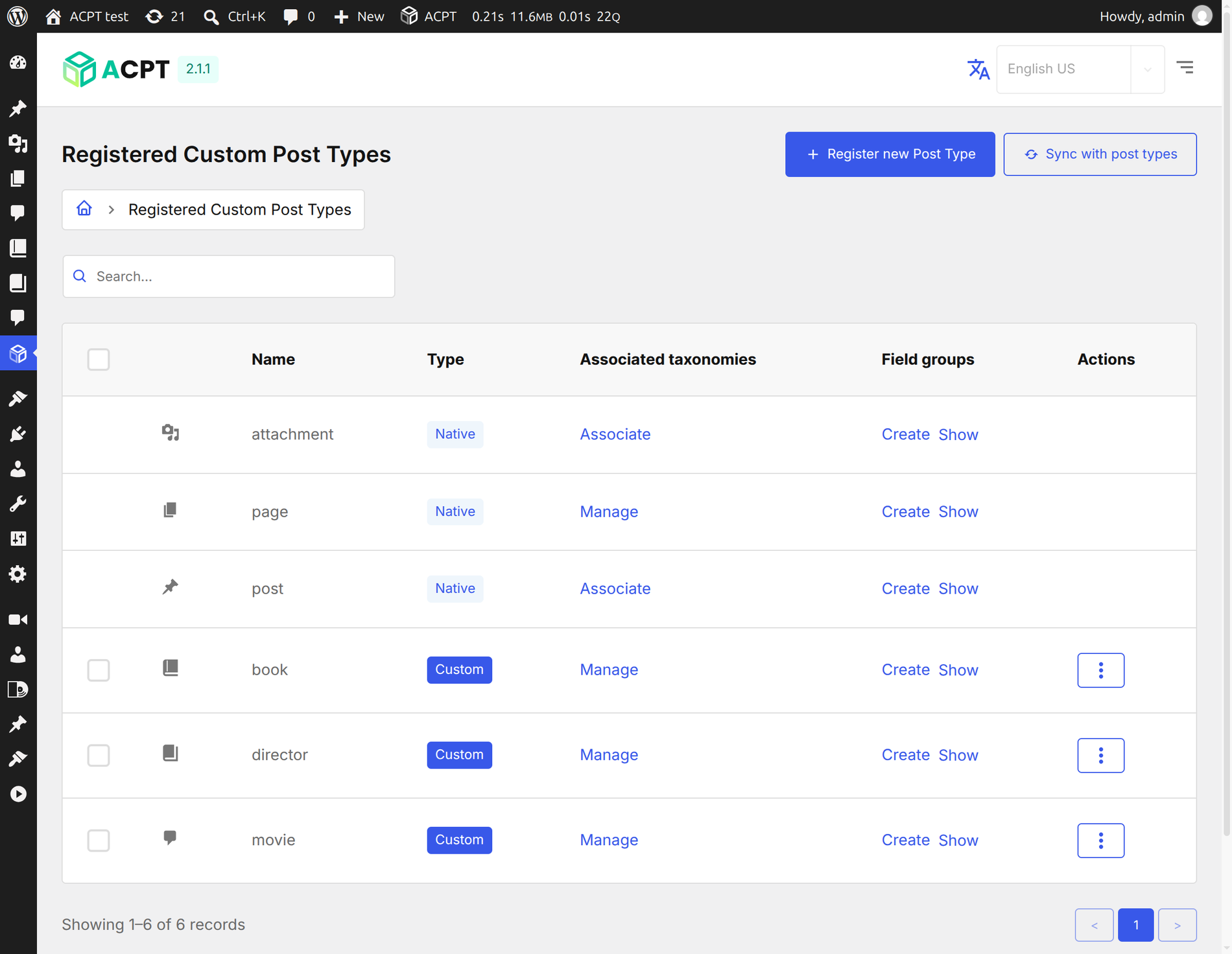
ACPT gives custom post types and taxonomies their own management screens. You can define labels, slugs, supported editor features, archive behavior and REST exposure without editing functions.php. The important planning step comes before clicking Create: decide which concepts deserve their own post type, which are taxonomies, and which are only fields. A clean model is easier to query, template and migrate than a collection of overlapping content types.


The meta field manager groups custom fields into boxes and lets you control field behavior from one interface. Pro expands far beyond simple text fields with repeaters, flexible content, relational fields, validation and conditional rendering. Use repeaters for truly repeating groups, not as a substitute for a related post type. Use relational fields when the connected object should remain independently queryable and reusable elsewhere on the site.


The Pro form builder can map fields to posts, taxonomies, users or option data and supports post-management workflows. This makes ACPT useful for internal editorial forms, member submissions or controlled frontend editing. The form action and target should be chosen carefully: decide whether submissions create drafts, update a known record or pass data to custom logic. On public forms, add the same spam, validation and moderation thinking you would apply to any user-generated content workflow.


ACPT can generate dynamic blocks with controls and server-side rendering logic. This is useful when structured data needs an editor-friendly presentation but you do not want every site editor touching Twig or PHP directly. Build blocks around stable content concepts and keep presentation concerns separate from the field model so a future redesign does not force a data migration.

The custom API dashboard exposes ACPT operations through REST endpoints and supports authentication. That can help integrations or headless projects, but it also raises the security bar. API keys, endpoint permissions and data exposure should be reviewed before production. Do not expose a broad management endpoint simply because the interface makes it easy; restrict the operations and credentials to the minimum the external application needs.

Option pages are useful for information that belongs to the site rather than one post, such as contact details, global labels, integration settings or reusable business data. They are a better fit than hiding site-wide values inside a random page or theme option. Keep editorial data and technical secrets separate: an option page is convenient for structured settings, but credentials still need appropriate permission and storage decisions.

ACPT becomes most valuable when the structured fields can be consumed by the template system you already use. Before committing to a page builder integration, test the exact field types you need inside loops, archives and single templates. Complex relations and repeaters are the areas where integration quality matters most. Design the data model first, then build templates against it; changing field structure after dozens of templates are live creates avoidable migration work.
A custom-field framework becomes part of the site architecture, so document field names, relationships and where each field is rendered. Export configuration before major structural changes and back up the database before deleting content types or relationships. ACPT documentation notes that deleting a post type registration does not automatically delete the underlying WordPress posts, which is useful for recovery but can also leave hidden data if a migration is not planned.
Before creating dozens of fields, define the entities and relationships on paper. A property directory, for example, might use a Property post type, Location taxonomy, Agent post type and a relation between Property and Agent. Amenities may belong in a taxonomy if they need archives and filtering, while square footage belongs in a numeric field. Making those distinctions early prevents the common problem of storing filterable entities inside text fields or turning every label into a separate post type.
Name fields for long-term use rather than the current design. A key such as property_bedrooms is safer than hero_number_three because templates can change while the data meaning stays stable. The same principle applies to relations and option-page values. When a redesign arrives, a semantic data model lets the presentation change without rewriting the content database.
Structured data becomes valuable when it can be queried predictably. Decide which fields will be used for sorting or filtering before launching a large dataset, because field type and storage choices affect query complexity. A taxonomy is often a better fit for reusable categorical filters, while numeric fields suit ranges such as price or area. Relations are useful when two entities need independent templates and administration. If the project is expected to hold a very large volume of structured records, evaluate ACPT Custom Content Types and custom database tables before defaulting every value to normal post meta.
For agency handoff, keep a short schema document listing post types, taxonomies, field groups, relations, option pages and the templates that consume them. That document is often more useful to a future developer than screenshots of the admin UI because it explains why the data model exists.
Choose ACPT if the project needs one integrated framework for post types, taxonomies, advanced fields, relationships, forms and dynamic output. It fits developers and advanced site builders who want a visual data layer but still care about APIs, reusable templates and structured architecture.
Keep it simpler if you only need a single post type or a few basic fields. A smaller plugin stack can be easier for a content team to understand when none of the advanced ACPT workflows will be used.
Pricing checked October 27, 2026. ACPT Lite is free. Pro pricing is $29/year for Personal with one site, $49/year for Business with five sites and $99/year for Agency with unlimited sites. The vendor states that all paid plans include the full Pro feature set, with the license tier mainly changing site activations.
The official ACPT changelog lists 2.1.7, released October 22, 2026, as the latest Pro release. Version 2.1 introduced Custom Content Types with dedicated tables, unified builder screens and native block bindings. The separate ACPT Lite package follows its own release line, so its version and directory history should not be mistaken for the Pro release.
ACPT is strongest when you need a coherent content framework, not simply a custom-fields plugin. The combination of post types, advanced fields, relationships, forms, blocks and APIs can replace several disconnected tools on a complex site. That concentration is also the trade-off: once a project uses all of those layers, ACPT becomes architectural infrastructure. Start with a clear model, document it, and upgrade to Pro when the workflow genuinely needs the advanced data and application features.
Yes. ACPT Lite provides custom post types, taxonomies and a limited set of meta fields. The broader framework features are available in ACPT Pro.
Pro adds 60+ field types, repeaters, flexible and relational fields, option pages, custom content types, forms, dynamic blocks, custom APIs, import/export, permissions and expanded integrations.
Current annual pricing is $29 for one site, $49 for five sites and $99 for unlimited sites. All paid plans include the complete Pro feature set.
Yes, in Pro. Forms can map structured fields to posts, taxonomies, users or options and can support post-management workflows.
Yes. ACPT supports Gutenberg and multiple page builders. Test the exact field types and loop scenarios your project needs before standardizing the template architecture.
Yes, Pro includes custom REST API tooling. Treat endpoint permissions and credentials as part of the project security model.
It can replace parts of both on projects that want post-type registration and custom fields in one framework, but migration should be planned around your existing field data and templates.
Adds structured custom fields, custom post types, taxonomies, and developer APIs for building tailored WordPress editing and data models.
Build structured WordPress content with custom post types, fields, relationships, taxonomies, settings pages, and templates.
Creates and manages WordPress custom post types and taxonomies through an admin UI, with optional Pro display and layout tools.
Log in or create an account to continue.