
Freemium
Create responsive WordPress image galleries with drag-and-drop ordering, lightbox viewing, and flexible embedding options.

Modula is a WordPress gallery plugin for photographers, designers, agencies, portfolios, and image-heavy sites that want more layout control than the core Gallery block without moving to a heavyweight visual builder. The free version handles basic galleries, while paid tiers add video, filters, albums, CDN and optimization, protection, proofing, downloads, watermarking, comments, and other client-facing workflows.
I would shortlist Modula when galleries are a real content type rather than an occasional row of images. For a simple blog that only needs a few static galleries, WordPress core may be enough. For professional photography delivery, filtering, albums, or client proofing, the paid plans are more relevant.
Modula 3.0 focuses on a rebuilt visual editor plus multiple gallery layouts, lightboxes, hover effects, filtering, sorting, video galleries, albums, image protection, watermarking, proofing, comments, downloads, dynamic galleries, Instagram feeds, optimization, CDN delivery, and role controls depending on plan.
The plugin’s value comes from combining visual presentation and gallery operations. A photographer may care about image proofing and watermarking; an editorial site may care about filters and dynamic galleries; an agency may care about role controls and reusable defaults.
You can build portfolio grids, masonry galleries, justified layouts, mixed image and video galleries, filtered collections, multi-level albums, client proofing galleries, product or project showcases, Instagram-powered galleries, and protected image libraries.
The best results come from deciding the gallery’s purpose first. A portfolio meant to impress needs different interaction from a proofing gallery meant to collect client feedback, or an archive that visitors need to filter quickly.
| Capability | Free | Starter | Trio | Business |
|---|---|---|---|---|
| Core image galleries | Yes | Yes | Yes | Yes |
| Video galleries | Limited/plan dependent | Yes | Yes | Yes |
| Gallery filters and sorting | Limited | Yes | Yes | Yes |
| Albums | No | No | Yes | Yes |
| Unlimited image optimization and CDN | No | No | Yes | Yes |
| Password protection | No | No | Yes | Yes |
| Instagram and dynamic galleries | No | No | Yes | Yes |
| Watermark and image downloads | No | No | No | Yes |
| EXIF and lightbox zoom | No | No | No | Yes |
| Image proofing and comments | No | No | No | Yes |
| Sites | Free plugin | 1 | 3 | 5 |
Starter is the first paid tier for enhanced galleries. Trio is the practical jump for photographers or publishers that need albums, optimization, protection, dynamic sources, and richer organization. Business is where client-work features such as proofing, comments, watermarking, and stronger role controls become part of the decision.
Use Free when you need attractive responsive image galleries and basic layout control, but do not need professional delivery, client collaboration, protected galleries, or advanced content organization. It is suitable for testing the editing experience before buying a license.
Free also makes sense when galleries are secondary content and you can handle image optimization elsewhere. Do not pay for advanced gallery operations if the site only publishes a few small collections each year.
Choose Starter when video, filters, sorting, and a more capable lightbox are the main upgrades. Choose Trio when albums, CDN delivery, unlimited optimization, password protection, Instagram, and dynamic galleries become important. Choose Business when galleries are part of paid client work and you need proofing, comments, watermarking, downloads, EXIF, role controls, or reusable gallery defaults.
The Agency plan extends Business features to larger site counts. That matters for studios and agencies maintaining galleries across many client websites rather than one portfolio.
Modula 3.0 introduces a rebuilt editor intended to make gallery configuration more visual and direct. The editor brings gallery settings closer to the content being adjusted rather than relying only on a long settings screen.
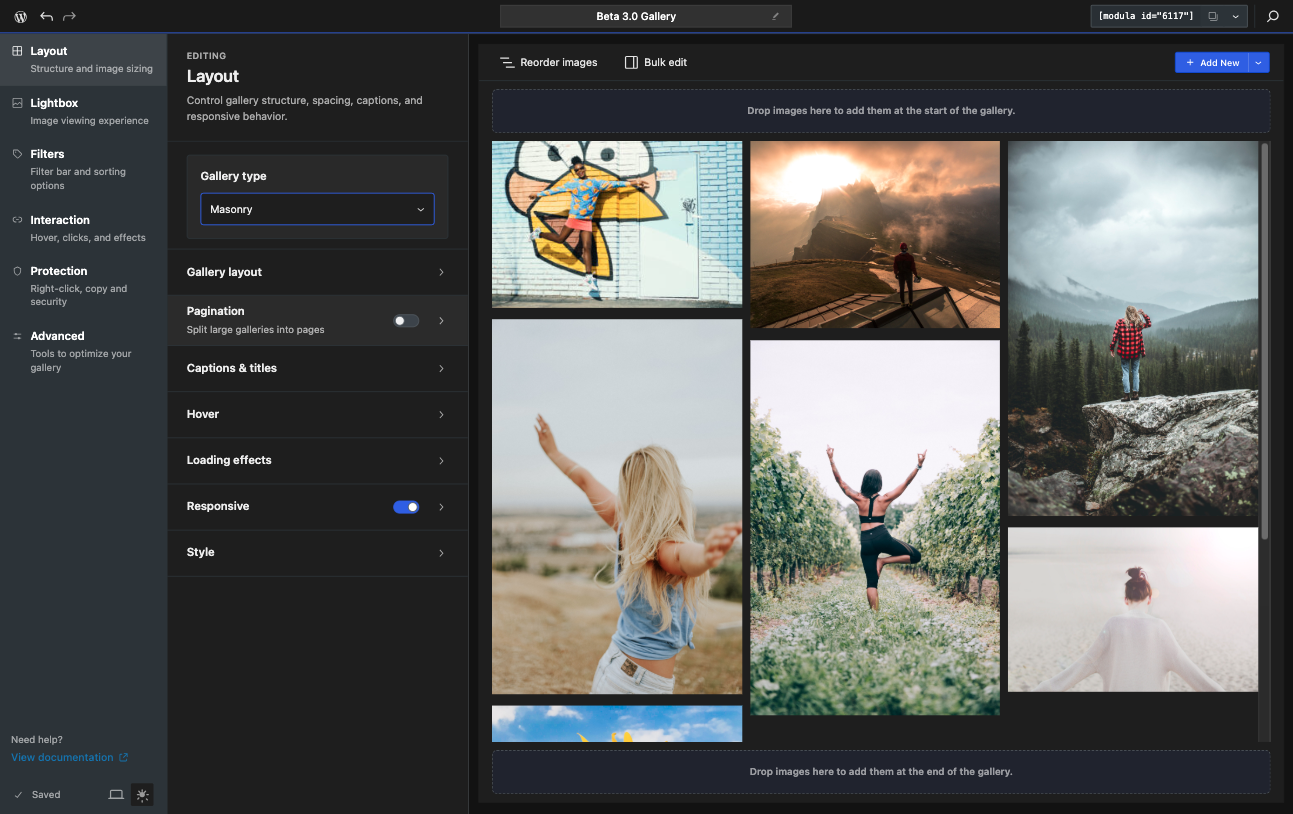
A visual editor is useful only if the team can reproduce consistent results. Establish default image ratios, spacing, caption behavior, lightbox rules, and mobile expectations before creating dozens of galleries.
The new editor includes a command palette that can speed up navigation to gallery actions and settings, particularly on complex galleries with many configuration areas.
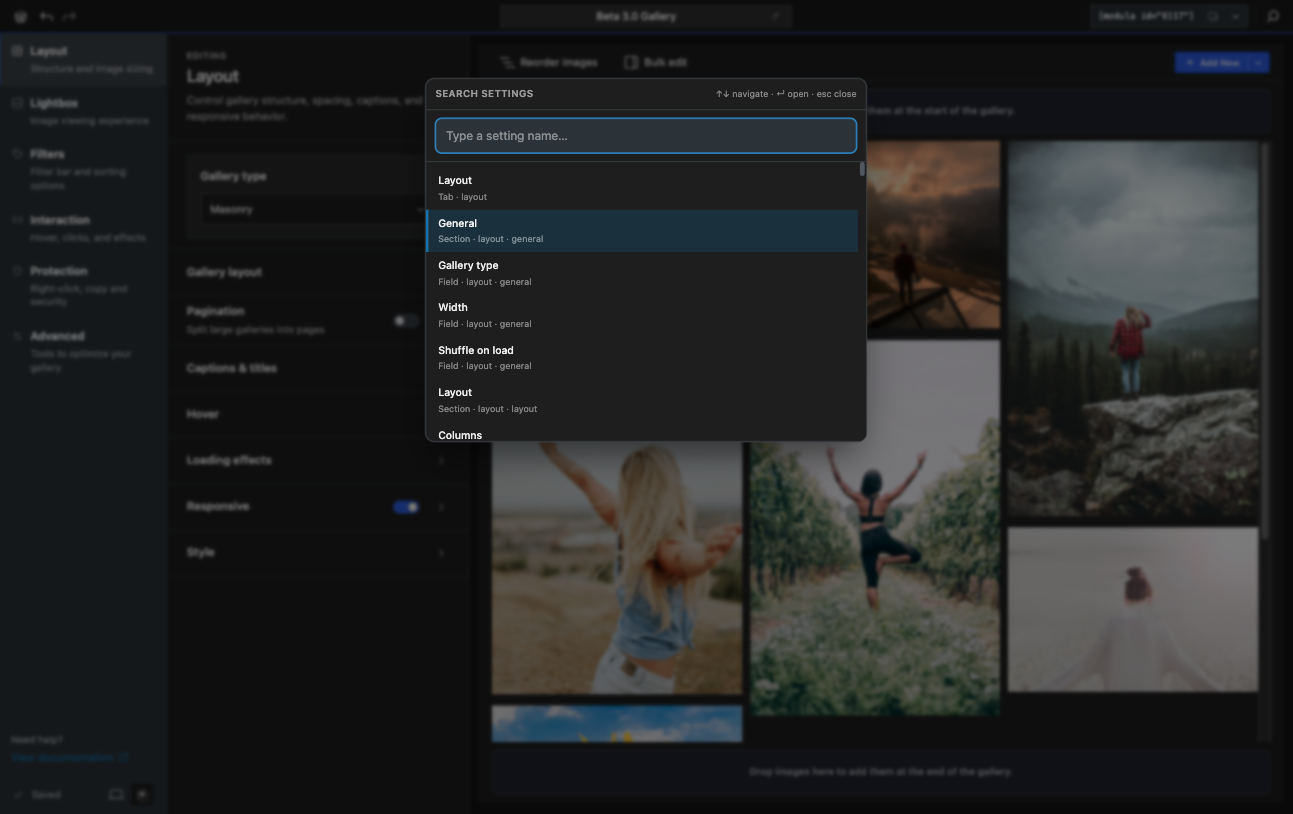
For editorial teams, this is most useful after a standard workflow is documented. Fast access to settings should not encourage each author to invent a different gallery style.
Modula includes a large library of hover effects and the 3.0 editor adds more direct control over those interactions.
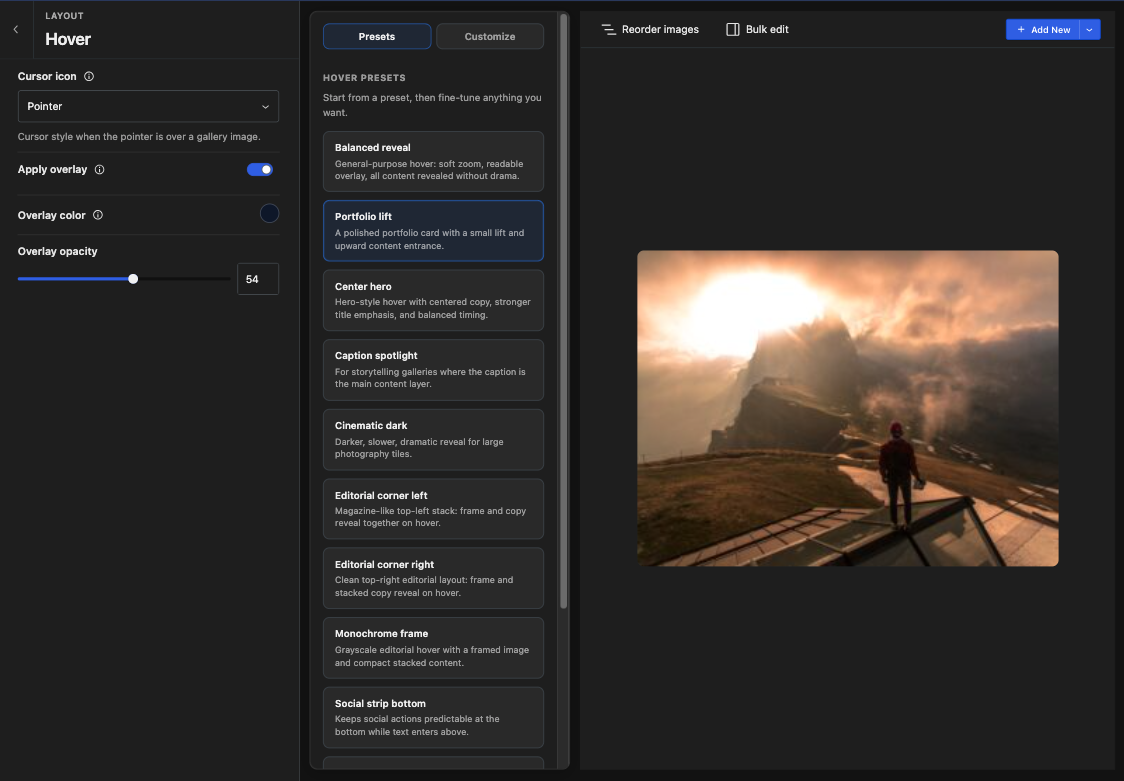
Use hover effects selectively. On desktop they can reveal captions or actions, but touch devices do not have a persistent hover state. Important information and navigation should remain accessible without relying on hover alone.
Filters let visitors narrow a gallery by categories or labels, which is useful for portfolios, project archives, events, products, or other collections where scrolling through every image would be inefficient.

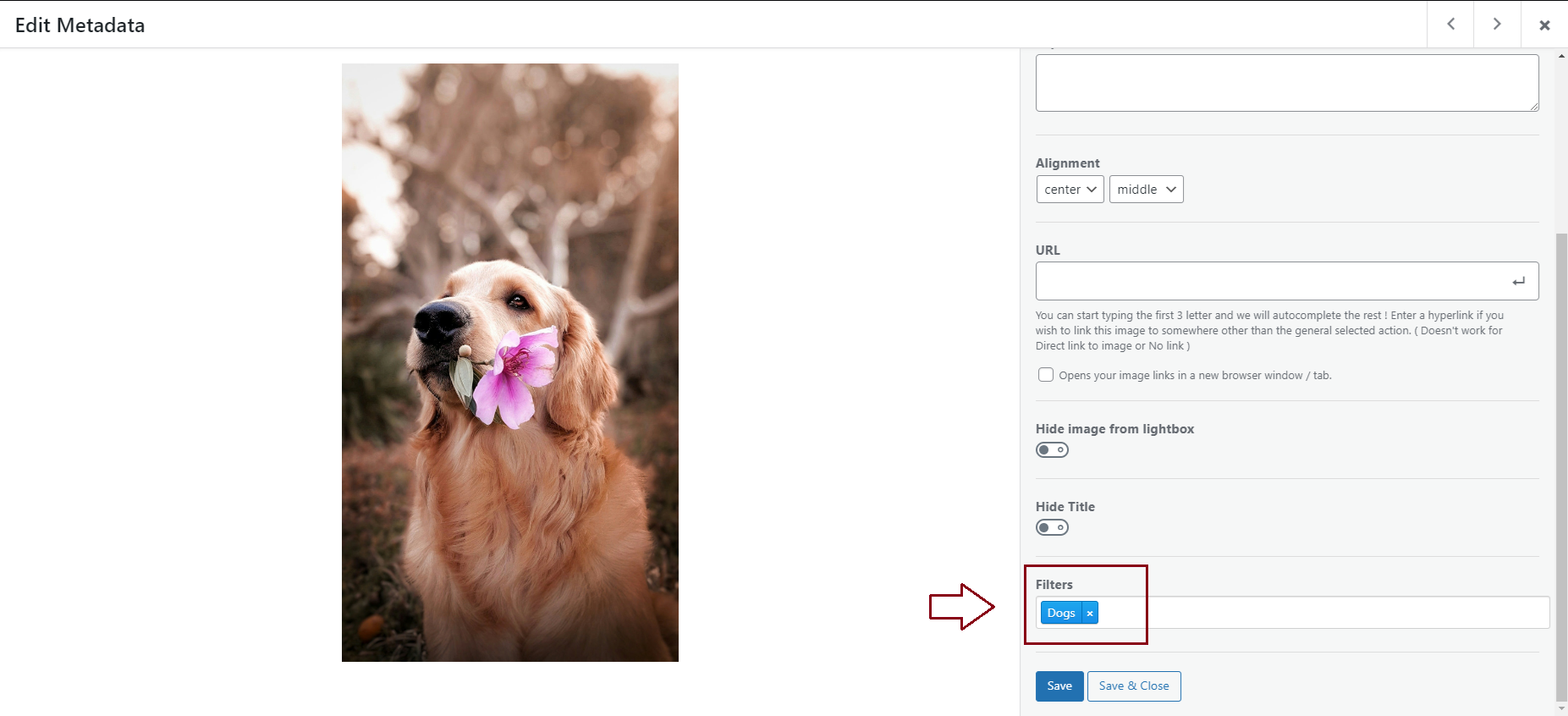
Plan the taxonomy before uploading hundreds of files. A clean filter system with five meaningful categories is more useful than dozens of inconsistent labels created ad hoc by different editors.
Business adds watermarking and other image-protection features. Watermarks can discourage casual reuse and help keep attribution visible when preview images leave the site.


Watermarking is not a complete copyright-control system. Keep original high-resolution files outside the public media workflow when licensing or client delivery requires stronger control, and test how watermarks look on both portrait and landscape images.
Trio and higher tiers can organize multiple galleries into albums, making it easier to structure weddings, events, destinations, portfolio categories, client projects, or long-running photo archives.

Albums solve navigation only when the hierarchy stays shallow and understandable. Avoid reproducing a complicated file-folder tree on the public site. Organize around how visitors browse, not how the photographer stores raw files.
Album presentation can be configured so visitors move from an overview into individual galleries while preserving a consistent visual experience.

Test navigation on mobile and with keyboard controls. Deep album structures can create dead ends if visitors cannot easily return to the parent collection or understand where they are.
The album extension provides display controls for how gallery collections appear to visitors.

Keep card proportions, titles, and cover-image choices consistent. An album grid is effectively navigation, so visual consistency helps visitors scan choices faster.
Trio and higher plans currently include unlimited image optimization and CDN delivery. This can simplify performance management for image-heavy sites by reducing file weight and serving optimized assets closer to visitors.
Do not judge gallery speed only on a fast office connection. Test real mobile pages with representative gallery sizes. Page weight, image dimensions, lazy loading, lightbox assets, and the number of initial thumbnails all affect perceived performance.
Business adds proofing and visitor comments, which can turn a gallery into a client-review workflow rather than a passive portfolio. Photographers can use these features to collect selections and feedback without moving the conversation into email threads.
Define who can access a proofing gallery, how long it remains online, whether comments are private enough for the project, and how final selections are exported into the editing or delivery process.
Paid tiers can support downloads and image-licensing workflows. These features are useful for press kits, client deliverables, stock-like collections, or media libraries where visitors need more than a lightbox preview.
Separate display files from master originals. A public gallery optimized for fast browsing is not always the right place to expose full-resolution deliverables, even when download functionality is available.
Modula includes import pathways from several gallery plugins and WordPress core galleries. Migration can reduce rework, but layout and metadata should be reviewed after import because another plugin’s gallery model may not map perfectly to Modula.
Keep original media and a migration backup until every gallery, caption, link, filter, and album has been checked on the live frontend. Do not delete the old gallery system immediately after an automated import.
Every gallery should have meaningful alt text for informative images, keyboard-usable controls, visible focus states, and captions where context is needed. Decorative photos should not receive keyword-stuffed alt text.
Test the lightbox without a mouse and check mobile orientation changes. A gallery can look polished visually while still being difficult to navigate for keyboard or assistive-technology users.
The feature set is tiered, so the cheapest paid plan is not the right comparison for every photographer. Albums, optimization, protection, proofing, watermarking, comments, and role controls appear at higher tiers.
Modula also becomes another layer in the image pipeline. If your host, CDN, image optimizer, or media workflow already handles some of the same jobs, decide which system owns optimization and delivery to avoid unnecessary duplication.
Modula fits photographers, creative agencies, portfolios, event sites, visual publishers, and businesses that need richer gallery browsing or client workflows without adopting a full page builder.
It is less necessary for text-heavy sites that only use a few occasional galleries, or for teams already deeply invested in another gallery ecosystem that meets their organization and proofing needs.
Current introductory annual pricing is $39 for Starter on 1 site, $69 for Trio on 3 sites, and $99 for Business on 5 sites. Those plans renew at the regular annual prices shown on the pricing page: $78, $138, and $198 respectively. Agency starts at $199/year for higher site counts. Pricing checked October 16, 2026.
Lifetime options are also offered. Compare the plan by required features first, then license duration. A cheap lifetime license is not useful if the tier omits the proofing, albums, optimization, or protection workflow you actually need.
The current WordPress.org version is 3.0.13. Modula 3.0 includes the rebuilt editor and new gallery workflows, so existing users upgrading from older releases should review critical galleries after major editor changes.
Modula is a strong fit when a gallery is part of the product, portfolio, or client workflow rather than a decorative block on a page. The current 3.0 editor improves the editing model while paid tiers cover increasingly professional gallery operations.
I would start with Free or Starter for presentation-focused sites, move to Trio for albums and delivery infrastructure, and choose Business when client proofing, watermarking, comments, or download control justify the higher tier.
Yes. Modula has a free WordPress.org edition, with paid plans adding more gallery, optimization, protection, album, and client-work features.
Current introductory annual pricing starts at $39 for Starter, $69 for Trio, and $99 for Business. Renewal prices are higher.
Albums are included from the Trio tier upward.
Trio and higher currently include unlimited image optimization and CDN delivery according to the pricing comparison.
Yes. Watermarking is included in the Business tier and higher plans.
Business includes image proofing and visitor comments, making it suitable for professional client-review workflows.
Modula provides import tools for several gallery plugins and WordPress core galleries, but every migrated gallery should be checked after import.
Create responsive WordPress image galleries with drag-and-drop ordering, lightbox viewing, and flexible embedding options.
FooGallery builds responsive photo galleries with multiple layouts, live previews, lightbox support, albums, and performance-focused controls.
Creates WordPress photo galleries and albums with dashboard tools for organizing, managing, and publishing image collections.
Log in or create an account to continue.