Freemium
Official WooCommerce and Square integration for online payments, POS-connected selling, inventory sync and customer data.

Mollie Payments for WooCommerce is a free gateway plugin for merchants that want Mollie’s European-focused payment platform inside WooCommerce. The plugin is not the paid product. Mollie makes money through payment processing and optional financial services, so the buying decision is about payment-method coverage, country eligibility, processing economics, payout operations, and recurring-payment needs rather than a WordPress license fee.
I would shortlist Mollie for European stores that benefit from local methods such as iDEAL, Bancontact, cards, PayPal, Klarna, Apple Pay, and other regionally relevant options through one provider. I would compare another gateway when Mollie is not available in the merchant country or when a different processor has materially better rates or required local methods.
The integration brings Mollie payment methods into WooCommerce checkout, supports on-site card components, refunds from WooCommerce orders, test API keys, WooCommerce Blocks, multilingual setups, and recurring-payment compatibility with WooCommerce Subscriptions for supported methods. The Mollie account also provides transaction, payout, refund, and reconciliation workflows outside WordPress.
The operational value is consolidation. Instead of maintaining separate direct integrations for multiple regional payment methods, a merchant can manage a broader set of methods through one Mollie relationship and one WooCommerce plugin.
You can accept cards and local payment methods in a WooCommerce checkout, expand into European markets with regionally familiar options, issue full or partial refunds from WooCommerce, test payments before launch, and use Mollie as a recurring-payment gateway with WooCommerce Subscriptions where the selected method supports recurring collection.
For international ecommerce, payment choice can affect conversion. A buyer in the Netherlands may expect iDEAL, while customers elsewhere may prefer cards, PayPal, Klarna, Apple Pay, Bancontact, or other methods. The plugin lets the store expose supported choices without building each gateway integration independently.
| Cost or capability | WooCommerce plugin | Mollie payment services |
|---|---|---|
| Plugin license | Free | No WordPress license fee |
| Payment methods | Integration included | Per-transaction fees vary by method and market |
| Test mode | Included | Test API keys provided |
| Refunds from WooCommerce | Included | Processed through Mollie account |
| Recurring payments | Integration support | Requires supported recurring method and subscription setup |
| Payouts | Plugin displays payment workflow | Payout schedule managed by Mollie |
| Fraud and payment operations | Gateway integration | Provider-level tools and services |
| Optional financial services | Not a plugin charge | May have separate eligibility or pricing |
There is no Mollie Pro plugin tier required for ordinary WooCommerce payments. The real commercial relationship is the merchant account and its transaction fees. This means a free plugin can still represent a significant operating cost at high order volume.
The free plugin is enough when your business is eligible for a Mollie merchant account, its payment-method coverage fits your customers, and you are comfortable with Mollie’s processing model. Most stores do not need to buy a separate premium WooCommerce gateway extension just to use Mollie.
A straightforward store can install the plugin, connect test credentials, configure payment methods, run checkout tests, switch to live credentials, and then manage daily transaction operations through WooCommerce and the Mollie Dashboard.
Every live payment is subject to Mollie’s transaction pricing for the selected method and country. Additional provider services can have their own commercial terms or eligibility requirements. Those costs are separate from the WordPress plugin.
As volume grows, model the blended processing cost across your actual method mix. A store where most buyers use low-cost local bank methods can have a different effective rate from one dominated by credit cards, wallets, or buy-now-pay-later transactions.
Setup uses API credentials from the Mollie Dashboard. Start with the test API key rather than entering live credentials immediately. That gives the store a controlled environment for validating checkout, order status changes, refunds, and error handling before customer money is involved.
Keep merchant-account ownership with the business. Agencies and developers may configure the plugin, but the company should control the Mollie organization, bank account, security settings, and recovery methods. Payment-provider access should never depend on one contractor’s login.
Do not enable every available method simply because the integration supports it. Choose methods based on customer geography, average order value, product type, refund behavior, fraud risk, and transaction cost. A shorter relevant payment list is usually easier to understand than a checkout full of unfamiliar logos.
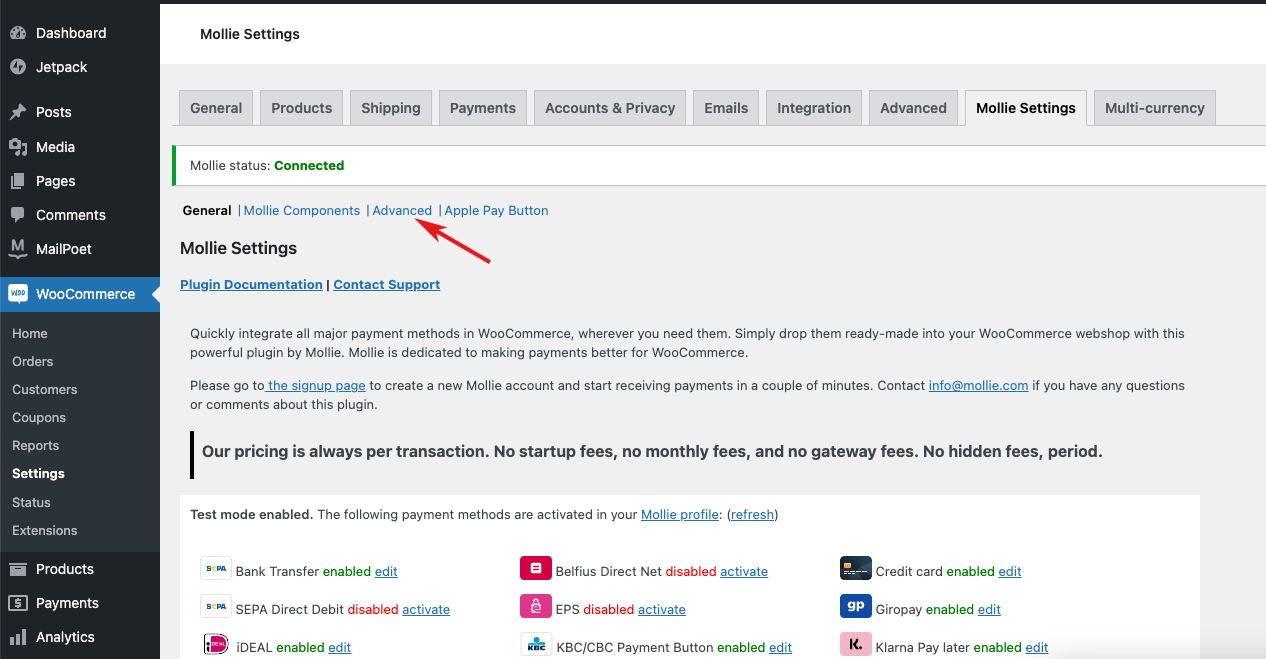
Review mobile checkout separately because wallets and bank-app handoffs often behave differently from desktop. Test the customer returning from an external authorization flow, closing the bank app, refreshing the order-received page, and attempting payment twice.
Mollie Components can keep supported card-entry experiences on the merchant site while Mollie handles the sensitive payment infrastructure. This can reduce unnecessary checkout redirection and keep the payment experience visually closer to the store.
Treat the payment form as a conversion and trust surface. Keep checkout copy concise, preserve recognizable security cues, and avoid custom scripts that interfere with gateway fields or the WooCommerce checkout lifecycle.
Mollie’s strongest positioning is broad European payment coverage through one integration. Local methods can matter more than card-brand breadth because shoppers often trust the payment method they already use with their bank or local ecommerce market.
Before entering a new country, check whether the method is available to your merchant entity, whether it supports refunds, whether settlement timing differs, and whether recurring payments are possible. “Supported for checkout” and “supported for unattended recurring billing” are different questions.
Mollie positions its WooCommerce integration for recurring revenue with WooCommerce Subscriptions, including recurring payments through supported card and SEPA Direct Debit workflows. The subscription extension still owns the subscription lifecycle, while Mollie processes the compatible renewal payment.
Test first payment, stored mandate or token creation, scheduled renewal, failed renewal, customer payment-method change, cancellation, and refund. A successful first order does not prove the gateway can collect a future renewal automatically.
Full and partial refunds can be initiated from the WooCommerce order workflow when the payment and account configuration support it. That reduces the need for support staff to reconcile a refund manually across two dashboards.
Train staff to distinguish a WooCommerce order status change from an actual gateway refund. Changing an order to refunded without sending money back through the gateway can leave accounting and customer expectations out of sync.
The Mollie Dashboard centralizes payment status, refunds, chargebacks, payout information, and other provider-level activity. Mollie also exposes fraud-prevention and operational tools outside the WordPress plugin.
Monitor unusual failure rates by method and device. A sudden rise in failed payments can come from checkout customization, API issues, a payment-method outage, account configuration, or customer authentication changes, not only from bad cards.
Payment acceptance and cash availability are separate events. Mollie lets eligible businesses configure payout timing, while exact settlement behavior depends on account, country, method, and provider policies.
Finance teams should reconcile WooCommerce gross order value against gateway fees, refunds, chargebacks, and net payouts. Store revenue reports do not automatically equal cash deposited into the bank account.
Payment gateways use server-to-server notifications so WooCommerce can learn that a payment succeeded, failed, expired, was refunded, or changed state after the shopper left the page. Those callbacks need to reach the site reliably.
After launch, test and monitor webhook delivery, caching exclusions, security rules, and background processing. A checkout can appear normal while blocked callbacks leave paid orders waiting in the wrong WooCommerce status.
Use the Mollie test key to cover successful and failed payment scenarios, cancellation, refunds, mobile redirects, duplicate attempts, and delayed payment methods. Then switch to the live key and place a controlled low-value live order before opening the gateway to all customers.
Repeat checkout testing after major WooCommerce, theme, checkout-block, caching, or gateway updates. Payments are not a set-and-forget feature because several systems participate in each transaction.
The current Mollie integration supports WooCommerce Blocks and is positioned for multilingual and multisite use cases. That makes it suitable for modern Woo checkout implementations and stores expanding across multiple European languages.
Still test each translated checkout. Payment labels, return pages, error messages, taxes, currencies, and method availability can change by locale and should make sense to the customer in context.
The plugin is free, but Mollie is a payment processor, not a free payments service. Transaction pricing, payout timing, merchant eligibility, supported methods, recurring capabilities, and account support should all be evaluated before making it the primary gateway.
Mollie is especially compelling in Europe. A store serving a different geography may find another provider has stronger local methods or a more established merchant-support footprint.
It fits European WooCommerce stores, cross-border merchants that need multiple regional payment methods, agencies standardizing payment setups for supported clients, and subscription stores that use WooCommerce Subscriptions with a compatible Mollie recurring method.
It is less suitable when the merchant country is not supported, when the business needs a payment method Mollie does not offer, or when another processor produces meaningfully better total economics for the store’s customer mix.
The WordPress plugin is free. Mollie charges transaction fees that vary by payment method, merchant country, and commercial arrangement. There is no single plugin subscription fee that replaces those processing charges. Pricing checked October 16, 2026.
For a fair gateway comparison, calculate the expected blended fee using your real mix of cards, wallets, bank payments, buy-now-pay-later, refunds, and chargebacks rather than comparing one advertised transaction rate.
The current WordPress.org version is 8.1.11. The plugin supports current WordPress and WooCommerce releases, and Mollie’s current WooCommerce integration materials describe WooCommerce Blocks, multilingual setups, refunds, and WooCommerce Subscriptions compatibility.
Mollie Payments for WooCommerce is a strong gateway candidate for merchants that need European payment diversity without maintaining many separate WooCommerce payment integrations. Its free plugin lowers software friction, but the real decision is about processor fit and transaction economics.
I would shortlist Mollie for Europe-focused WooCommerce stores and recurring businesses using supported methods. I would compare Square, Stripe, WooPayments, and PayPal when geography or the customer payment mix points elsewhere.
Yes. The WordPress plugin is free. Mollie charges transaction fees for live payments based on payment method, country, and account terms.
Mollie supports cards and a broad set of local and alternative methods. Exact availability depends on the merchant country and account.
Yes. Mollie supports recurring-payment workflows with WooCommerce Subscriptions for compatible methods such as supported cards and SEPA Direct Debit.
Yes. Supported full or partial refunds can be initiated from the WooCommerce order workflow.
Yes. The current integration is designed to support modern WooCommerce Blocks checkout flows.
No. The plugin has no license cost, but Mollie processing, refunds, chargebacks, and optional services can still create costs.
Choose based on merchant country, payment-method coverage, processing economics, recurring needs, support, and operational fit. Mollie is particularly strong for European local payment methods.
Official WooCommerce and Square integration for online payments, POS-connected selling, inventory sync and customer data.
Connects WooCommerce directly to Stripe for cards, Apple Pay, Google Pay, and supported local payment methods across many currencies and…
Adds PayPal, Pay Later, cards, wallets, and supported alternative methods to WooCommerce through the official PayPal Payments integration.
Log in or create an account to continue.