
Freemium
PixelYourSite manages Meta Pixel, GA4, Google Tag Manager, Conversion API, consent features, and ecommerce tracking from WordPress.

PixelPair is a WordPress marketing tracking plugin that brings Meta Pixel, Meta Conversions API, Google Analytics 4, Google Tag Manager and TikTok into one dashboard. It also offers automatic and custom events, supported browser/server delivery, and optional WooCommerce and Easy Digital Downloads tracking.
I would shortlist PixelPair when several marketing platforms need consistent events and the site owner wants to manage them without maintaining multiple snippets. Its event controls and diagnostic screens are useful additions to simple pixel insertion. A site with a complex, reliable Google Tag Manager setup may not need another tracking layer.
Best fit: WordPress sites and stores using Meta, Google and TikTok marketing events.
Pricing: Free WordPress.org plugin; no separate Pro edition advertised.
Store integrations: WooCommerce and Easy Digital Downloads are optional.
Server delivery: Supported Meta Conversions API and TikTok Events API workflows.
Version reviewed: 0.9.4, checked October 23, 2026. Official-source review, not hands-on performance or conversion testing.
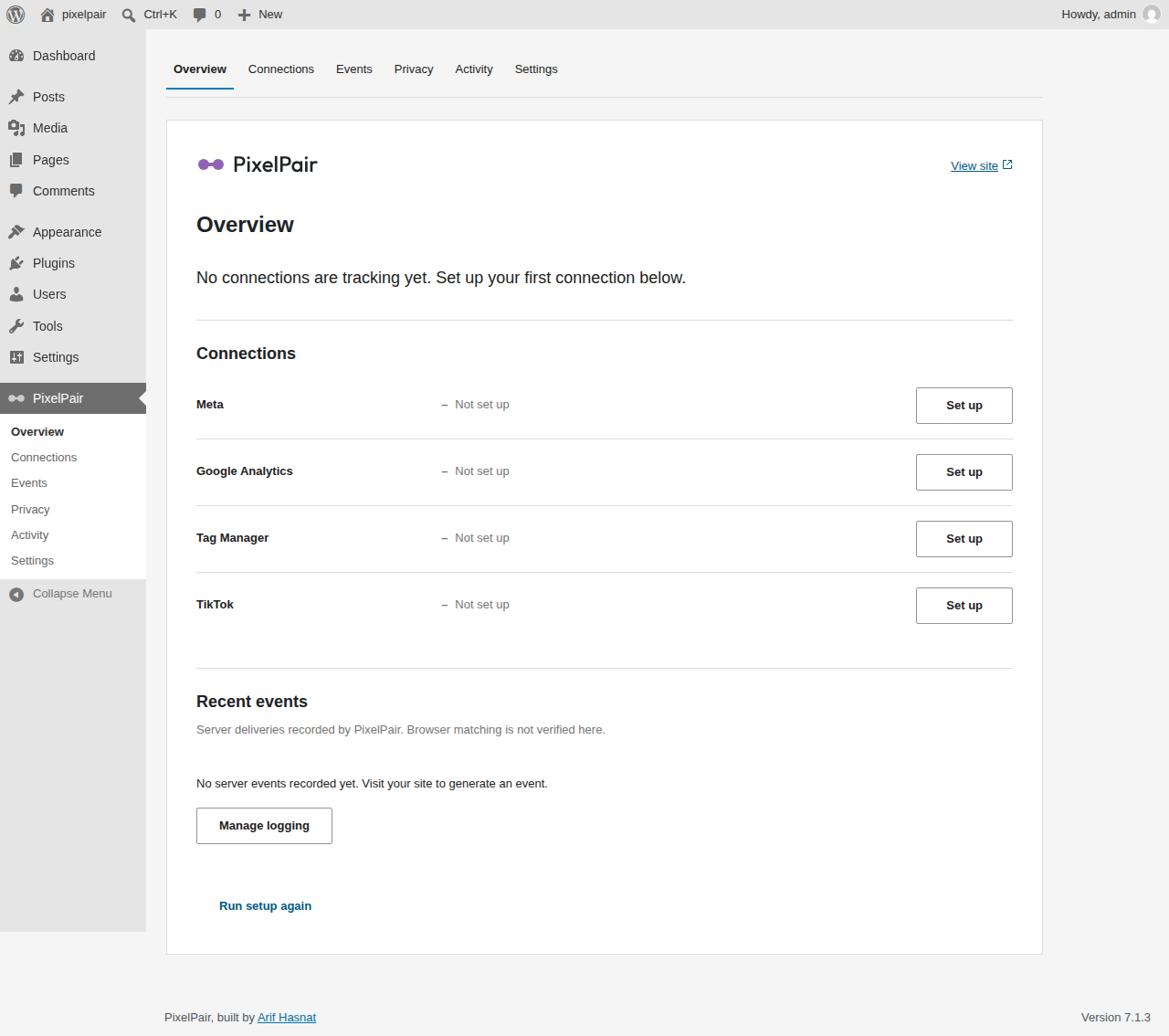
Meta Pixel and TikTok Pixel handle supported browser events; their corresponding server APIs provide another delivery method for selected interactions. Google Analytics 4 measures site activity, while Google Tag Manager runs tags in the published container you configure. That distinction matters when deciding where an event is sent and how to verify it.
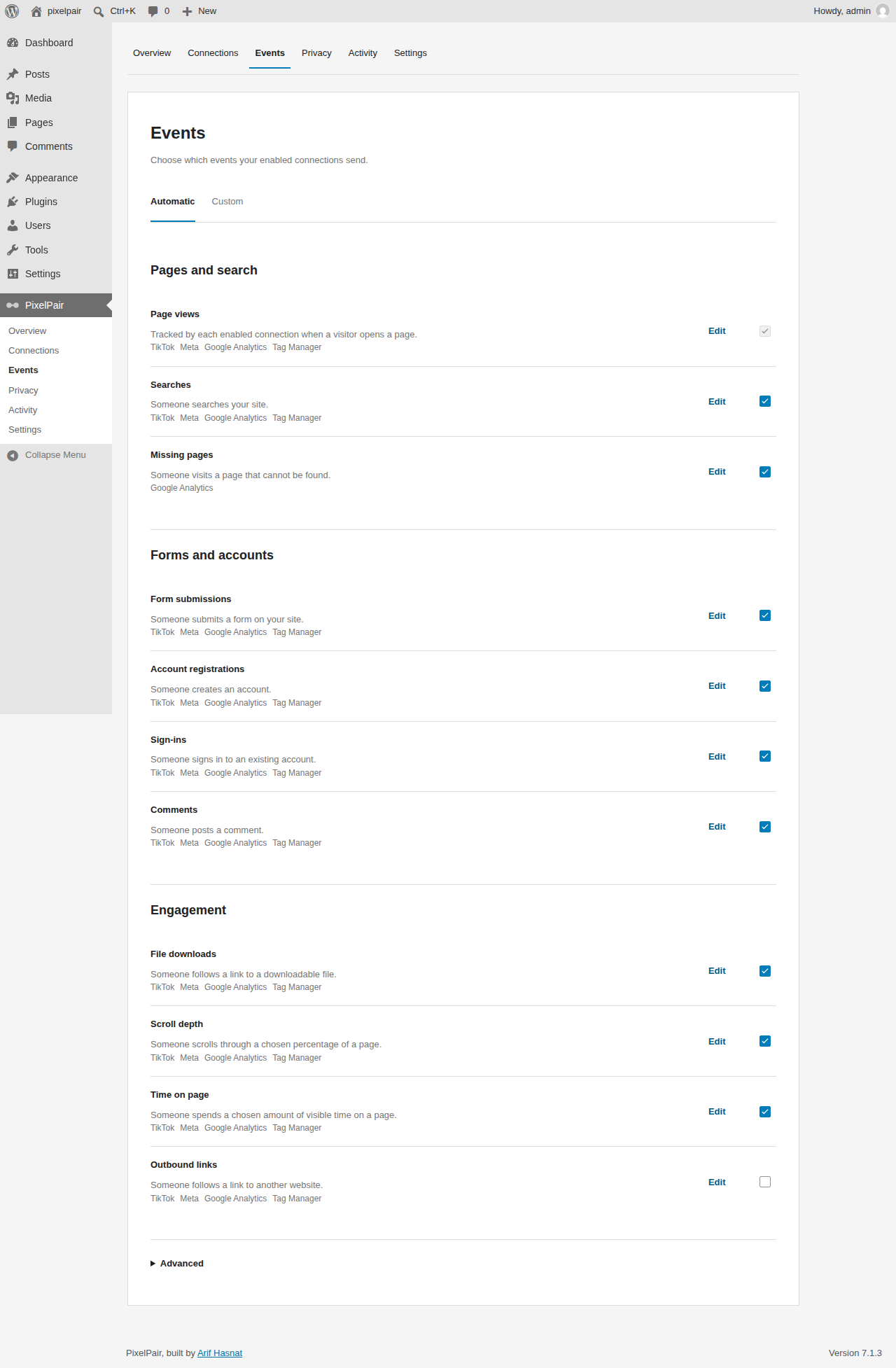
Beyond ordinary page views, PixelPair provides controls for searches, forms, accounts and engagement. Custom rules can use supported page visits, button clicks and scroll-depth triggers, with platform-specific event mappings and payload previews. These features help define an action that matters to marketing instead of recording every possible visitor interaction.
Tracking coverage still depends on the exact trigger, connection and site workflow. For example, a custom checkout or form may behave differently from an ordinary WordPress page. Define the important conversions, verify the available event types, and test the destination results before depending on them for campaign decisions.
Tracking starts disabled. The optional setup wizard walks through platform selection, connection IDs, configuration checks and traffic exclusions. It can extract supported Meta and Google IDs from a pasted code snippet, which can be more convenient than manually separating the ID from a longer script.
A practical first test is to connect one platform, turn on a single meaningful event and confirm it in the destination service. A lead-generation website might begin with a page visit and a supported form action. Add custom events after those basics behave correctly, and clear the page cache following tracking or consent changes.
The automatic tracking screen organizes common WordPress actions by purpose. This gives site owners a clearer way to configure events than inserting unrelated snippets into several plugins or theme settings. An event should still have a reporting purpose; collecting more signals is not necessarily the same as collecting better data.
For a campaign landing page, a custom rule can follow a selected button interaction or a specific page visit. Mapping it to the connected platform determines which event is sent, and a preview helps inspect the prepared payload. The supported rule builder is helpful for ordinary marketing tasks, but it is not an unrestricted replacement for complex GTM triggers and data-layer scripts.

If an existing website depends on many sophisticated GTM variables or tags, compare the tracking workflow with GTM4WP before changing its measurement architecture. Removing a working container simply because another plugin has an event builder can break reporting.
PixelPair connects to Meta Conversions API and TikTok Events API for supported server events. It uses shared event IDs for supported browser/server pairs, encrypted credentials, retries and redacted logs. These tools can help investigate delivery failures and reduce the need to manage all events solely in browser scripts.
Shared IDs support deduplication, but they do not guarantee that the receiving platform accepts every event or attributes every conversion accurately. Use Meta Events Manager or TikTok Events Manager to check the events actually received. Compare purchase and lead events against the activity recorded by your own site, particularly when browser and server events are both enabled.

PixelPair tracks supported WooCommerce product, cart, checkout and paid purchase activity, including supported Blocks flows and High-Performance Order Storage. For Easy Digital Downloads, it lists supported download, cart, checkout and purchase events. Neither store plugin is required when the website only needs page or interaction tracking.
Store settings include controls for product identifiers and purchase values. Matching identifiers to the relevant advertising catalog and sending the intended transaction value can materially affect reporting. Test a real checkout path on staging, including any unusual payment or order states, rather than assuming that every checkout customization behaves the same way.

For a store-first comparison, see PixelYourSite and Pixel Manager for WooCommerce. The deciding details are the marketing destinations, event payloads, checkout compatibility and actual verification results, not a general claim that a plugin supports ecommerce.
PixelPair includes adapters for WP Consent API, Cookiebot, Complianz, CookieYes, Borlabs Cookie v3 and Real Cookie Banner. When a supported tool is detected, the relevant tracking is blocked while consent is unresolved or denied. Some adapters require matching identifiers, so consent behavior needs testing with the installed service and version.
Important: When no consent tool is detected, PixelPair grants marketing consent by default unless the site owner enables Wait for marketing consent. For a website that requires explicit opt-in, that setting and the consent integration are essential configuration steps. Installing a tracking plugin alone does not make the site privacy-law compliant.
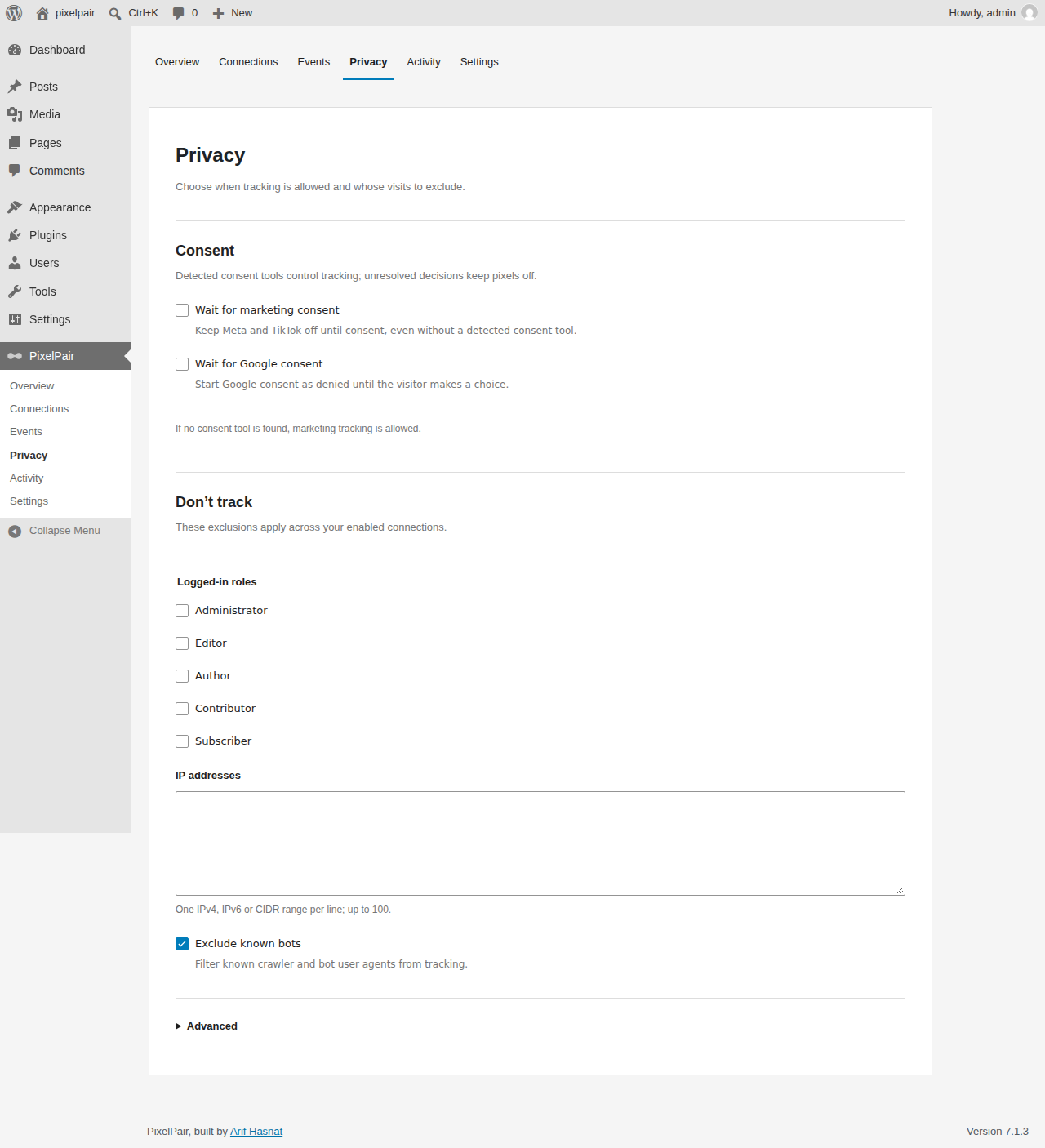
Administrators can exclude roles, IP addresses, CIDR ranges and bots. The plugin also provides a fast cache mode and stricter eligibility checks for situations where public caches might serve the same page to visitors with different permissions. Clear cache after relevant setting changes and test visitor behavior in ordinary and logged-in sessions.
Depending on enabled connections, event data may include URLs, search phrases, purchase amounts, IP addresses, browser IDs and optional hashed contact information. Hashing alone does not anonymize personal information. The site owner remains responsible for notices, consent choices and the data sent to each third-party service.
Overview displays connection configuration and warnings, while Activity can show redacted server diagnostics. These screens support troubleshooting but should not be treated as final proof of conversion delivery. Verify the receiving platform directly with GA4 DebugView, Meta Events Manager or TikTok Events Manager, whichever applies to the event being tested.

PixelPair also offers configuration import and export that excludes secret tokens, and per-site configuration on WordPress multisite. Deactivation stops its jobs while retaining data; uninstall data removal depends on the settings-retention option. Excluding secrets from an export is especially helpful when copying a measurement setup between staging and production.
Optional authenticated MCP access lets compatible external AI tools inspect selected settings, events and redacted logs, or manage supported configurations. PixelPair does not include an AI chatbot or contact an AI provider itself. This feature specifically needs WordPress 6.9 or later, the official WordPress MCP Adapter, HTTPS and a WordPress Application Password with the manage_pixelpair capability. Those requirements do not apply to every ordinary tracking feature.
PixelPair version 0.9.4 is distributed for free through WordPress.org, and the reviewed listing does not advertise a premium plan or separate Pro feature set. A Free-versus-Pro table would suggest a product distinction that is not currently established. The listed platform connections, event controls and optional store support belong to the available plugin.
External providers have their own terms and may involve advertising or other service costs. Implementing the tracking also takes time: deciding which events represent meaningful outcomes, confirming consent, testing purchases and keeping mappings current when the site’s checkout or marketing stack changes. There is no published license price to compare against those operational needs.
Good fit: WordPress businesses running Meta, Google or TikTok campaigns that want centrally managed events, a few custom rules and visibility into supported server tracking. Store owners can evaluate the built-in commerce controls if their WooCommerce or EDD paths match the supported flows.
Less suitable: Organizations with bespoke GTM containers, specialized attribution pipelines, unsupported interaction triggers or privacy requirements that exceed the provided integrations. A configured connection is not a guarantee of accurate attribution, successful deduplication or legal compliance.
If the main need is tracking conversion events across a broad set of WordPress business plugins, Conversion Bridge is another product to compare. Keeping an established and validated tagging system can be preferable to rebuilding the same behavior in a new plugin.
PixelPair is worth evaluating as a free WordPress tracking hub for Meta, GA4, GTM and TikTok, particularly when common events, optional server APIs and WooCommerce or Easy Digital Downloads integrations are enough. The event builder and diagnostic activity screens add value beyond basic script placement.
I would introduce it gradually: enable a single destination, test a small set of meaningful events, review consent behavior and then expand. A reliable existing tag manager setup may remain the simpler choice if PixelPair does not solve a specific tracking or administration problem.
The current WordPress.org release is free and does not advertise a separate Pro plan. The third-party marketing services it connects remain subject to their own requirements and terms.
Yes. It includes selected product, cart, checkout and purchase tracking for WooCommerce and EDD. WooCommerce support includes supported Blocks flows and HPOS, but custom checkout paths need verification.
No, its tracking connections are initially disabled. When enabled, delivery also depends on visitor eligibility and consent configuration. With no consent tool detected, marketing consent defaults to granted unless you choose to wait for explicit consent.
Yes, supported Meta Conversions API and TikTok Events API connections can send selected server events. Shared event IDs help pair supported browser and server events, but acceptance and deduplication require platform-side verification.
The plugin lists WP Consent API, Cookiebot, Complianz, CookieYes, Borlabs Cookie v3 and Real Cookie Banner adapters. Test the behavior with your installed version and any required service identifiers.
It can manage several common connections and rules, but it is not a documented replacement for every GTM variable, trigger, container or custom data-layer implementation.
Optional MCP access works with compatible clients, WordPress 6.9 or newer, the official WordPress MCP Adapter, HTTPS and a privileged Application Password. PixelPair does not provide its own AI chat.
PixelYourSite manages Meta Pixel, GA4, Google Tag Manager, Conversion API, consent features, and ecommerce tracking from WordPress.
Connects Google Tag Manager with WordPress for advanced tag setups without manually managing GTM container code in theme files.
Track WooCommerce conversions across major ad and analytics platforms, with browser tracking free and server-side tools in Pro.
Log in or create an account to continue.