
RecommendedEditors Choice
Creates responsive WordPress sliders, carousels, and visual hero sections with a drag-and-drop editor, templates, layers, and animation tools.

Soliloquy is a focused WordPress slider plugin for site owners who want image, video, carousel, lightbox, and dynamic-content sliders without adopting a full visual page builder. The free Lite plugin covers the basic slider workflow, while the paid plans mainly unlock addons and advanced presentation options. I would shortlist it when sliders are a specific content requirement, not when the real need is a complete site-design system.
Its strongest argument is workflow simplicity. You create a slider as its own WordPress object, add media, configure behavior, and then place it where needed with the block or embed options. That separation makes Soliloquy easier to hand off than animation-heavy design tools, but it also means the premium decision is driven by addon requirements rather than a radically different editor.
The core workflow centers on reusable responsive sliders. Depending on license level and installed addons, Soliloquy can add carousel layouts, lightboxes, video slides, thumbnail navigation, dynamic sliders, WooCommerce content, featured-content sliders, PDF slides, scheduling, and other specialized behaviors. The Lite edition stays deliberately narrower, which is useful if you only need straightforward image sliders.
The editor keeps the slider content separate from the post or page where it will be embedded. That is useful on editorial and marketing sites where the same slider may appear in multiple places and needs one source of truth.
You can use Soliloquy for homepage image sliders, portfolio presentations, product or service carousels, lightbox galleries, video-led hero areas, testimonial-style content sliders, featured-post displays, WooCommerce showcases, and smaller promotional rotators. It fits best when the content naturally belongs in a sequence and when slide-level links, captions, or metadata matter.
A practical pattern is to keep each slider purpose-specific. A homepage hero can prioritize a small number of messages, while a portfolio carousel can show more visual items. Combining too many goals into one slider usually creates a harder experience to edit and a weaker experience for visitors.
Soliloquy Lite is the free WordPress.org plugin. Paid plans use the same general slider workflow but add premium addons, more advanced slider types, and higher site allowances. The current pricing page shows first-year promotional pricing, with renewals based on the regular plan price.
| Capability | Free Lite | Personal | Multi | Developer | Ultra |
|---|---|---|---|---|---|
| Basic responsive image sliders | Yes | Yes | Yes | Yes | Yes |
| Premium addons | No | Entry set | More addons | Advanced addon set | Full agency-oriented access |
| Carousel and lightbox workflows | Limited | Plan dependent | Plan dependent | Yes | Yes |
| Dynamic, featured, WooCommerce and PDF sliders | No | No | Limited | Yes | Yes |
| Site allowance | 1 site plugin use | 1 site | 3 sites | 25 sites | 25 sites |
| Support level | Community | Standard | Standard | Priority | Premium |
| First-year price | Free | $19.50 | $49.50 | $99.50 | $199.50 |
The pricing page currently lists Personal at $19.50 for the first year, Multi at $49.50, Developer at $99.50, and Ultra at $199.50. Their regular prices are $39, $99, $199, and $399 respectively. Pricing checked October 16, 2026.
Stay with Lite when your requirement is a conventional responsive image slider and you do not need addon-driven presentation types. It is also the sensible way to validate whether a slider actually helps the page before adding premium complexity. If the site already has a page builder with a capable basic carousel, compare the editing and reuse workflow before buying another plugin.
Upgrade when the slider itself becomes an important content component and you specifically need carousel behavior, lightboxes, video, thumbnails, dynamic sources, featured content, WooCommerce integration, PDF slides, or other premium addons. The Developer tier becomes more relevant when those richer slider types are part of client or commercial sites rather than a single basic marketing page.


The basic creation flow starts by adding a new slider and loading the images or media that belong to it. Keeping slide count intentional matters more than filling the editor. For a promotional hero, I would use only the slides that support distinct messages. For a portfolio or product carousel, a larger set can make sense because scanning is the goal.

Once the media is loaded, the slider editor becomes the operational home for that presentation. This is where a content team should make future changes instead of editing copies of the same slider on multiple pages.
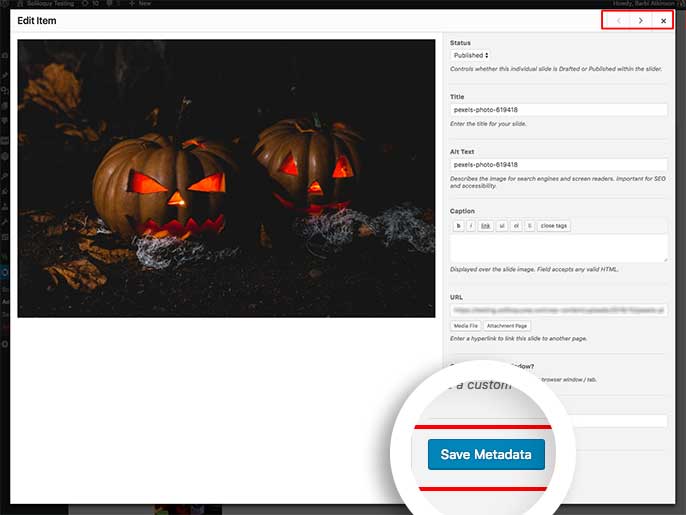
Individual slides can carry their own information and links. This is important when the slider is meant to move visitors toward different products, portfolio items, or articles. Titles and captions should add context rather than repeat visible text in the image, and links should have a clear destination rather than turning every slide into an ambiguous click target.

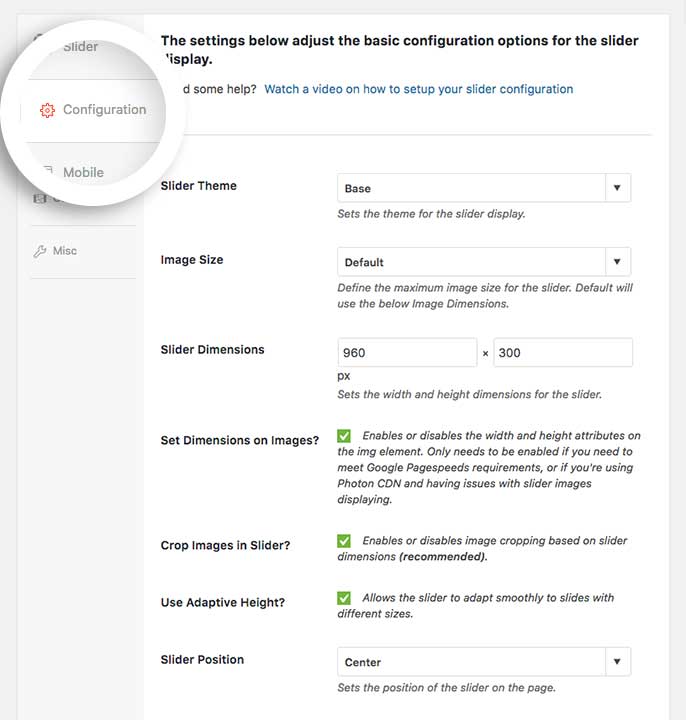
Soliloquy exposes configuration settings for the slider rather than forcing every decision into the page where the slider is embedded. Dimensions, transitions, navigation behavior, and other options should be chosen around the final container. Oversized desktop media can still create poor mobile performance if the source images are not prepared carefully.
After publishing the slider, you can place it through the available WordPress insertion options. That separation is useful for reuse and maintenance, but it also creates a dependency: deleting or renaming a slider without checking its placements can leave empty areas. For client handoffs, document where the important sliders are used and keep naming descriptive.

The Carousel Addon turns the slider into a multi-item presentation. You can control item dimensions, margins, how many slides appear, and how many advance at a time. This makes it a better fit for logo rows, product selections, portfolio items, or visual resources than a single-slide hero.

Carousel density needs special attention on smaller screens. Soliloquy provides a mobile option for the carousel workflow, so you can decide whether mobile visitors should keep the carousel or fall back to a standard slider. That choice should be tested with real content lengths, not only placeholder images.

For photography, portfolio work, or detailed visual content, the Lightbox Addon lets visitors open slider media in a larger focused view. The value is not the overlay itself; it is preserving enough image detail without forcing oversized media into the normal page layout.

A lightbox is less useful when the slide is primarily a navigation card or a promotional banner. In those cases, the click should usually lead to the destination instead of opening the same image at a larger size.
Slider performance depends heavily on the media you feed it. Compress images, avoid unnecessary autoplay video, and do not treat a slider as a place to hide dozens of full-resolution assets. For accessibility, use useful alt text, keep controls keyboard-friendly, ensure text contrast is readable, and avoid motion that makes the page difficult to use.
If a slider contains essential information, make sure that information is still understandable without waiting for automatic rotation. Important calls to action should not disappear before a visitor can read them, and navigation controls should remain obvious on touch screens.
The cleanest Soliloquy setup uses a naming convention and a small number of purposeful sliders. Names such as Home hero, Customer logos, and Portfolio highlights are easier for editors than generic names such as Slider 1. On multi-editor sites, keep responsibility clear so people do not create near-duplicate sliders for the same section.
Before changing a production slider, check every page where it is embedded. A centralized slider is convenient precisely because one edit can change several placements at once. That is an advantage when intentional and a risk when editors do not realize the slider is reused.
Soliloquy is specialized. That is a strength if you want a dedicated slider plugin, but a limitation if your site already relies on a visual builder with equivalent carousel and lightbox capabilities. Premium value comes from the addon ecosystem, so compare the exact addon requirements against the plan before paying. Also remember that the current public WordPress.org release number refers to Soliloquy Lite; the public pricing page does not expose a separate current Pro package version.
I see Soliloquy fitting photographers, small businesses, publishers, agencies, and WooCommerce sites that need reusable sliders without making the slider tool responsible for the entire page layout. It is especially sensible when editors prefer a familiar WordPress-style workflow and need the same slider in more than one location.
Soliloquy Lite is free. Current first-year promotional prices are $19.50 for Personal, $49.50 for Multi, $99.50 for Developer, and $199.50 for Ultra. The regular prices shown alongside them are $39, $99, $199, and $399. Because addon access varies by plan, choose based on the specific features you need rather than the lowest license that technically installs. Pricing checked October 16, 2026.
The current public Soliloquy Lite release is version 2.8.4 and is tested with WordPress 7.1. The premium site does not currently expose a separate public Pro package version in the same way, so this profile does not present the Lite version as proof of the Pro package version.
Soliloquy remains a good shortlist option when you want sliders to be a dedicated, reusable WordPress content type and you know which premium presentation features you need. Start with Lite for ordinary sliders. Pay for Pro when carousel, lightbox, dynamic sources, WooCommerce, or other addons solve a real requirement. If your existing builder already handles the same use case cleanly, avoid adding another editing system just for visual novelty.
Yes. Soliloquy Lite is available free from WordPress.org for basic responsive slider creation.
Current first-year promotional pricing starts at $19.50 for Personal. Higher plans are $49.50, $99.50, and $199.50 for the first year, with higher regular renewal pricing shown on the official pricing page.
The current public Soliloquy Lite version is 2.8.4. The public premium pricing material does not expose a separate current Pro package version.
Yes, carousel functionality is available through the Carousel Addon on eligible paid plans.
Yes. The Lightbox Addon can display slider images in a larger focused overlay and includes configurable lightbox settings.
Yes. Sliders are created separately and then embedded where needed, so one slider can be reused across multiple placements.
Use Soliloquy when you want a dedicated reusable slider workflow or need its premium addons. If your existing builder already provides the exact carousel or lightbox behavior you need, adding another plugin may be unnecessary.
Creates responsive WordPress sliders, carousels, and visual hero sections with a drag-and-drop editor, templates, layers, and animation tools.
Builds WordPress image, video, post, and product sliders with responsive layouts, galleries, carousels, themes, and Pro slide types.
Build sliders, carousels, animated heroes, and interactive WordPress modules with the rebuilt Slider Revolution 7 editor.
Log in or create an account to continue.