
Freemium
Adds 20+ configurable Gutenberg blocks and layout controls for responsive WordPress pages while staying inside the block editor.

Ultimate Blocks is a Gutenberg extension built for publishers, bloggers, affiliate sites, and content teams that want richer article components without moving routine publishing into a separate page builder. Its strongest use cases are practical editorial blocks such as Table of Contents, Review, HowTo Schema, Tabs, Content Toggle, Call to Action, Styled List, Social Share, Post Grid, Countdown, and ratings.
I would shortlist it when the team already likes the WordPress block editor but repeatedly rebuilds the same review boxes, comparison sections, accordions, calls to action, and article navigation. It is less compelling when core Gutenberg already covers the site or another large block suite is already the design system.
Best for: Blogs, affiliate sites, editorial teams, documentation, and marketers that publish heavily in Gutenberg.
Free version: Yes. The free plugin contains most of the content-focused block library.
Paid pricing: $39/year for 1 site or $79/year for unlimited sites. Lifetime starts at $99.
Current release reviewed: 3.6.1, released September 23, 2026.
Upgrade reason: Pro is mainly for premium blocks, advanced styling and animation, saved styles, patterns, and publisher-focused enhancements.
| Area | What Ultimate Blocks can do | Availability |
|---|---|---|
| Article navigation | Generate a Table of Contents from page headings with list styles, collapsible behavior, heading controls, and layout options | Free |
| Reviews | Create review boxes with product details, ratings, summaries, pros and cons, buttons, and supported schema markup | Free |
| Structured tutorials | Add HowTo Schema blocks for step-by-step instructional content | Free |
| Expandable content | Use Content Toggle, Expand, and Tabs for FAQs, specifications, long comparisons, and dense information | Free; some advanced Pro enhancements |
| Conversion blocks | Add calls to action, improved buttons, countdowns, social sharing, testimonials, styled boxes, and lists | Free core blocks |
| Content discovery | Display post grids and filterable content directly inside Gutenberg | Free; some post-selection controls in Pro |
| Premium publisher blocks | Use Coupon, Timeline, and Image Hotspots blocks | Pro |
| AI handoff | Let readers send the current article to ChatGPT, Claude, Perplexity, Gemini, or Grok with a configurable summary prompt | Pro, added in 3.6.1 |
| Styling workflow | Use advanced styling, animations, saved styles, copy/paste styles, and pre-built patterns | Broader controls in Pro |
| Block control | Enable or disable blocks you do not use to keep the editor cleaner | Free and Pro |
Long tutorials, reviews, comparisons, and documentation pages need predictable navigation. Ultimate Blocks can generate a table of contents from the headings already in the article, so editors do not have to maintain anchor lists manually every time a section changes.

The block includes numbered, bulleted, and plain list styles, heading visibility controls, editable entries, collapsible behavior, column layouts, and styling controls. Recent versions also improved Full Site Editing compatibility, spacing, item font sizing, and border controls.
This is a better fit than automatically injecting a TOC into every article when editorial judgment matters. A short post does not need one, while a 3,000-word tutorial may need it directly after the introduction.
The Review block can present a product name, image, feature ratings, overall score, summary, pros and cons, and a call-to-action button in a repeatable layout. It also supports product review schema fields, which is useful for sites publishing genuine product evaluations.

Version 3.5.9 expanded Product schema with shipping and return-policy data plus review and aggregate-rating fields, and version 3.6.0 fixed a problem that could cause product reviews to be counted multiple times in Google Search.
The presence of schema fields does not make every rating eligible for review markup. Use the block for real editorial reviews and populate data accurately. Do not manufacture ratings simply because the design supports stars.
Tabbed Content and Content Toggle are useful for specifications, FAQ groups, feature comparisons, code alternatives, or other sections where showing everything at once would make the article harder to scan.
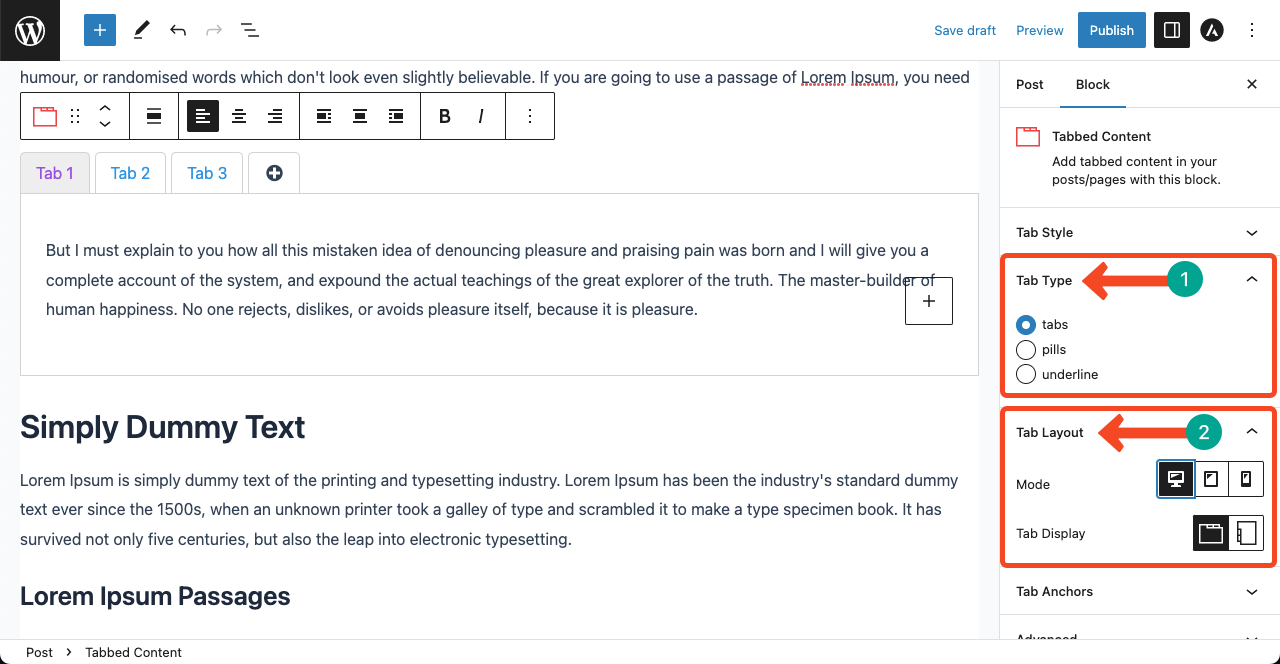
Tabs support different orientations, active-tab controls, icons, anchor links, styling, and nested block content. Accordions can be collapsed and can also be converted from existing heading-and-paragraph FAQ structures. Pro adds enhancements such as searchable accordions and sticky tab navigation.
The searchable accordion is also a good example of recent performance work. Version 3.6.0 reduced its frontend search script from roughly 3.7 MB to about 4 KB and removed the need to load React on the frontend for that feature.
The premium block set is smaller than the free library, but the blocks target specific publishing workflows. Timeline is useful for histories, roadmaps, processes, and chronological stories. Coupon is designed for affiliate and deal content. Image Hotspots can turn a static image into an interactive explainer with positioned tooltip content.

The Timeline block includes horizontal and vertical layouts, connector controls, responsive options, images, and nested content. That makes it more flexible than a decorative timeline image because the underlying content remains editable as blocks.

The Coupon block supports coupon type, expiration date, visibility behavior, responsive controls, styling, and animation. Recent Pro updates also added expiry-content and redirect-on-expiry options to the Countdown block, which can be useful when a campaign should change state after a deadline.
Version 3.6.1 introduced the Pro Summarize with AI block. It lets a reader send the current article to supported AI services such as ChatGPT, Claude, Perplexity, Gemini, and Grok with an editable prompt for summarization.
This is different from an AI content-generation block inside the editor. Its purpose is to make the published article easier to hand off to an external AI assistant. The block includes rules for archives, private or password-protected posts, and noindex content so site owners can decide where that action should appear.
| Capability | Free | Pro |
|---|---|---|
| Table of Contents | Yes | Yes |
| Review and supported schema fields | Yes | Yes |
| HowTo Schema | Yes | Yes |
| Tabs, accordion, expand | Yes | Yes, with extra enhancements |
| CTA, buttons, social share, testimonial | Yes | Yes |
| Post Grid and content filters | Yes | Yes, with additional controls |
| Timeline | No | Yes |
| Coupon | No | Yes |
| Image Hotspots | No | Yes |
| Summarize with AI | No | Yes |
| Advanced styling and animation | Core controls | Expanded |
| Saved styles and pre-built patterns | Limited | Yes |
The free version is enough for many editorial sites because most of the frequently used content blocks are already included. Pro makes more sense when the paid blocks solve recurring publishing work or when a team wants saved styles, patterns, and more advanced presentation controls across many articles.
Block plugins should be judged by more than the number of blocks. Every suite can add editor scripts, frontend CSS, and JavaScript. Ultimate Blocks lets administrators disable blocks they do not use, which helps keep the inserter cleaner and reduces unnecessary feature overlap.
The recent changelog also shows active work on script size, React compatibility, Full Site Editing, output escaping, sanitization, accessibility, and editor conflicts. Version 3.6.1 specifically fixed multiple blocks breaking in the editor when Widget Options was installed, while 3.6.0 aligned plugin scripts with the React version provided by WordPress.
I would still avoid installing several broad Gutenberg suites unless each has a clear job. The performance cost is only part of the problem. Editors also have to choose between overlapping buttons, tabs, lists, accordions, and container blocks that behave differently.
Pricing checked October 15, 2026. The standalone annual Starter license is $39/year for one website. Pro is $79/year for unlimited websites. Both annual plans include one year of updates and priority support.
Lifetime pricing is $99 one time for one website and $199 one time for unlimited websites, with lifetime updates and priority support. The pricing page is currently advertising a temporary 30% promotional coupon, so the checkout price may be lower while that campaign is active.
Kadence Blocks is broader and leans toward layout systems, design components, and site-building workflows. GenerateBlocks is more minimal and system-oriented, using a smaller set of flexible primitives. Stackable provides a large visual block library with strong design controls.
Ultimate Blocks is easier to justify when the recurring problem is article composition rather than full-site visual design. Its TOC, review, schema, filter, coupon, tab, accordion, and social blocks are directly connected to publishing workflows.
Ultimate Blocks is strongest as a publishing toolkit rather than a page-builder replacement. The free edition includes enough useful blocks to improve real editorial workflows, and the paid layer is focused on a smaller set of premium components plus reusable styling and presentation controls.
I would shortlist it for blogs, affiliate sites, review sites, documentation, and content teams that live in Gutenberg. I would not install it simply to increase the number of blocks in the inserter. Its value appears when several of its content-focused components replace repetitive manual layouts.
Yes. Ultimate Blocks has a free WordPress.org version with most of its content-focused Gutenberg blocks, including Table of Contents, Review, HowTo Schema, Tabs, Content Toggle, Styled List, Call to Action, Post Grid, and more.
The current WordPress.org release is Ultimate Blocks 3.6.1, released September 23, 2026.
Pro adds premium blocks such as Timeline, Coupon, Image Hotspots, and Summarize with AI, plus expanded styling, animation, saved styles, patterns, and additional enhancements for existing blocks.
Yes. The Review block supports structured product review fields and recent versions expanded its schema options. The data still needs to represent a genuine review and should be completed accurately.
As checked October 15, 2026, annual pricing is $39 for one site or $79 for unlimited sites. Lifetime pricing is $99 for one site or $199 for unlimited sites.
No. Ultimate Blocks extends the native WordPress block editor. Posts and pages are still created in Gutenberg rather than a separate page-builder interface.
It can be. Review, Table of Contents, Call to Action, Styled List, ratings, and social blocks are useful in editorial content, while Pro adds a Coupon block and other presentation features that can support affiliate workflows.
Adds 20+ configurable Gutenberg blocks and layout controls for responsive WordPress pages while staying inside the block editor.
A compact Gutenberg building toolkit with flexible layout, typography, query, image, shape, and dynamic-content blocks.
Turn the WordPress block editor into a broader page-building system with advanced blocks, patterns, and global design controls.
Log in or create an account to continue.