
RecommendedEditors Choice
Run WordPress appointment and event bookings with services, employees, payments, calendars, notifications, events, and customer workflows.

FluentBooking is a self-hosted appointment scheduling plugin for WordPress that covers the full path from availability to confirmed meeting. Hosts can publish booking calendars, guests can choose open time slots in their own timezone, and teams can expand into round-robin scheduling, recurring events, calendar sync, video meetings, payments, reminders, and CRM-connected follow-up.
I would shortlist FluentBooking for consultants, agencies, coaches, sales teams, educators, clinics, and service businesses that want scheduling to stay inside WordPress rather than sending every visitor to a separate SaaS booking account. I would choose a more specialized reservation system when availability depends mainly on rooms, vehicles, seats, or other inventory instead of people and calendars.
Best for: WordPress-based service businesses and teams that need appointment scheduling, host availability, reminders, calendar sync, paid bookings, or team distribution.
Free version: Yes. The core plugin includes the scheduling foundation, unlimited calendars and event types, availability schedules, booking lifecycle management, and email notifications.
Paid pricing: Current first-year promotion starts at $55/year for 1 site. Lifetime licensing currently starts at $199 one time.
Current release reviewed: 2.5.0, released September 24, 2026.
Hosting model: Booking data stays in WordPress, while connected calendars, video platforms, payment gateways, and messaging services remain external integrations.
| Area | What FluentBooking can do | Availability |
|---|---|---|
| Personal scheduling | Create host calendars, one-to-one event types, custom durations, booking links, availability, buffers, date overrides, and timezone-aware slots | Core scheduling in Free |
| Team scheduling | Use multiple hosts, team pages, group events, collective meetings, and round-robin distribution | Advanced team event types are Pro |
| Recurring events | Let guests reserve repeating occurrences and control whether all required occurrences must be available | Current product feature; advanced workflows vary by event setup |
| Calendar sync | Connect Google, Outlook, Apple, and Nextcloud calendars for conflict checking and event synchronization | Pro integrations |
| Video meetings | Create meeting links through Google Meet, Zoom, and Microsoft Teams | Pro integrations |
| Payments | Charge for appointments with Stripe, PayPal, WooCommerce, FluentCart, or offline payment workflows | Pro |
| Notifications | Send booking confirmations, reminders, cancellation notices, ICS files, and supported SMS notifications | Email foundation in Free; advanced channels and integrations expand in Pro |
| Booking questions | Collect attendee information with custom fields and map Fluent Forms fields into booking questions | Core and advanced options vary by field/workflow |
| Admin booking tools | Create bookings manually, approve, cancel, rebook, reschedule, add host-only notes, export bookings, and manage no-show states | Mix of Free and Pro capabilities |
| CRM and automation | Connect FluentCRM, Fluent Forms, FluentBoards, automation platforms, webhooks, and commerce tools | Pro integrations |
| Frontend publishing | Show booking calendars through Gutenberg blocks, shortcodes, public landing pages, or HTML embeds | Core publishing plus Pro enhancements |
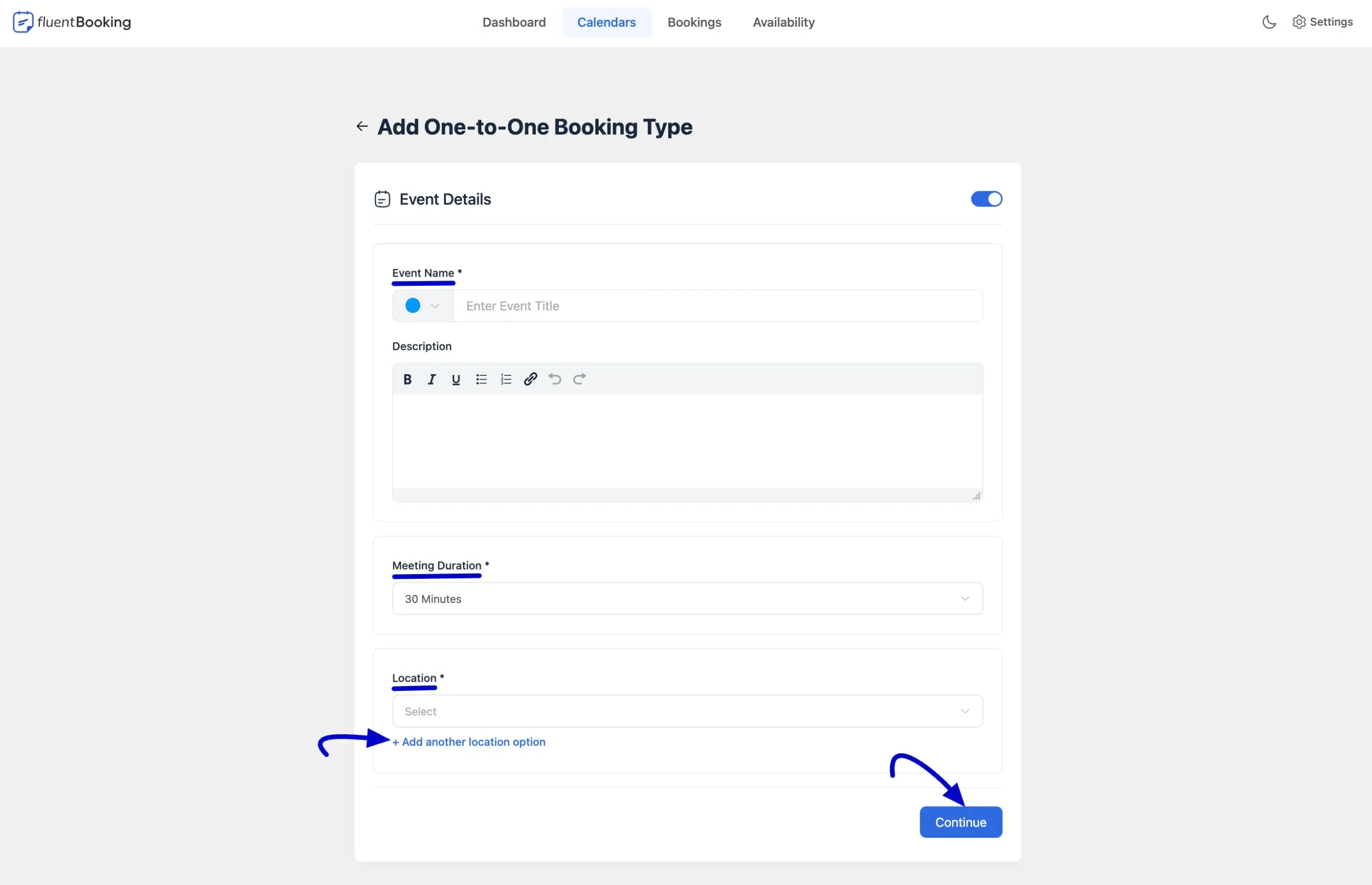
FluentBooking is organized around hosts, event types, availability schedules, and bookings. A host is the person or shared calendar accepting meetings. An event type describes what the visitor is booking, such as a 30-minute consultation, onboarding call, group class, or paid coaching session. Availability decides when that event can actually be booked.
That structure is useful because the same host can offer several meeting types without duplicating the entire setup. A sales representative might have a 15-minute qualification call and a 45-minute demo. A coach might offer free discovery calls and paid sessions with different durations and buffers.
Events can use online, in-person, phone, or custom locations. Current versions also support one-off and recurring workflows, and version 2.5.0 improved one-off rescheduling restrictions and added admin-side rescheduling without forcing the manager to leave the booking details screen.
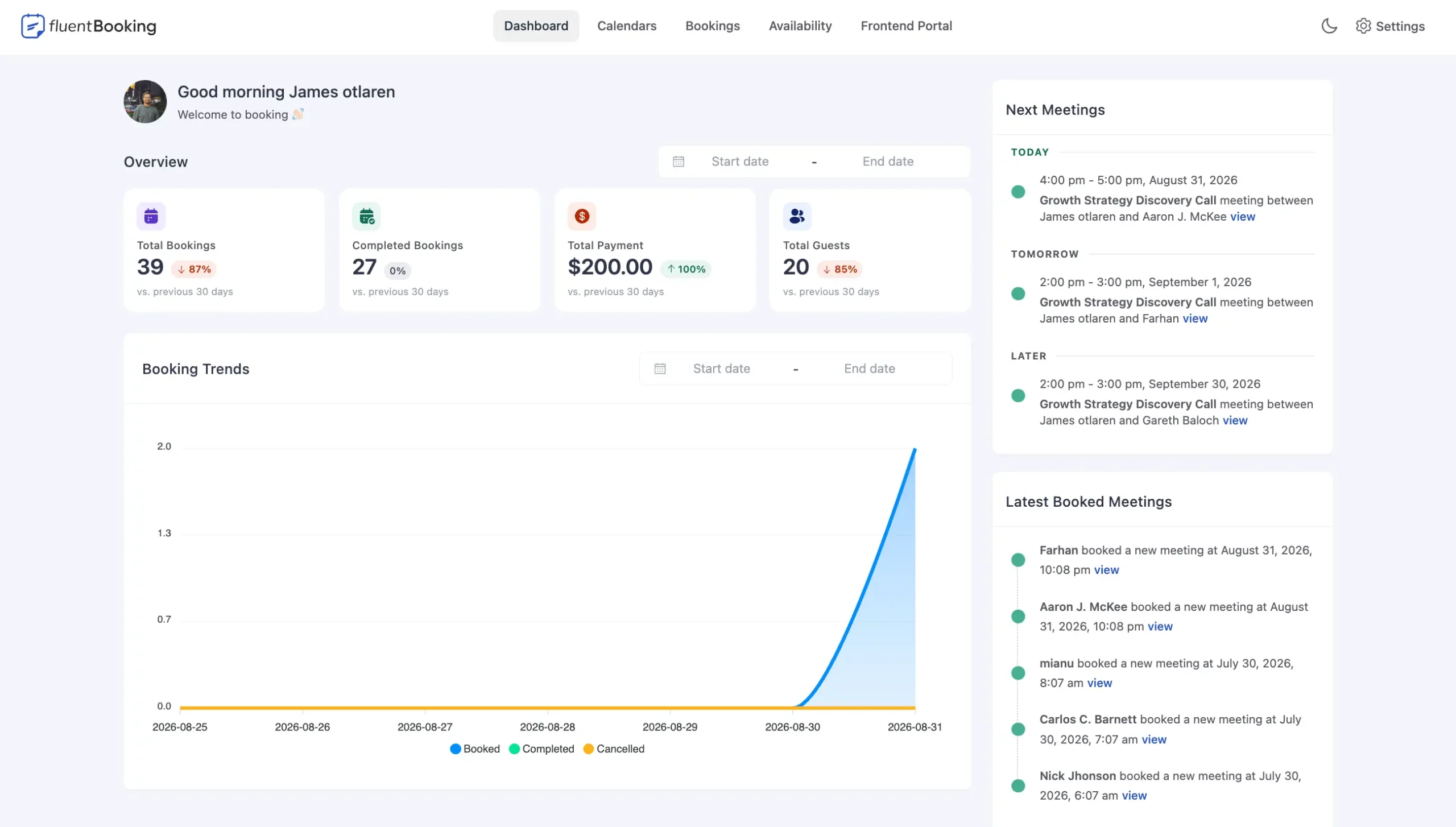
The main reason to use scheduling software is that visitors should see times they can actually reserve. FluentBooking lets hosts set weekly working hours, date-specific overrides, buffers, minimum notice, booking limits, timezone behavior, and other availability rules instead of collecting a preferred date and coordinating manually afterward.
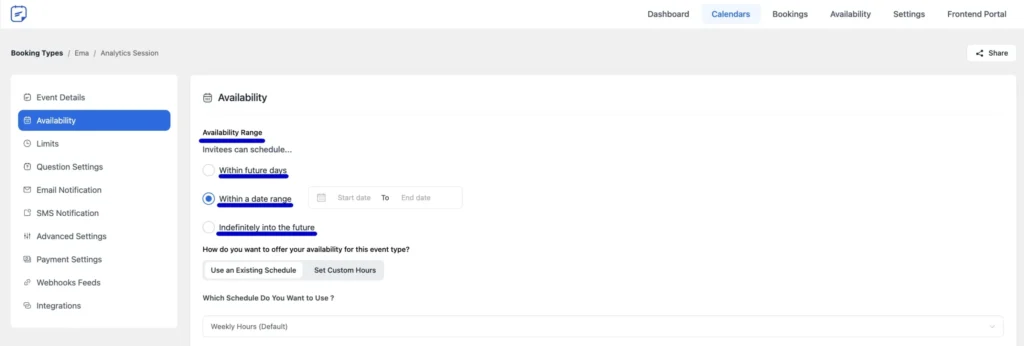
Timezone conversion matters for remote teams. A visitor can choose a slot in their own timezone while the host works from a different one. I would still test daylight-saving transitions and real calendar conflicts before publishing a high-volume booking page, especially if hosts work across several connected calendars.
A solo booking calendar is straightforward. Team scheduling is where the rules become more interesting. FluentBooking Pro supports round-robin events that distribute bookings across available team members instead of forcing the guest to choose one person manually. It also supports collective and group meeting models for workflows where several hosts or several attendees need to participate.
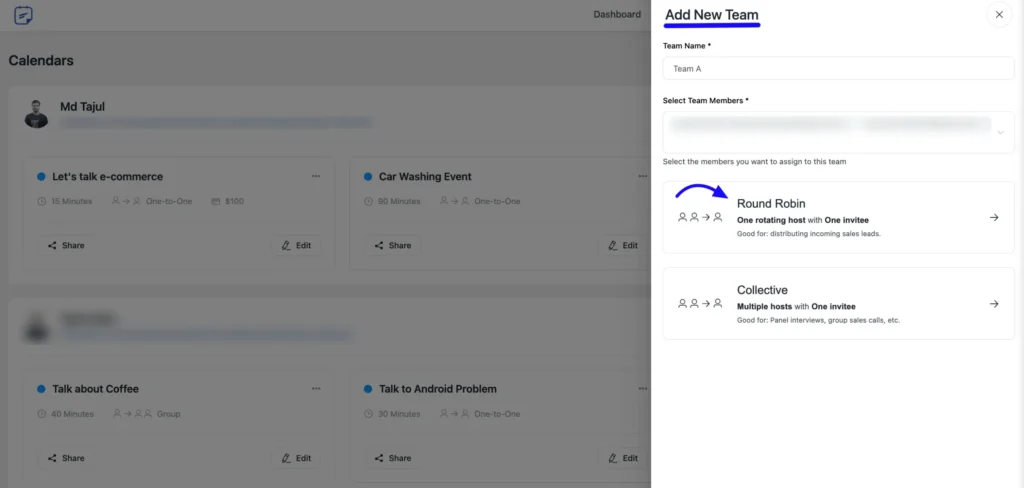
Round robin is especially useful for sales, onboarding, support, recruiting, and customer-success teams where the customer mainly needs the next qualified person. A shared team schedule can be used, or host availability can determine who is eligible. Connected calendar conflicts are also important because an assigned host should not receive a meeting that overlaps with an existing event.
FluentBooking Pro integrates with Google Calendar, Outlook Calendar, Apple Calendar, and Nextcloud. These connections can be used to check availability against remote calendars and synchronize booking events. Google Calendar can also generate Google Meet links, while Zoom and Microsoft Teams cover other common conferencing workflows.
The setup decision I would pay most attention to is conflict checking. A person may have a work calendar, personal calendar, and shared team calendar. Decide which calendars should block bookings and which calendar should receive the new event. Then test a deliberate conflict before relying on the booking page in production.
Once an appointment is created, FluentBooking gives administrators a booking record with the guest, event, time, status, answers, payment context where applicable, and management actions. Recent releases have expanded the admin side with host-only notes, rescheduling from the booking screen, CSV export, no-show handling, and better CRM context.
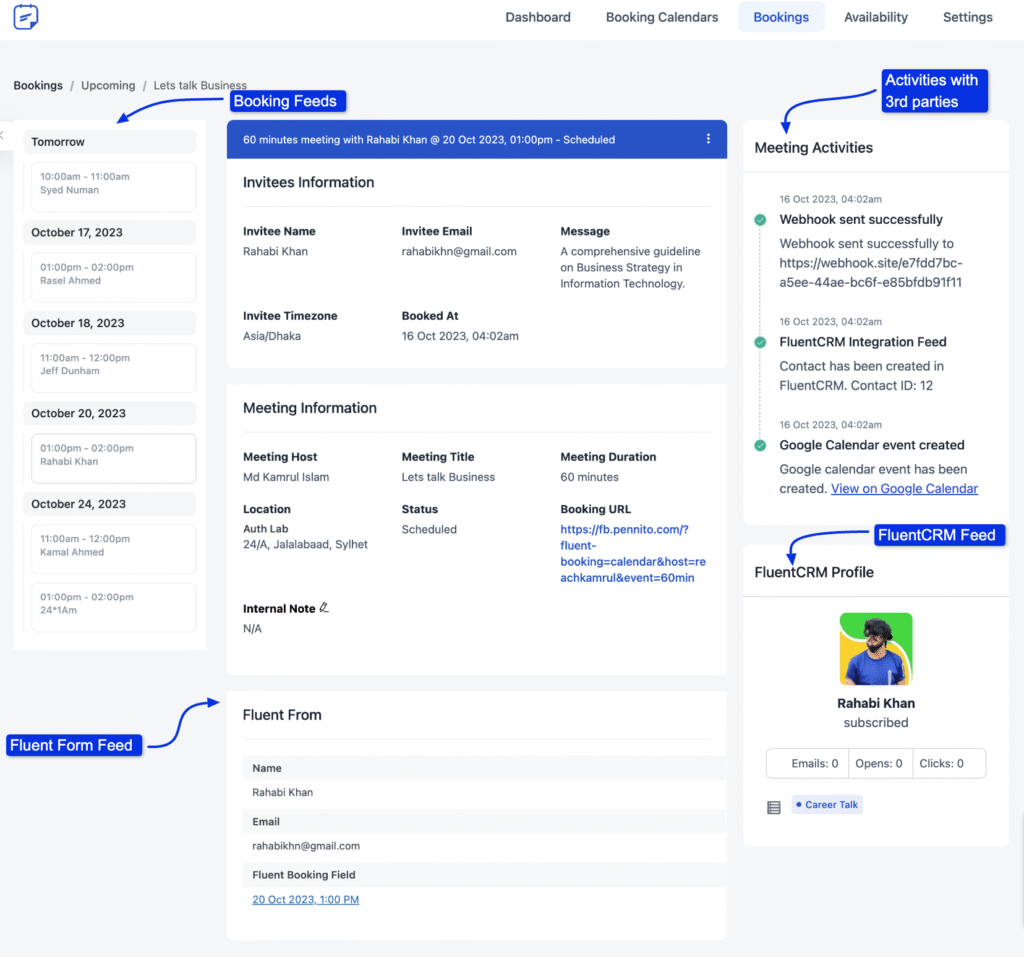
Version 2.5.0 also added host-only notes and stronger controls around one-off event rescheduling. That matters for teams because internal context, customer-facing notifications, and booking status should not all be treated as the same kind of information.
FluentBooking Pro can monetize appointments rather than sending the visitor to a separate checkout after the slot is selected. Current payment options include Stripe and PayPal, plus WooCommerce, FluentCart, and offline payment workflows. Stripe can also expose Google Pay or Apple Pay when those methods are available through the connected Stripe account.
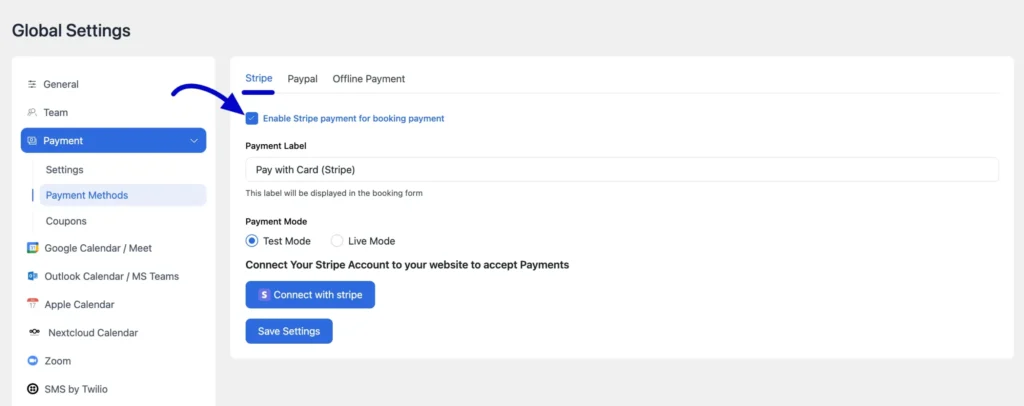
Coupons, multiple payment methods, refunds, and payment confirmation broaden the use cases for consultations, coaching, classes, paid demos, and professional services. FluentCart integration can also monetize booking slots through a commerce workflow. Payment processors still have their own transaction fees and account requirements, so the FluentBooking license is not the full payment cost.
FluentBooking can run without any other Fluent plugin, but the integrations become useful when the website already relies on the same ecosystem. Fluent Forms can collect and map booking data, FluentCRM can receive booking events and customer context, FluentBoards can connect scheduled meetings with project work, and FluentCart can be used for paid booking workflows.
Version 2.5.0 added Fluent Forms field mapping to booking questions, which makes the form-to-booking handoff more useful for workflows that need qualification data before or during scheduling.
| Capability | Free | Pro |
|---|---|---|
| Unlimited calendars and event types | Yes | Yes |
| Core booking lifecycle and availability schedules | Yes | Yes |
| Email notifications | Yes | Yes |
| One-to-one appointment scheduling | Yes | Yes |
| Round robin, collective, and advanced team events | Limited / not included | Yes |
| Google, Outlook, Apple, Nextcloud calendar integrations | No | Yes |
| Google Meet, Zoom, Microsoft Teams | No | Yes |
| Stripe, PayPal, WooCommerce, FluentCart payments | No | Yes |
| Coupons and advanced payment controls | No | Yes |
| SMS / WhatsApp through supported integrations | No | Yes |
| FluentCRM, Fluent Forms, FluentBoards integrations | Basic ecosystem compatibility varies | Full supported integrations |
| Advanced team and host management | Basic | Yes |
I would start with Free for straightforward one-to-one scheduling where the booking calendar can stand on its own. Pro becomes the practical choice when the schedule must coordinate with external calendars, distribute meetings across a team, generate conference links, collect payment, send SMS, or connect deeply with the rest of the business stack.
Pricing checked October 27, 2026. The current first-year annual promotion is $55 for Solo with 1 site, compared with $79/year regular. Small Business is $139 for 5 sites, compared with $199/year regular. Agency is $279 for 50 sites, compared with $399/year regular.
Lifetime licensing is also currently offered at $199 one time for Solo, $349 for 5 sites, and $599 for 50 sites. The pricing page shows regular lifetime values of $249, $436, and $749. All paid plans include the full Pro feature set, so the main difference is the number of licensed sites rather than feature tiers.
FluentBooking does not charge per host or per booking. External services can still add costs, including payment processing, SMS delivery, or other third-party services used in the scheduling workflow.
Amelia and Bookly are broader appointment-booking competitors with their own service, employee, and scheduling models. The Events Calendar solves a different problem and is better understood as an events publishing system rather than a direct replacement for appointment scheduling.
FluentBooking’s clearest fit is calendar-driven scheduling: hosts, meetings, availability, remote calls, team distribution, and paid time slots. If that matches the business model, the WordPress-native architecture and Fluent integrations are meaningful advantages. If the workflow is mainly resource inventory, venue management, or ticketed public events, compare a more specialized product.
FluentBooking has matured into a capable scheduling system rather than a basic booking form. The current product covers the pieces that make appointment software operationally useful: availability, team assignment, external calendar conflicts, recurring events, conferencing, payment, admin rescheduling, reminders, and connected customer data.
I would shortlist it for WordPress businesses that want scheduling under their own site and especially for teams already using Fluent Forms, FluentCRM, or FluentCart. Start with Free if one-to-one scheduling is enough. Pro is the more realistic tier when appointments are part of a serious sales or service workflow.
Yes. FluentBooking Free includes the core scheduling foundation, including unlimited calendars and event types, booking lifecycle management, availability schedules, and email notifications.
As checked October 27, 2026, the current first-year promotion starts at $55/year for one site, compared with $79/year regular. Five-site and 50-site annual plans are also available, along with lifetime licenses.
Yes. FluentBooking Pro supports two-way calendar integrations including Google Calendar, Outlook, Apple Calendar, and Nextcloud. Connected remote calendars can be used for conflict checking when configured for the host.
Yes. FluentBooking Pro supports round-robin team events so bookings can be distributed among eligible hosts according to availability.
Yes. Pro supports paid booking workflows through Stripe, PayPal, WooCommerce, FluentCart, and offline payment options. Payment-provider fees remain separate from the FluentBooking license.
No. FluentBooking works as a standalone scheduling plugin. Fluent Forms, FluentCRM, FluentBoards, and FluentCart are optional integrations that can extend the booking workflow.
The current official changelog lists FluentBooking 2.5.0, released September 24, 2026.
Run WordPress appointment and event bookings with services, employees, payments, calendars, notifications, events, and customer workflows.
Accept WordPress appointments with services, customers, staff scheduling, notifications, payments, calendar sync, and a large add-on ecosystem.
Create and manage WordPress event calendars with venues, organizers, multiple views, exports, search, and an extensible event system.
Log in or create an account to continue.