
RecommendedBest Value
Adds share and follow buttons for major social and messaging services, letting visitors quickly share WordPress posts and pages.

Bit Social is a WordPress social publishing plugin for automating the distribution work that starts after content is created. It can auto-share new WordPress content, schedule social posts, re-share older posts, publish one-off updates with Share Now, manage multiple social accounts, and monitor publishing results from the WordPress dashboard.
I would shortlist it for publishers, marketing teams, agencies, and WooCommerce stores where WordPress is the source of the content being promoted. I would use a broader social media management platform instead when the primary requirement is a unified inbox, social listening, ad management, or campaign planning that starts outside WordPress.
Best for: WordPress-led social publishing, scheduling, re-sharing, and WooCommerce promotion.
Current release reviewed: 1.19.0, released September 15, 2026.
Platform coverage: 13 social networks, with Facebook and LinkedIn Profile available in Free and the wider network set in Pro.
Usage model: Unlimited connected accounts, auto-posting, and scheduling within the platforms available to your license.
Paid pricing: $49/year for one site; lifetime starts at $89 during the current promotion.

| Area | What Bit Social can do | Availability |
|---|---|---|
| WP Auto Post | Automatically share newly published WordPress content to selected social accounts | Free and Pro |
| Share Now | Publish custom social updates immediately without creating a WordPress post first | Free and Pro |
| Scheduling | Schedule posts, recurring campaigns, intervals, sleep times, and re-sharing | Core scheduling Free; advanced controls Pro |
| Social Calendar | Review and manage scheduled social publishing from a calendar view | Pro |
| Templates and Smart Tags | Build platform-specific messages using dynamic WordPress and WooCommerce data | Basic Free; full platform/template library Pro |
| WooCommerce | Auto-share products and inject price, SKU, stock, images, links, and other product data | Pro |
| Custom post types | Publish pages, media, CPTs, taxonomies, and custom-field data | Expanded support in Pro |
| AI Prompts | Generate reusable captions, summaries, hashtags, and images with OpenAI | Pro |
| First comment | Automatically add a first comment on Instagram, Threads, and Bluesky | Pro |
| Logs and retries | Track publish runs, inspect platform responses, identify missed posts, and retry failed runs | Logs in Free; advanced operational controls vary by feature |
| Failure alerts | Email failed-post alerts and publishing digest reports | Pro |
| External Cron | Run scheduled social automation independently of normal website traffic | Pro |

The core use case is simple: publish content in WordPress and let Bit Social distribute it to the accounts you have selected. Filters can limit automation by category, tag, post ID, taxonomy, post type, or publishing conditions so every WordPress item does not have to become a social post.
Version 1.19.0 improved this workflow in an important way. Newly published posts now wait until their WordPress data has fully settled before the social share begins. That reduces cases where taxonomy terms, custom fields, or classic meta-box values are missing because a social post was generated before the final WordPress save finished.
Delayed rules still count from the original publish time, and delayed auto-post events can catch up without unnecessarily pushing back other rules. This is operationally more important than another visual feature because automated publishing needs the final post data to be correct.
Not every social update deserves a blog post. Share Now lets you compose a standalone update, choose the destination accounts, add text or media, and publish immediately or turn that update into a schedule.
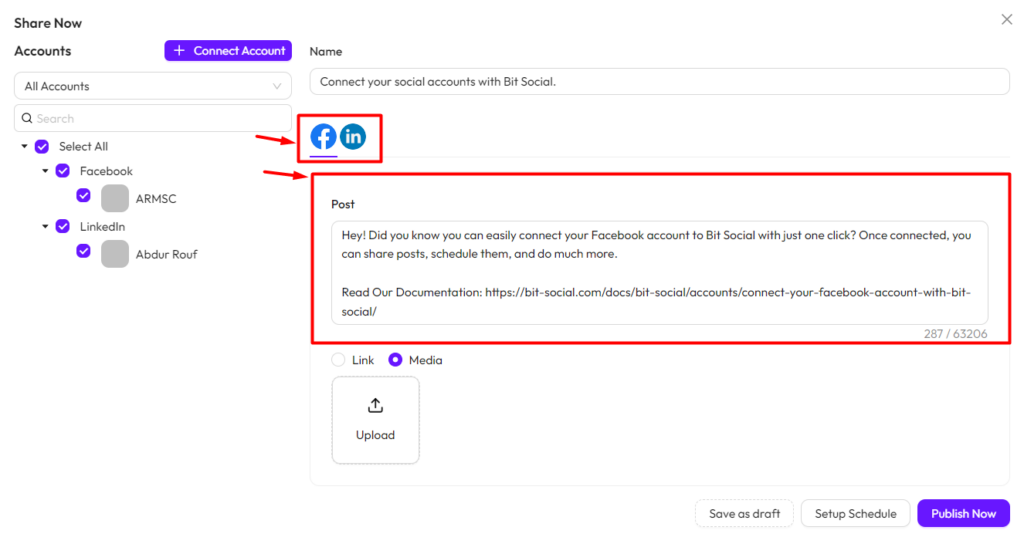
This fits announcements, launches, quick promotions, event updates, and social-only messages. Platform-specific composition matters because a Facebook post, Pinterest pin, Instagram caption, Google Business Profile update, or X post may need different text, media, or limits.
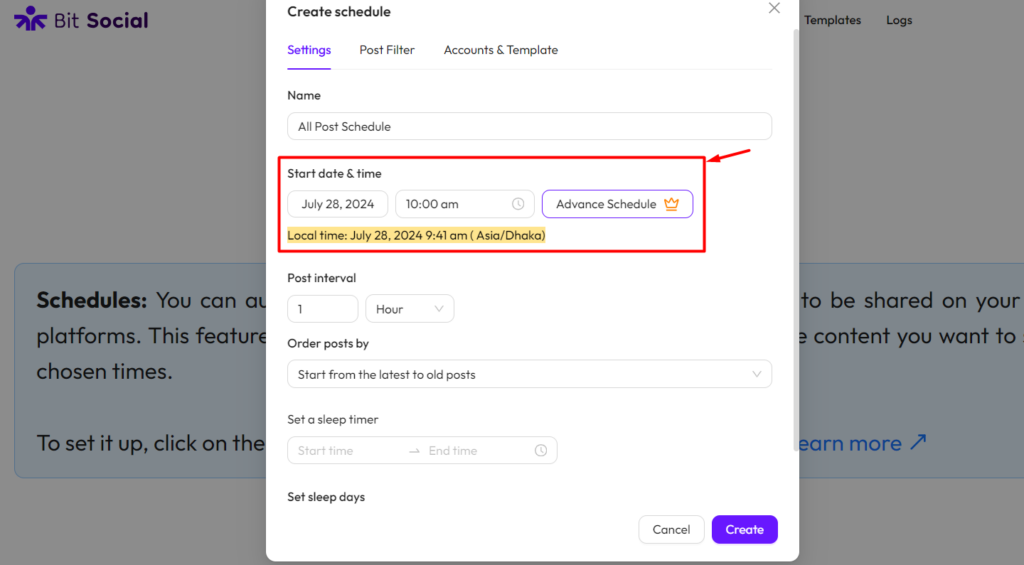
Bit Social can schedule posts for future publishing and re-share older content. More advanced schedules can use intervals, recurring runs, delayed platform publishing, sleep-time windows, and filters that control which WordPress content enters the schedule.

Pro adds the social Calendar so scheduled activity can be reviewed visually rather than only as a list. For evergreen sites, re-sharing is especially useful because a tutorial or product guide can continue receiving distribution after its original launch date.
Cron reliability still matters. If normal WordPress cron is unreliable because the site gets little traffic or the host restricts background activity, Pro supports an external cron setup so scheduling does not depend on page visits.

Templates determine how WordPress content is converted into a social post. Smart Tags can insert values such as the title, link, author, categories, tags, featured image, publish date, or custom fields. WooCommerce templates can also use product-specific data such as name, price, SKU, stock, images, product tags, and product links.

Version 1.15.0 added per-platform preview cards for the supported networks, which helps editors see how a post is likely to look before publishing. That is useful because one global template rarely fits every network equally well.
Bit Social Pro can store reusable AI Prompt templates for captions, rewritten descriptions, summaries, hashtags, and images. Smart Tags can inject live WordPress data into the prompt when the social post is generated.
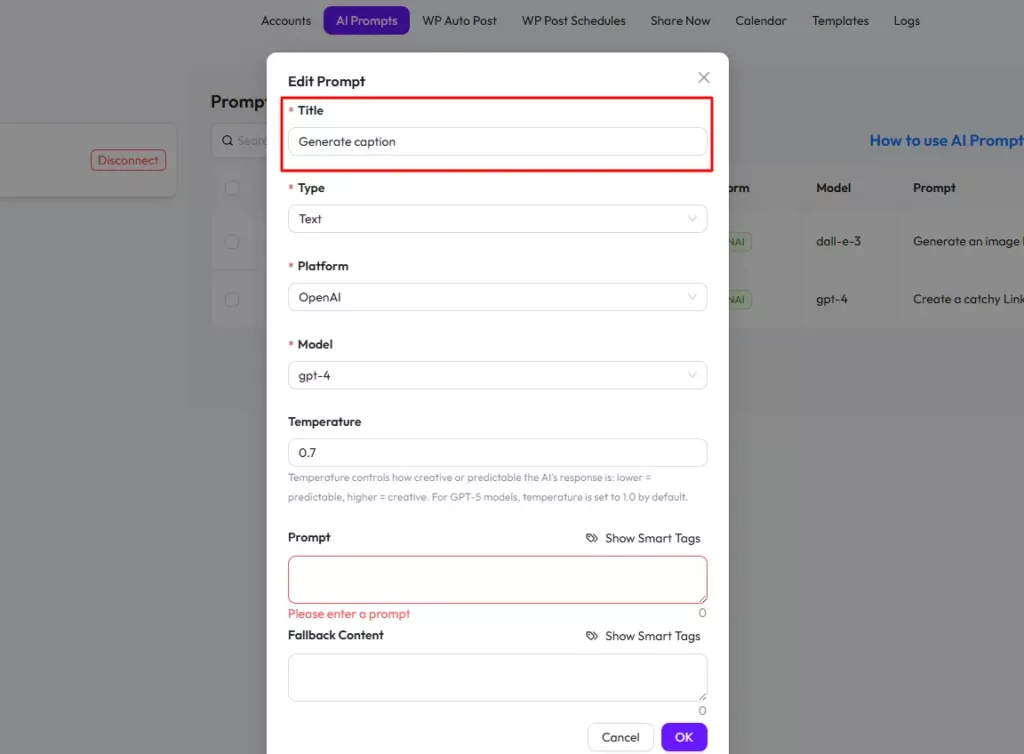
The feature connects to OpenAI using your own API key. Bit Social does not bundle unlimited AI usage into the license, so model availability, quota, and API cost remain separate. Version 1.15.3 migrated Bit Social’s AI image generation to OpenAI’s newer gpt-image-1 implementation.
Bit Social currently describes support for 13 social networks: Facebook, LinkedIn, Instagram, Google Business Profile, X, Tumblr, Pinterest, TikTok, Bluesky, Discord, Line, Telegram, and Threads.
The Free version supports Facebook and LinkedIn Profile. Pro unlocks LinkedIn Pages plus Instagram, Google Business Profile, X, Tumblr, Pinterest, TikTok, Bluesky, Discord, Line, Telegram, and Threads. Instagram also gained direct Instagram Login in version 1.16.0, removing the requirement for a linked Facebook Page in that connection flow.
The plugin does not currently charge by the number of connected accounts or social posts. Both Free and Pro advertise unlimited connected accounts, unlimited auto-posting, and unlimited scheduling within the networks available to that edition.

Social automation can fail because an authorization token expires, a network changes its API, media does not meet a platform requirement, cron is late, or the site temporarily cannot reach the remote service. A scheduling plugin needs to make those failures visible.

Version 1.18.0 rebuilt the Logs experience around publish runs. It added search and filters, records missed posts, allows failed or missed runs to be retried, exposes platform responses, and adds clearer account reconnect warnings. The same release added a Cron Status panel so administrators can see when WordPress cron last ran and when the next Bit Social event is due.
Pro also offers failed-post email alerts and digest reports. I would enable those for a commercial site instead of assuming an unattended social queue is healthy.
| Capability | Free | Pro |
|---|---|---|
| Facebook publishing | Yes | Yes |
| LinkedIn Profile | Yes | Yes |
| LinkedIn Pages | No | Yes |
| Instagram, X, Pinterest, TikTok, Threads and wider network set | No | Yes |
| Unlimited connected accounts | Yes | Yes |
| Unlimited auto-posting and scheduling | Yes | Yes |
| Share Now | Yes | Yes |
| Basic templates and Smart Tags | Yes | Yes, full platform/template feature set |
| Social Calendar | No | Yes |
| WooCommerce product auto-posting | No | Yes |
| Pages and custom post types | Limited core workflow | Yes, expanded publishing support |
| AI Prompts | No | Yes |
| First comment automation | No | Yes |
| External Cron | No | Yes |
| Failure email alerts and digest reports | No | Yes |
Free is a real publishing tool if Facebook and LinkedIn Profile cover the channels you need. Most businesses evaluating Instagram, Pinterest, TikTok, X, Google Business Profile, Threads, or LinkedIn Pages will need Pro.
Pricing checked October 16, 2026. Bit Social Free costs $0. Starter Annual is $49/year for one site. The current Starter Lifetime promotion is $89 one time, with $120 displayed as the regular price.
Agency Annual is $99/year for unlimited sites, with $120 shown as the regular annual price. Agency Lifetime is currently $159 one time for unlimited sites, with $399 displayed as the regular price. The paid plans include the full Pro publishing feature set and primarily differ by site allowance and annual versus lifetime licensing.
AddToAny Share Buttons and Sassy Social Share are primarily visitor-facing sharing tools. They help readers share a page, while Bit Social is designed for the site owner to publish WordPress content automatically to connected accounts.
Bit Flows can orchestrate broader multi-step automation involving social APIs and other systems, but it is not a dedicated social scheduling interface. Bit Social is the better fit when the recurring job is specifically social distribution, templates, scheduling, calendar management, and publishing logs.
Bit Social is strongest when social publishing is an extension of the WordPress editorial workflow. Auto Post, Share Now, scheduling, templates, Smart Tags, re-sharing, Calendar, AI Prompts, and logs cover the practical steps needed to turn WordPress content into an ongoing social distribution process.
I would shortlist it for blogs, publishers, agencies, and WooCommerce stores that want WordPress-led social automation. I would not use it as a substitute for a full social operations platform when inbox management, listening, advertising, or non-WordPress campaign collaboration is the real requirement.
Yes. Bit Social Free supports Facebook and LinkedIn Profile and includes unlimited connected accounts, unlimited auto-posting and scheduling, Share Now, filters, activity logs, and essential template features.
The current WordPress.org release is Bit Social 1.19.0, released September 15, 2026.
Bit Social currently describes support for 13 networks: Facebook, LinkedIn, Instagram, Google Business Profile, X, Tumblr, Pinterest, TikTok, Bluesky, Discord, Line, Telegram, and Threads.
The current product material advertises unlimited connected social accounts, unlimited auto-posting, and unlimited scheduling within the platforms available to your Free or Pro edition.
Yes. Pro can auto-share WooCommerce products and use product Smart Tags for details such as price, SKU, stock, images, product tags, and links.
Yes. Pro includes reusable AI Prompts for captions, summaries, hashtags, rewritten content, and images. You connect your own OpenAI API key, so provider usage and billing remain separate.
As checked October 16, 2026, Starter Annual is $49/year for one site. Starter Lifetime is currently $89 one time. Agency Annual is $99/year for unlimited sites, and Agency Lifetime is currently $159 one time.
Adds share and follow buttons for major social and messaging services, letting visitors quickly share WordPress posts and pages.
Adds optimized sharing buttons for 100+ social and messaging services, giving users more ways to share WordPress content online.
Displays customizable, responsive Instagram feeds from one or more accounts and supports Instagram oEmbeds in WordPress pages.
Log in or create an account to continue.