When something changes on a WordPress site, the hardest question is often not how to fix it but who changed what and when. An activity log can turn a vague incident into a timeline: a plugin was deactivated at 10:14, an administrator account was created at 10:18, settings changed at 10:21, and a page was unpublished at 10:24. That context is useful for security, troubleshooting, editorial accountability and agency maintenance. It is especially valuable when an SEO monitoring tool detects a change and you need to trace who or what caused it.
The best WordPress activity log plugins in 2026 differ mainly in depth, readability, alerting and retention. I would not choose one simply because it records the largest number of events. The useful log is the one your team can search quickly during an incident.
TL;DR: WordPress Activity Log Plugins
- WP Activity Log: best overall for detailed security auditing, alerts and compliance-oriented logging.
- Simple History: best for readable day-to-day history and editorial teams.
- Stream: best free open-source option for developers, agencies and multisite monitoring.
- WP Admin Audit: best lightweight audit trail for core admin and security-relevant changes.
Quick Comparison
| Plugin | Best for | Alerts / exports | Pricing |
|---|---|---|---|
| WP Activity Log | Detailed security and compliance auditing | Advanced alerts, reports and external storage in paid plans | Free core; Premium available |
| Simple History | Readable editorial and admin history | CSV/JSON export; premium add-on available | Free core |
| Stream | Free developer-friendly audit trail | CSV/JSON, webhooks, email alerts | Free |
| WP Admin Audit | Straightforward admin change tracking | Core audit log + extension ecosystem | Free core |
What an Activity Log Should Record
- Successful and failed logins.
- User creation, deletion, role and profile changes.
- Post, page and custom post type changes.
- Plugin and theme installs, activations, deactivations and updates.
- WordPress settings and configuration changes.
- Media, taxonomy and menu changes where relevant.
- WooCommerce or membership events if those systems are business critical.
A log should also have a retention policy. Keeping every low-value event forever can bloat the database and make investigations harder. Decide what you need for troubleshooting, security or compliance, then configure retention and external storage accordingly.
1. WP Activity Log — Best Overall for Security Auditing

WP Activity Log is built for sites where the audit trail itself is a security control. It records a wide range of WordPress and plugin activity, identifies users and source IPs, and its premium editions add capabilities such as alerts, reports, external database storage and SIEM-oriented workflows. Official plugin page.
What it records well
- User login and logout events
- User and role changes
- Content, plugin, theme and settings changes
- WooCommerce and third-party integration coverage
- Search and filtering
- Premium alerts, reports and external log storage
Best for: Businesses, agencies, ecommerce sites and regulated environments that need a detailed searchable audit trail.
Pros: Very deep event coverage; strong security focus; scalable storage and reporting options.
Cons: The full feature set is more complex than necessary for a small single-author blog.
Pricing: Free core plugin. Premium editions are available with pricing based on sites and required features.
2. Simple History — Best for Readable Day-to-Day History
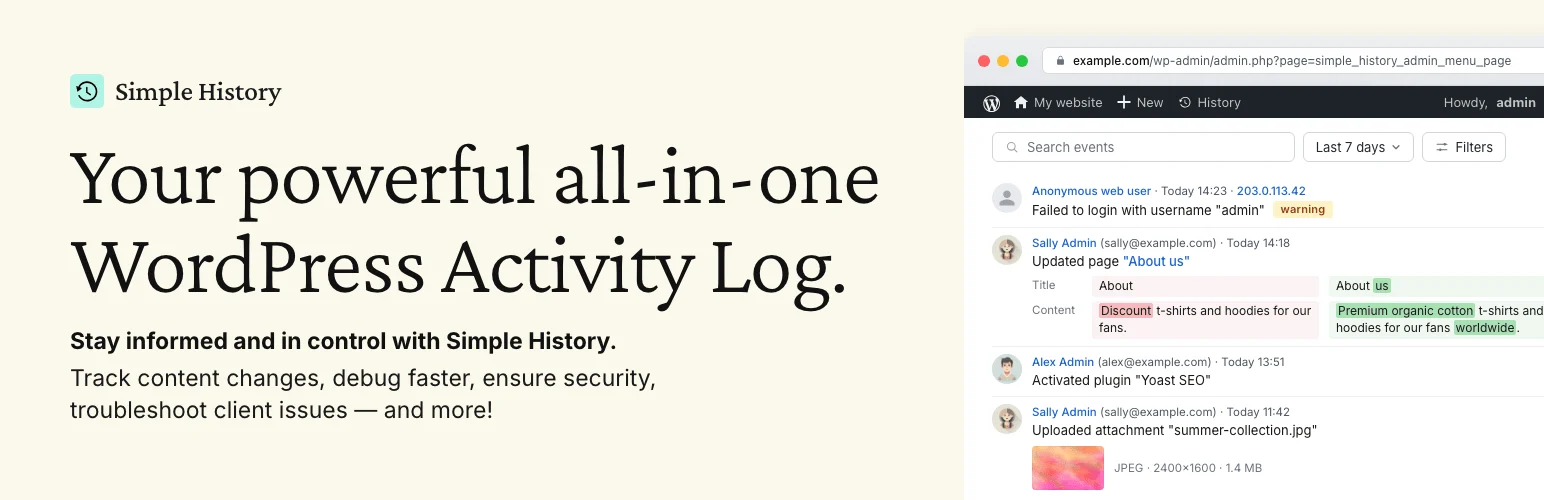
Simple History prioritizes human-readable event descriptions. Instead of making an editor interpret raw technical records, it explains changes in plain language and increasingly shows useful before-and-after context. It is especially good for editorial teams and agencies that need to answer “what changed?” quickly. Official plugin page.
What it records well
- Content edits and revisions
- User login activity
- Plugin and theme changes
- Security-relevant events
- Before/after comparisons for supported events
- CSV and JSON export
Best for: Editorial teams, client sites and agencies that want an understandable timeline without a heavy security console.
Pros: Very readable UI; quick setup; large active install base; broad plugin integrations.
Cons: Security operations teams may want more alerting, compliance and external-storage controls than the free core provides.
Pricing: Free core plugin. A premium add-on is available for additional capabilities.
3. Stream — Best Free Open-Source Activity Log

Stream is a mature free audit trail maintained by XWP. It records core and plugin actions, supports filtering by user, role, context, action or IP, and provides exports, alerts, webhooks and multisite views without putting those fundamentals behind a commercial license. Official plugin page.
What it records well
- Core WordPress activity tracking
- WooCommerce, Yoast, EDD and other integrations
- Filtering by user, role, action and IP
- CSV and JSON export
- Email alerts and webhooks
- Multisite network view and WP-CLI support
Best for: Developers, agencies and multisite administrators who want a capable open-source audit log with integration hooks.
Pros: Free and open source; strong developer features; alerts and exports included.
Cons: The interface is more utilitarian than some commercial security-audit products.
Pricing: Free.
4. WP Admin Audit — Best Lightweight Admin Audit Trail
WP Admin Audit focuses on the practical administrative events that answer common troubleshooting and security questions. It logs content changes, user events, WordPress settings, plugins, themes and media actions and is actively maintained for current WordPress versions. Official plugin page.
What it records well
- Post and page changes
- User registrations and profile changes
- Password and application-password events
- Plugin and theme actions
- WordPress settings changes
- Media and taxonomy activity
Best for: Site owners who want a straightforward admin audit trail without a large external service.
Pros: Focused scope; current WordPress compatibility; useful core-event coverage.
Cons: Its ecosystem and advanced reporting depth are smaller than the most established activity-log products.
Pricing: Free core plugin; optional extensions or vendor offerings may vary.
How I Use an Activity Log During an Incident
- Define the approximate time window when the problem started.
- Filter for administrators, editors or system changes first.
- Check plugin/theme updates and settings changes around the same time.
- Review failed and successful logins from unfamiliar IP addresses.
- Export or preserve relevant records before making destructive fixes.
- After recovery, adjust permissions, 2FA or monitoring rules so the same issue is easier to detect next time.
An activity log is evidence, not prevention. Pair it with least-privilege user roles, updates, backups and strong authentication. Our WordPress 2FA plugin comparison covers the login layer, while the broader WordPress security plugin guide covers firewall, malware and hardening tools.
Conclusion
WP Activity Log is the strongest choice when audit depth, alerts and compliance-style reporting matter. Simple History is easier to read for everyday editorial work, Stream gives developers and agencies a surprisingly capable free open-source trail, and WP Admin Audit keeps the setup focused. Whichever plugin you select, define retention and ownership before an incident happens so the log is useful when you actually need it.
Frequently Asked Questions
What is the best WordPress activity log plugin?
WP Activity Log is my best overall choice for detailed security auditing and advanced reporting. Simple History is easier for editorial teams, while Stream is an excellent free open-source option.
Does WordPress have a built-in activity log?
WordPress stores revisions and some system data, but it does not provide a complete administrator-facing audit trail of logins, plugin changes, user-role changes and settings events. A dedicated activity log plugin fills that gap.
Can an activity log show who changed a page?
Yes. Good activity log plugins record the user, time and content action. Some also show revision links or before-and-after differences.
Do activity log plugins slow down WordPress?
They add database writes because events must be recorded. On busy sites, configure sensible retention, cleanup and external storage where available so the log does not grow without limit.
How long should WordPress activity logs be kept?
Keep them long enough for your troubleshooting, security and compliance needs. A small site may only need weeks or months, while regulated businesses may require a defined longer retention policy.