



Choosing among WooCommerce min max quantity plugins is less about finding the plugin with the longest feature list and more about matching the tool to how your store actually works. This guide focuses on established options that help you enforce minimums, maximums, quantity steps, and purchasing rules at product or cart level. I checked the current plugin records and separated practical differences that matter during setup and day-to-day use.
TL;DR: Best WooCommerce Min/Max Quantity Plugins
Min Max Control – Min Max Quantity & Step Control for WooCommerce is the first option I would evaluate for most stores in this category. The alternatives below make more sense when you need a different workflow, lighter setup, or a more specialized feature set. Compare compatibility and test the workflow on staging before rolling it out to a live checkout.
Quick Comparison
| Plugin | Best for | Active installs | Model |
|---|---|---|---|
| Min Max Control – Min Max Quantity & Step Control for WooCommerce | Best overall fit | 10,000+ | Free + Premium from /year |
| Min and Max Quantity for WooCommerce | Simple focused setup | 20,000+ | Free + Pro from /year |
| Min Max Quantities – Set Minimum/Maximum Quantity & Price Limits with Step Control for WooCommerce | Specialized workflow | 10,000+ | Free + Pro from /year |
| Maximum, Minimum and Multiple Quantity for WooCommerce Shops | Alternative workflow | 3,000+ | Free plugin |
| Min Max Step Quantity Limits Manager for WooCommerce | Alternative workflow | 3,000+ | Free + Pro .99/year |
| WPC Product Quantity for WooCommerce | Alternative workflow | 2,000+ | Free + Premium from |
How I Chose These Plugins
For WooCommerce Min/Max Quantity Plugins, I started with the exact store event or rule that has to work reliably, then compared maintained plugins that solve that job without duplicating unrelated WooCommerce responsibilities.
1. Min Max Control – Min Max Quantity & Step Control for WooCommerce — Best Overall

Min Max Control lets you set minimum, maximum, and step quantities for WooCommerce products. It also supports broader quantity-management workflows such as cart-level controls and bulk adjustments, making it useful when stores need more control than the default quantity field provides.
Key features
- Set minimum purchase quantities
- Set maximum purchase quantities
- Control quantity step intervals for pack or increment-based sales
- Define a default product quantity
- Apply quantity rules from the WooCommerce admin
Pros
- Addresses the core use case without requiring a custom plugin.
- Current plugin record makes maintenance easier to verify before installation.
Cons
- For Min/Max Quantity Plugins, advanced store rules may require a paid edition, an add-on, or an external service. Confirm that dependency before rollout so the workflow and recurring cost are clear.
- Theme, checkout, HPOS, and extension compatibility should be tested on staging.
Pricing
Min Max Control has a free version on WordPress.org. The vendor currently lists the 1-site Premium plan at $41 per year or $45 for a lifetime license.
2. Min and Max Quantity for WooCommerce — Best Focused Option

Min and Max Quantity for WooCommerce lets you control purchase limits at the product, variation, cart, and product-group level. It is a practical option when a store needs minimum or maximum quantity rules, spending limits, or grouped restrictions without adding custom checkout code.
Key features
- Set quantity limits for individual products
- Apply separate limits to product variations
- Control product quantities at cart level
- Set cart-level cost limits
- Group products and variations under shared purchase rules
- Manage the rules directly from the WordPress and WooCommerce admin
Pros
- Addresses the core use case without requiring a custom plugin.
- Current plugin record makes maintenance easier to verify before installation.
Cons
- For Min/Max Quantity Plugins, advanced store rules may require a paid edition, an add-on, or an external service. Confirm that dependency before rollout so the workflow and recurring cost are clear.
- Theme, checkout, HPOS, and extension compatibility should be tested on staging.
Pricing
Min and Max Quantity for WooCommerce has a free version. BeRocket's paid version starts at $34 per year for 1 site, with 3-site, 5-site, and 10-site licenses at $59, $79, and $109 per year.
3. Min Max Quantities – Set Minimum/Maximum Quantity & Price Limits with Step Control for WooCommerce — Best Alternative
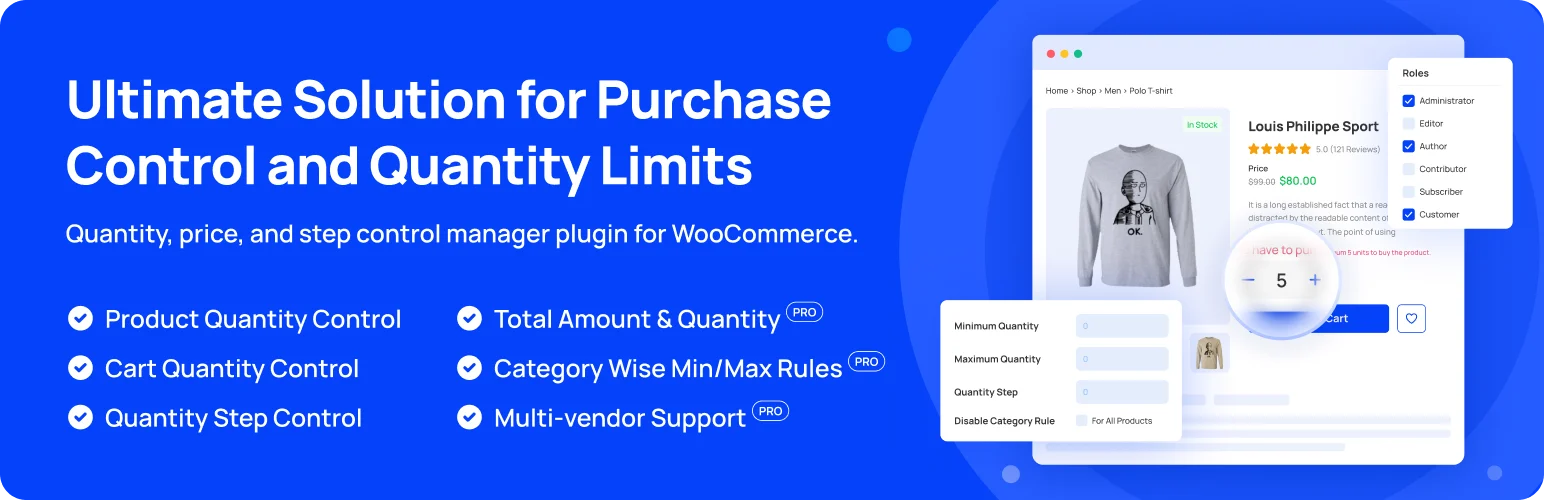
Min Max Quantities gives WooCommerce stores control over quantity, price, and step restrictions. You can apply purchase limits to individual products, categories, or broader store rules, which is useful for wholesale, pack-based, and minimum-order workflows.
Key features
- Set minimum purchase quantities
- Set maximum purchase quantities
- Control quantity step intervals for pack or increment-based sales
- Define a default product quantity
- Apply quantity rules from the WooCommerce admin
Pros
- Addresses the core use case without requiring a custom plugin.
- Current plugin record makes maintenance easier to verify before installation.
Cons
- For Min/Max Quantity Plugins, advanced store rules may require a paid edition, an add-on, or an external service. Confirm that dependency before rollout so the workflow and recurring cost are clear.
- Theme, checkout, HPOS, and extension compatibility should be tested on staging.
Pricing
Min Max Quantities has a free version on WordPress.org. WC Min Max Quantities Pro costs $49 per year for 1 site, $149 per year for 5 sites, or $299 per year for unlimited sites; lifetime licenses start at $199.
4. Maximum, Minimum and Multiple Quantity for WooCommerce Shops — Best for a Different Workflow
Maximum, Minimum and Multiple Quantity for WooCommerce Shops lets you set minimum and maximum purchase quantities and require customers to buy in fixed multiples. It is a straightforward option for stores that sell products in packs, cases, or controlled quantity ranges.
Key features
- Built specifically around a WooCommerce-compatible workflow
- Current WordPress.org plugin record checked for this 2026 comparison
- Can be evaluated on a staging store before production rollout
- Works from the WordPress/WooCommerce admin rather than requiring a custom-built system
- Provides a focused alternative to handling this task manually
- Used on approximately 3,000+ active WordPress installations according to the current WordPress.org record
Pros
- Addresses the core use case without requiring a custom plugin.
- Current plugin record makes maintenance easier to verify before installation.
Cons
- For Min/Max Quantity Plugins, advanced store rules may require a paid edition, an add-on, or an external service. Confirm that dependency before rollout so the workflow and recurring cost are clear.
- Theme, checkout, HPOS, and extension compatibility should be tested on staging.
Pricing
Maximum, Minimum and Multiple Quantity for WooCommerce Shops is free on WordPress.org. There is no separate Pro plan for this plugin.
5. Min Max Step Quantity Limits Manager for WooCommerce — Best for a Different Workflow
Min Max Step Quantity Limits Manager for WooCommerce focuses on granular quantity control. It is a better fit when products must be sold within a minimum or maximum range, in fixed step increments, or with a predefined default quantity.
Key features
- Set minimum purchase quantities
- Set maximum purchase quantities
- Control quantity step intervals for pack or increment-based sales
- Define a default product quantity
- Apply quantity rules from the WooCommerce admin
Pros
- Addresses the core use case without requiring a custom plugin.
- Current plugin record makes maintenance easier to verify before installation.
Cons
- For Min/Max Quantity Plugins, advanced store rules may require a paid edition, an add-on, or an external service. Confirm that dependency before rollout so the workflow and recurring cost are clear.
- Theme, checkout, HPOS, and extension compatibility should be tested on staging.
Pricing
Min Max Step Quantity Limits Manager has a free version on WordPress.org. WPFactory's Pro version is $59.99 per year or $199 for a lifetime license with unlimited-site use.
6. WPC Product Quantity for WooCommerce — Best for a Different Workflow
WPC Product Quantity for WooCommerce adds more control over how customers choose quantities. It supports minimum and maximum limits, step values, decimal quantities, and different quantity selector interfaces, making it useful for stores with non-standard purchasing rules.
Key features
- Built specifically around a WooCommerce-compatible workflow
- Current WordPress.org plugin record checked for this 2026 comparison
- Can be evaluated on a staging store before production rollout
- Works from the WordPress/WooCommerce admin rather than requiring a custom-built system
- Provides a focused alternative to handling this task manually
- Used on approximately 2,000+ active WordPress installations according to the current WordPress.org record
Pros
- Addresses the core use case without requiring a custom plugin.
- Current plugin record makes maintenance easier to verify before installation.
Cons
- For Min/Max Quantity Plugins, advanced store rules may require a paid edition, an add-on, or an external service. Confirm that dependency before rollout so the workflow and recurring cost are clear.
- Theme, checkout, HPOS, and extension compatibility should be tested on staging.
Pricing
WPC Product Quantity has a free version. Premium licenses cost $29 for 1 site, $59 for up to 5 sites, or $99 for unlimited sites, with lifetime plugin updates.
Which One Should You Choose?
Start with Min Max Control – Min Max Quantity & Step Control for WooCommerce if you want the most straightforward starting point from this shortlist. Choose another option when its workflow matches a specific requirement your store has. For WooCommerce min max quantity plugins, compatibility with your checkout stack and the quality of the day-to-day admin workflow matter more than simply choosing the plugin with the most settings.
Conclusion
The best WooCommerce min max quantity plugins should solve the store problem cleanly without creating a second maintenance problem. Shortlist two options, test them against real products and orders on staging, and confirm compatibility with your payment, caching, checkout, and other WooCommerce extensions before deploying.
Frequently Asked Questions
Do I need a dedicated plugin for this WooCommerce task?
A dedicated Min/Max Quantity Plugins plugin becomes useful when WooCommerce core no longer covers the operational rule cleanly. The benefit should be a simpler, more reliable store workflow rather than another layer of settings for its own sake.
Should I test the plugin before installing it on a live store?
Test any Min/Max Quantity Plugins plugin on staging with the same theme, payment gateways, checkout configuration, HPOS setup, caching, and extensions used by the live store. Run the complete affected order flow before deployment.
Are free WooCommerce plugins enough?
A free Min/Max Quantity Plugins plugin can be enough for a straightforward store. Paid versions become more relevant when the workflow needs advanced conditions, deeper integrations, higher-volume operations, or vendor support.
How many plugins from this list should I install?
Use one primary Min/Max Quantity Plugins plugin unless two products have clearly separate responsibilities. Overlapping tools can create duplicate settings, competing hooks, or inconsistent customer and admin experiences.
What should I check before choosing?
For Min/Max Quantity Plugins, check recent maintenance, current WooCommerce and HPOS compatibility, support history, the exact workflow you need, and the total cost of any paid modules or external services.

