
A WooCommerce purchase order plugin can solve two very different jobs. Some stores need to create purchase orders for suppliers and receive incoming stock. Others need to let B2B customers submit a PO number at checkout instead of paying immediately. I separated those workflows before choosing the tools below and excluded very new plugins with little real-world adoption.
TL;DR
ATUM is the best fit when you need supplier purchase orders, receiving, inventory and purchase prices inside WooCommerce. B2BKing is stronger for wholesale stores that need a purchase-order gateway plus company accounts and approval workflows. WooCommerce Purchase Order Gateway is the cleanest dedicated paid option for accepting customer PO numbers, The official WooCommerce Purchase Order Gateway is the cleanest dedicated option when you only need customers to submit a PO number at checkout.
Quick comparison
| Plugin | Best for | Adoption signal | PO direction |
|---|---|---|---|
| ATUM Inventory Management | Supplier procurement and receiving | 10,000+ active installs | Store → supplier |
| B2BKing | Wholesale PO checkout and company workflows | 10,000+ active installs | Customer → store |
| WooCommerce Purchase Order Gateway | Dedicated customer PO payment method | 2,000+ active installs | Customer → store |
How I evaluated these plugins
I checked current adoption in October 2026 and avoided padding this list with newly launched purchase-order plugins. For procurement tools, I looked for supplier records, purchase orders, receiving, inbound stock and purchase pricing. For customer-side PO gateways, I focused on PO-number capture, checkout behavior, B2B controls, approval options and how clearly the information is stored with the WooCommerce order.
1. ATUM WooCommerce Inventory Management – Best for supplier procurement
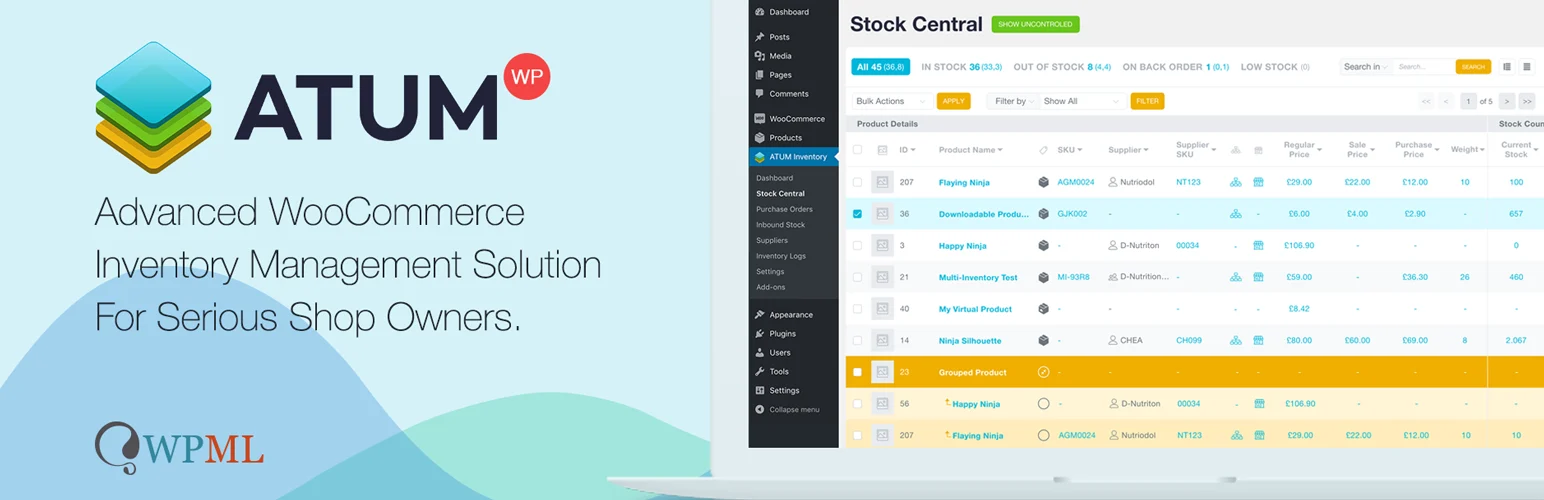
ATUM is the strongest established choice in this category when the purchase order is going to your supplier. It combines WooCommerce inventory management with suppliers, purchase orders, purchase prices, inbound stock and receiving. WordPress.org shows more than 10,000 active installations, which gives it a much stronger usage history than most dedicated procurement plugins.
- Create purchase orders for WooCommerce inventory.
- Assign products and variations to suppliers.
- Receive stock against purchase orders.
- Track inbound inventory before it reaches available stock.
- Add purchase prices directly to PO items.
- Export purchase orders to PDF.
Best for: stores that buy physical inventory and want purchasing tied directly to WooCommerce stock. Keep in mind: ATUM is a broader inventory system, so it is heavier than a single-purpose PO payment gateway.
2. B2BKing – Best for wholesale purchase orders and company approvals
B2BKing is not a procurement system. Its purchase-order feature is designed for the customer side of a B2B store. The purchase order gateway can collect a PO number during checkout and can also allow buyers to upload a PO document. B2BKing also supports company subaccounts and order approval, which makes it useful when employees place orders that a parent business account must review.
- Purchase Order payment gateway.
- PO number field at checkout.
- Optional purchase-order document upload.
- Enable PO payments only for selected B2B groups.
- Company subaccounts and employee permissions.
- Company-level order approval workflow.
Best for: wholesale and B2B stores that need purchase orders as part of a larger business-account workflow. WordPress.org currently shows 10,000+ active installations.
3. WooCommerce Purchase Order Gateway – Best dedicated paid PO gateway
WooCommerce Purchase Order Gateway is a focused commercial extension sold through the WooCommerce Marketplace. It adds a purchase order payment method and lets customers enter the PO number issued through their organization. The Marketplace currently reports 2,000+ active installs.
- Dedicated Purchase Order payment gateway.
- PO number captured during checkout.
- Orders can be placed without an immediate card payment.
- Simple setup inside WooCommerce payment settings.
- Commercial support and updates through WooCommerce.
Best for: stores that already have an offline invoicing process and mainly need a reliable PO field and payment method in WooCommerce.
Supplier PO vs customer PO: choose the correct workflow
If you are ordering stock from a supplier, use a procurement tool such as ATUM. If your customer is giving you a purchase-order number so their company can pay later, use a PO payment gateway such as B2BKing, WooCommerce Purchase Order Gateway. The term is the same, but the workflow is completely different. Stores with complex inventory can also compare our WooCommerce stock management plugins.
What to verify before enabling purchase orders
Purchase orders are not the same as instant payment. Decide whether you are solving supplier procurement, B2B customer checkout, or an internal approval workflow before installing anything. ATUM has 10,000+ active installations for inventory and supplier-side procurement, while B2BKing also has 10,000+ installations for wholesale workflows. The official WooCommerce Purchase Order Gateway currently reports 2K+ active installs and supports Cart/Checkout Blocks and HPOS.
For B2B stores, also compare our WooCommerce B2B plugins, order approval plugins, and accounting integrations. Test who can select PO payment, which order status is created, how the PO number appears on invoices, and who is responsible for approving credit before fulfillment.
Sources checked: ATUM on WordPress.org, B2BKing on WordPress.org, and the official WooCommerce Marketplace listing above.
Final Take
Use ATUM for supplier purchasing and incoming stock. Use B2BKing when purchase orders are part of a larger wholesale account and approval system. Choose WooCommerce Purchase Order Gateway for a focused supported extension, when you want a simpler free gateway. I excluded lower-adoption tools rather than filling the list with new plugins that have not built enough usage history yet.
FAQs
Can WooCommerce create supplier purchase orders by default?
No. WooCommerce mainly manages customer orders. Supplier purchasing, receiving and procurement usually require an inventory or purchase-order extension.
Can a B2B customer enter a PO number at checkout?
Yes. A purchase-order payment gateway can add a PO number field to checkout and store the reference with the WooCommerce order.
What is the difference between a purchase order and an invoice?
A purchase order normally comes from the buyer and authorizes a purchase. An invoice comes from the seller and requests payment. B2B WooCommerce stores often use both in the same offline payment process.