



Affiliate links are easy to add and surprisingly hard to maintain. Once a site has hundreds of product mentions, one merchant migration or expired campaign can leave broken destinations across dozens of articles. Editing those links one by one is slow, and missed links can quietly cost revenue.
That is the problem this roundup solves. These are publisher-side affiliate link management and cloaking plugins: tools for organizing outbound affiliate URLs, creating branded redirects, tracking clicks, and updating destinations centrally. If you want software for recruiting affiliates to promote your own products, see our WordPress affiliate management plugins guide instead.
TL;DR
Pretty Links is the broadest all-around choice for publishers who want mature redirect controls and reporting. ThirstyAffiliates is especially practical for content-heavy affiliate sites and includes Amazon-aware workflows. BetterLinks offers a modern interface plus strong automation and split-testing features. Lasso stands out when product displays, link health, and monetization workflow matter as much as cloaking. Easy Affiliate Links is the simpler free-first choice.
Quick Comparison
| Plugin | Best for | Pricing model |
|---|---|---|
| Pretty Links | Mature affiliate sites that need advanced redirect controls | Free Lite + annual Pro tiers |
| ThirstyAffiliates | Content publishers managing a large link library | Free + Pro from $99.60 promotional first year when checked |
| BetterLinks | Marketers wanting automation, analytics and A/B redirects | Free + Pro; Individual $79/year when checked |
| Lasso | Publishers combining link management with product displays | Usable free plan + paid optimization features |
| Easy Affiliate Links | Bloggers who want straightforward link organization | Free core + commercial upgrades/support |
How I Chose These Affiliate Link Management Plugins
I separated link-management tools from affiliate-program plugins first. Then I checked whether each product is currently maintained and whether its core workflow genuinely helps a publisher create, organize, replace, disclose, monitor, or analyze outbound affiliate links. I gave extra weight to central destination updates, redirect flexibility, reporting, broken-link detection, and workflows that remain manageable after a site grows beyond a few dozen links.
1. Pretty Links — Best overall for established affiliate sites
Pretty Links is the most complete fit here when you want link management to behave like infrastructure rather than a collection of shortcuts. You can keep affiliate destinations in one place, use branded URLs on your own domain, organize links with categories and tags, and review click data without rebuilding every article that contains a link.
Its paid plans go beyond basic redirects. Current documentation lists geographic and device targeting, rotation, expiration, split testing, advanced redirect types and conversion reporting on higher tiers. That makes Pretty Links a better fit than a lightweight cloaker when you actively test offers or operate several campaigns at once.
Key features
- Central link library with categories and tags
- Branded short links on your own WordPress domain
- Click tracking and reports
- QR-code generation
- Geographic and device targeting on higher plans
- Link rotation, expiration and split testing on higher plans
- Product display and UTM-related add-ons in higher tiers
Pros
- Mature feature set for sites with a large affiliate-link footprint
- Good choice when redirect rules and testing matter, not just cleaner URLs
- Central updates reduce the risk of outdated links remaining in old posts
Cons
- Many of the most useful targeting and testing features are paid
- The full feature set can be more than a small blog needs
Pricing
Pretty Links has a free Lite plugin and paid annual plans. At the time of this review, the official pricing page showed Marketer at $149.60/year and Super Affiliate at $199.60/year as introductory promotional prices; renewal pricing can be higher, so check the current checkout terms before buying.
2. ThirstyAffiliates — Best for content publishers and Amazon-aware workflows

ThirstyAffiliates is built around the day-to-day work of inserting and maintaining affiliate links inside editorial content. You can categorize links, choose redirect behavior, insert saved links from the editor, and see where a link has been used. That last point matters when an affiliate relationship changes and you need to understand the impact before replacing a destination.
The Pro feature set is particularly relevant to publishers with large archives. Automatic keyword linking can reduce repetitive editing, geolocation can send visitors to different destinations, link scheduling can handle time-sensitive campaigns, and the 404 checker helps surface broken targets. Its documented smart-uncloaking and Amazon API features are also useful if Amazon Associates is part of the mix.
Key features
- Central affiliate-link library and categorization
- Server-side or enhanced JavaScript redirect choices
- Basic statistics in the core workflow
- Automatic keyword linking in Pro
- Geolocation redirects in Pro
- CSV import/export and statistics export
- Link scheduling and 404 checking
- Amazon API importing and smart uncloaking in paid plans
Pros
- Strong editorial workflow for link-heavy blogs
- Useful controls for finding where affiliate links are used
- Good range of automation for mature publisher sites
Cons
- Advanced automation is concentrated in paid plans
- Promotional first-year pricing differs from standard renewal pricing
Pricing
A free version is available. When checked, the official site listed Basic at $99.60 for the promotional first year for one site, Plus at $149.60 for five sites, and Advanced at $199.60 for ten sites. The same checkout also showed higher standard renewal prices, so budget for renewal rather than only the first-year offer.
3. BetterLinks — Best for a modern UI, automation and testing

BetterLinks is a strong choice if you want a cleaner dashboard and more automation around link creation. Beyond branded short links, it supports keyword-based auto-linking, UTM tools, link expiration, role controls and analytics. For a publisher running campaigns across blog posts, email, and social channels, those controls can replace several small link utilities.
Its paid plan is especially interesting for optimization work. The current feature list includes split testing, a full-site link scanner, broken-link checking, custom domains, Google Analytics tracking and password-protected redirects. That gives it a wider marketing-operations angle than a basic cloaking plugin.
Key features
- Branded short links and custom branded domains
- Individual link analytics
- Auto-link keywords and auto-created links
- Global UTM builder and templates
- Click limits and expiry dates
- Broken-link checker and full-site link scanner
- Split testing for redirects
- User roles, permissions and password-protected links
Pros
- Modern workflow with strong automation
- Useful combination of tracking, UTM and redirect features
- Unlimited-site Business option can suit agencies or portfolios
Cons
- Several standout features require Pro
- AI and automation features may be unnecessary for a small affiliate blog
Pricing
BetterLinks has a free version. When checked, the official pricing page showed the Individual plan at $79/year for one site, Business at $187/year for unlimited sites, and an Agency lifetime offer at $279. These were displayed promotional prices and can change.
4. Lasso — Best for product displays and link health

Lasso approaches affiliate links from a monetization perspective rather than treating them only as redirects. Its central dashboard lets you manage destinations globally, while its WordPress integration can place links and visual product displays directly in content. This is useful for review and comparison sites where presentation affects click-through as much as the URL itself.
The free plan is not just a short trial: Lasso says it includes core link management, branded cloaking, most displays and Pages. Paid plans add deeper performance insight, tools for finding broken or unoptimized links, advanced displays and more automation. That makes Lasso attractive when you want one workflow for both link maintenance and product presentation.
Key features
- Central affiliate and product-link dashboard
- Global destination updates
- Branded link cloaking
- WordPress product displays
- Link health alerts for broken or changed destinations
- Pages for link-in-bio or product collections
- Performance and optimization tools on paid plans
Pros
- Stronger merchandising tools than most traditional link cloakers
- Free plan can remain useful long term
- Link-health workflow is valuable for large review archives
Cons
- May be overkill if you only need simple redirects
- Some advanced displays, insights and audit tools require a paid plan
Pricing
Lasso offers a $0 plan with core link management, Pages and most basic display functionality. Paid plans unlock deeper optimization, automation, reporting and advanced display features. Because the company changes plan packaging, verify the current paid rate on Lasso before committing.
5. Easy Affiliate Links — Best lightweight free-first option
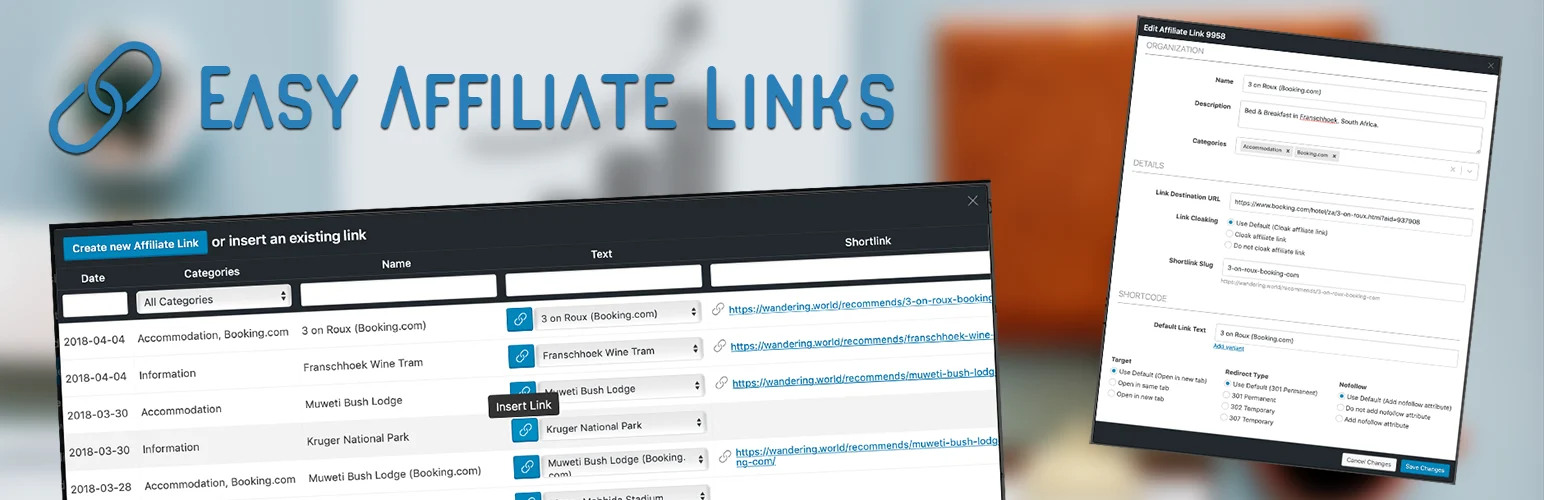
Easy Affiliate Links is the practical choice when your requirements are modest: store destinations centrally, create clean links, organize them, and track basic usage without adopting a large marketing suite. WordPress.org currently lists it as actively maintained, with 7,000+ active installations and compatibility tested through WordPress 7.1.
I would choose it over Pretty Links or BetterLinks when simplicity is the goal. A small editorial team that mainly needs reliable reusable links may get more value from a focused plugin than from advanced targeting, A/B testing or campaign automation it will never configure.
Key features
- Central affiliate link management
- Short or cloaked URLs
- Link organization for editorial use
- Click tracking and statistics
- Editor-friendly insertion workflow
- Free core plugin with optional commercial upgrades
Pros
- Lower complexity for smaller affiliate sites
- Established WordPress.org footprint
- Good free-first path
Cons
- Less suited to advanced targeting and experimentation
- Fewer marketing-automation features than the heavier options
Pricing
The core plugin is free on WordPress.org and the listing notes that commercial upgrades or support are available. Check the vendor for current premium pricing if you need paid features.
How to Choose the Right Affiliate Link Plugin
Start with the failure you are trying to prevent. If stale destinations across a large archive are the risk, prioritize global updates and broken-link monitoring. If you run geo-specific offers or frequent promotions, redirect conditions and scheduling matter more. If your revenue depends on product boxes and comparison content, Lasso deserves more weight because the display layer is part of its value.
Also check the affiliate program rules before cloaking. Some programs have specific requirements about redirects or link modification. Amazon Associates is the obvious example, which is why a product with documented Amazon-aware behavior can be safer than applying the same redirect rule to every merchant.
If your content is heavily Amazon-focused, our Amazon affiliate plugin guide covers adjacent tools such as product-display and Amazon-specific workflows.
Conclusion
For most established publisher sites, Pretty Links is the strongest general-purpose choice, while ThirstyAffiliates is excellent for editorial teams that want automation around a large link library. BetterLinks is compelling for marketers who care about testing and UTM workflows, and Lasso makes more sense when product presentation and link health are central to monetization.
Do not choose by feature count alone. The best affiliate link management plugin is the one your team can keep organized for years, because the real value appears when one destination changes and you can fix it once instead of hunting through 100 old posts.
Frequently Asked Questions
What is the difference between affiliate link management and affiliate management?
Affiliate link management is for publishers who promote other companies and need to organize outbound affiliate URLs. Affiliate management software is for merchants who run their own affiliate or referral program, recruit partners, and track partner commissions.
Is affiliate link cloaking always allowed?
No. Rules differ by affiliate program. Check each network or merchant policy before changing or masking a destination URL, especially for programs with strict linking requirements.
Can I change an affiliate link everywhere at once?
Yes, that is one of the main reasons to use a link-management plugin. If articles point to a saved redirect instead of a raw merchant URL, changing the destination in the plugin can update the path used across the site.
Do affiliate link plugins slow down WordPress?
A well-built redirect plugin should add little overhead, but tracking, scanners and analytics can increase database activity. On a large site, test redirect response time and scheduled scanning on staging before enabling every feature.
Should I use two affiliate link management plugins together?
Usually no. Two tools can compete for redirects, duplicate tracking, or make migration harder. Pick one system of record for affiliate URLs unless the second tool has a clearly separate purpose.

