
RecommendedEditors Choice
Yoast SEO review covering Free vs Premium, current pricing, content analysis, schema, redirects, AI tools, crawl controls, and version 28.7.

All in One SEO, usually called AIOSEO, is no longer just a plugin for titles, meta descriptions, and XML sitemaps. It now combines on-page optimization, schema, redirects, WooCommerce SEO, local SEO, author signals, internal-link management, Google Search Console reporting, AI tools, and an MCP connection for supported AI clients.
I would shortlist AIOSEO when you want most WordPress SEO work managed from one interface. The free version covers a solid SEO foundation. Paid plans make more sense when you need operational tools such as redirects, Local SEO, Author SEO, Link Assistant, SEO Revisions, or Search Statistics. The main buying mistake is choosing a plan because the feature list looks long instead of checking which workflows your site actually needs.
Best for: Businesses, publishers, WooCommerce stores, local businesses, and SEO teams that want a broad SEO toolkit inside WordPress.
Free version: Yes. Good for core search appearance, sitemap, indexing, and content-optimization work.
Paid plans: Basic, Plus, Pro, and Elite. Feature access changes by tier.
Current release checked: 5.0.3.
Paid pricing: Starts at $49.50 for the first year. Renewal is at the regular list price.

AIOSEO covers both basic SEO configuration and ongoing SEO operations. The important distinction is that not every feature is available in Lite or every paid plan.
| Area | What AIOSEO can do | Availability |
|---|---|---|
| Search appearance | SEO titles, meta descriptions, smart tags, canonical controls, social previews, and content visibility settings | Core tools in Lite |
| Content optimization | TruSEO scoring, keyword checks, readability, spelling, headline analysis, and editor guidance | TruSEO core in Lite; some AI actions use credits or paid access |
| Sitemaps | XML and RSS sitemaps with controls for post types and taxonomies; specialized sitemap options are available in paid plans | Core XML sitemap in Lite; advanced options are plan-dependent |
| Schema | Site and content structured data, schema generator tools, and richer schema workflows for supported content types | Baseline schema in Lite; Smart Schema and advanced schema features in paid plans |
| Redirects | Create redirects from the Redirect Manager or content editor; advanced redirect controls are available on higher plans | Basic+ |
| WooCommerce SEO | SEO controls for products and WooCommerce content | Basic+ |
| Local SEO | Local business information, Local Business schema, locations, opening hours, and map-related workflows | Plus+ |
| Author SEO | Add author experience, expertise, education, topics, bios, and author-related structured data | Plus+ |
| SEO Revisions | Track changes to SEO metadata and compare revisions | Plus: 15, Pro: 30, Elite: unlimited |
| Link Assistant | Internal-link reports, orphan-page discovery, link suggestions, and link management | Pro+ |
| Search Statistics | Google Search Console performance reports, content performance, index status, and Keyword Rank Tracker | Elite |
| AI and MCP | AI-assisted SEO/content tasks plus a WordPress abilities and MCP workflow for supported AI clients | AI limits are plan/credit-dependent; MCP starts in Lite and expands with paid features |
For a small brochure site, blog, or early-stage project, Lite can cover the important SEO foundation. I would start there unless a specific paid workflow is already part of the site plan.
The plan boundaries matter. “AIOSEO Pro” is often used as a general label for the paid product, but Basic, Plus, Pro, and Elite do not unlock the same features.
TruSEO is the editing layer most content teams will notice every day. The 5.0 release rebuilt the scoring workflow so scores update in real time and moved content optimization into a clearer panel. The current interface separates Keywords, Basics, Spelling, Readability, and Headline checks.

I would use TruSEO as a checklist, not as the definition of good SEO. A green score cannot confirm search intent, evidence quality, topical depth, originality, or whether a page deserves to rank. The useful part is catching routine issues such as missing metadata, weak keyword coverage, internal-link gaps, readability problems, and headline issues before publishing.
AIOSEO centralizes the technical controls that WordPress site owners usually need most often. Search Appearance manages how content types, taxonomies, archives, titles, descriptions, and indexing rules behave. XML sitemap settings decide which post types and taxonomies are submitted. Per-content controls can override the global defaults.
The Redirection Manager is a paid feature starting with Basic. You can create redirects centrally or from an individual post or page. Higher plans add more advanced redirect behavior. This matters on sites that regularly change URLs, remove content, consolidate pages, or run migrations.
Schema is also integrated with the same SEO workflow. AIOSEO supports site-level and content-level structured data, while paid plans expand the available schema tools. That is useful when you want metadata, canonicals, sitemaps, redirects, and schema controlled by one plugin instead of several overlapping SEO utilities.
Link Assistant is available on Pro and Elite. It builds an internal-link report, identifies orphaned content, and surfaces linking opportunities without requiring you to open every post manually. This is most valuable on larger editorial sites where internal linking becomes difficult to track by memory.
Search Statistics is a separate decision point because it requires Elite. It connects to Google Search Console and brings search-performance data into WordPress. The Keyword Rank Tracker can monitor selected keywords, group them, and show impressions, clicks, CTR, and ranking distribution.

If you already live in Google Search Console, the Elite upgrade is not automatically necessary. Its value is convenience and workflow. It keeps content, SEO settings, and performance data closer together inside WordPress.
AIOSEO now has two different AI layers that are easy to confuse. Native AI features use AIOSEO AI credits for tasks such as SEO copy, schema, FAQs, images, and other supported generation. The separate Writing Assistant uses SEOBoost and requires a paid SEOBoost subscription.
The newer MCP workflow is different again. AIOSEO can register SEO abilities with WordPress and expose them to supported MCP clients through the MCP Adapter. The Lite version starts with abilities for areas such as posts, settings, notifications, robots.txt, and site audits. Paid features add abilities for areas such as terms, redirects, Search Statistics, and Link Assistant when the related feature is available.
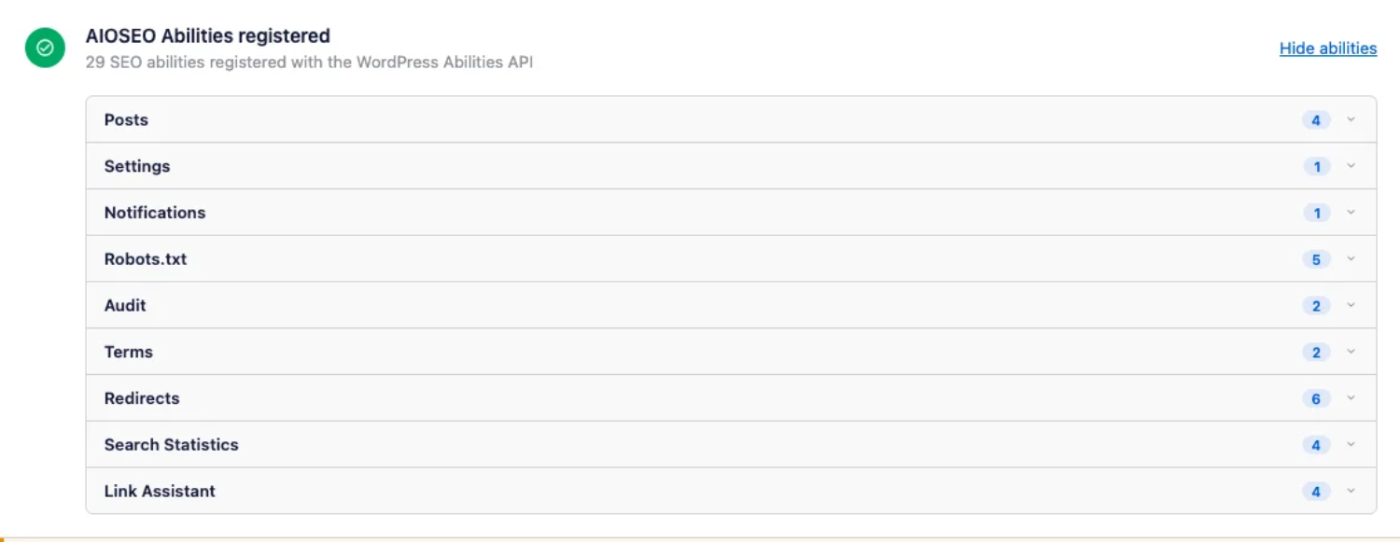
MCP access is useful when you want an AI client to inspect or update approved SEO data through structured actions instead of browser automation. It also increases the importance of WordPress permissions. An application password carries the permissions of the WordPress user behind it, so I would use a role with only the access the workflow needs and revoke credentials that are no longer used.
Pricing checked October 15, 2026. AIOSEO is currently showing discounted first-year pricing. The company states that renewals are charged at the regular list price.
| Plan | Sites | First year | Regular annual price | Included AI credits |
|---|---|---|---|---|
| Basic | 1 | $49.50 | $99 | 10,000 |
| Plus | 3 | $99.50 | $199 | 25,000 |
| Pro | 10 | $199.50 | $399 | 50,000 |
| Elite | 100 | $299.50 | $599 | 200,000 |
For long-term budgeting, compare the regular renewal price of the lowest plan that contains the exact features you need. A local business may need Plus. A content team that wants Link Assistant may need Pro. A team that wants Search Statistics and Keyword Rank Tracker inside WordPress needs Elite.
AIOSEO sits in the same broad SEO-plugin category as Yoast SEO, Rank Math SEO, and SEOPress. The right choice depends less on whether each plugin can set a title or create a sitemap and more on the workflows you want to keep inside WordPress.
AIOSEO stands out when its paid modules replace real tasks for your team, especially redirects, Local SEO, Author SEO, internal linking, Search Statistics, and AI-assisted SEO actions. If you will not use those workflows, comparing free versions and renewal pricing becomes more important than comparing raw feature counts.
AIOSEO is a strong choice for WordPress sites that want one plugin to manage both SEO setup and ongoing SEO work. Lite is enough for many smaller sites. Paid plans become easier to justify when a specific module replaces a separate tool or repeated manual process.
I would not upgrade just for a higher SEO score or because more modules are available. Start with the workflows your site actually needs, then buy the lowest plan that covers them. That keeps AIOSEO useful without turning the WordPress dashboard into a collection of features nobody on the team uses.
Yes. AIOSEO Lite is available from WordPress.org and covers core WordPress SEO work such as search appearance, XML sitemaps, indexing controls, and TruSEO guidance. Paid plans add broader operational features.
As of October 15, 2026, introductory annual pricing starts at $49.50 for Basic, $99.50 for Plus, $199.50 for Pro, and $299.50 for Elite. The regular annual prices are $99, $199, $399, and $599 respectively.
Link Assistant is available with the Pro and Elite plans. It provides internal-link reports, orphan-page discovery, link suggestions, and link-management tools.
Search Statistics and Keyword Rank Tracker require the Elite plan. They connect AIOSEO with Google Search Console data and bring search-performance reporting into WordPress.
Yes. Local SEO and Author SEO are available from the Plus plan upward. These features are useful for location-focused businesses and multi-author sites that need structured author information.
Yes. AIOSEO has native AI features that use AI credits, with different credit allowances on paid plans. Its separate Writing Assistant uses SEOBoost and requires a paid SEOBoost subscription.
Yes. AIOSEO can expose registered WordPress SEO abilities through an MCP workflow. The Lite version starts with a smaller set of abilities, while paid features add more actions when the related AIOSEO module is available.
Yoast SEO review covering Free vs Premium, current pricing, content analysis, schema, redirects, AI tools, crawl controls, and version 28.7.
Rank Math SEO review covering Free vs PRO, current pricing, Content AI, schema, redirects, rank tracking, sitemap generation, and version…
Adds WordPress SEO tools for metadata, schema, XML sitemaps, redirects, Search Console data, and AI SEO optimization features.
Log in or create an account to continue.