
RecommendedEditors Choice
Builds contact, payment, and custom WordPress forms with a drag-and-drop editor, letting users create forms without coding markup.
Bit Form is a WordPress form builder that tries to cover both ends of the market: lightweight contact forms for simple sites and advanced workflows for teams that need conditional logic, payments, integrations, PDFs, user registration, front-end data views, or conversational forms. The current release reviewed is 3.3.3, released October 13, 2026.
I would shortlist Bit Form when you want a visual builder with a generous free edition and do not want to assemble several separate add-ons just to get core form features. The free version already includes unlimited forms and submissions, 38+ free fields, multistep forms, basic conditional logic, email notifications, entry storage, file uploads, anti-spam tools, webhooks, Google Sheets and many other integrations.
Best for: business forms, lead generation, support, applications, booking requests, payments, onboarding, and data collection inside WordPress.
Current release: 3.3.3.
Free strength: unlimited forms/submissions, broad field set, multistep forms, basic conditional logic, entries, integrations, anti-spam, and styling.
Pro strength: payments, advanced conditional logic, PDF workflows, authentication forms, abandonment, front-end data views, advanced uploads, and more.
Pricing checked October 16, 2026: Pro starts at $25/year promotional for one site.

| Area | What it does | Free or Pro |
|---|---|---|
| Form builder | Drag-and-drop builder with responsive layout and field controls | Free |
| Fields | Text, email, number, phone, upload, repeater, rating, captcha and more | 38+ Free; advanced payment/signature/date fields Pro |
| Conditional logic | Show/hide fields and build dynamic form behavior | Basic Free; advanced rules Pro |
| Integrations | CRM, email, spreadsheets, automation tools, webhooks and WordPress plugins | 50+ Free integrations plus additional Pro capabilities |
| Entries | Store, search, filter, export and manage submissions | Free; advanced front-end views/editing Pro |
| Payments | Stripe, PayPal, Razorpay and Mollie payment fields | Pro |
| Generate PDFs from submitted data and attach them to email workflows | Pro | |
| Authentication | Registration, login, forgot/reset password forms | Pro |
| Conversational forms | One-question-at-a-time presentation | Available |
| Spam protection | reCAPTCHA v2/v3, hCaptcha, Turnstile; honeypot in Pro | Free + Pro |


Bit Form 3.x redesigned the form-building interface around a clearer field list, organized settings panels, responsive previews, an inline Add Field workflow, and theme controls. You can build a simple contact form quickly, but the same editor can also handle longer application or onboarding flows.
The current field set is broad enough that most forms do not require custom HTML. Free fields include text, name, email, number, phone, select, radio, checkbox, country, currency, date/time, URL, slider, GDPR agreement, file upload, image select, hidden fields, repeater, rating, and captcha fields. Pro adds payment fields, signature, advanced file upload, advanced date-time, shortcode, draft button, and email OTP verification.

Bit Form includes a visual style editor for layout, spacing, backgrounds, typography, field appearance, buttons, and responsive behavior. Version 3 also added custom theme management, import/export, organized style layers, and hover/focus states. This matters for agencies because a form can be matched to a client site without adding another styling plugin.


The free plugin advertises 50+ integrations and can send submission data to platforms such as Google Sheets, Mailchimp, FluentCRM, HubSpot, ActiveCampaign, Brevo, WooCommerce, Telegram, Zoho products, Zapier, Make, n8n, AutomatorWP, Uncanny Automator and webhooks. That means a basic lead form can feed directly into a CRM or spreadsheet without an extra automation subscription for every use case.
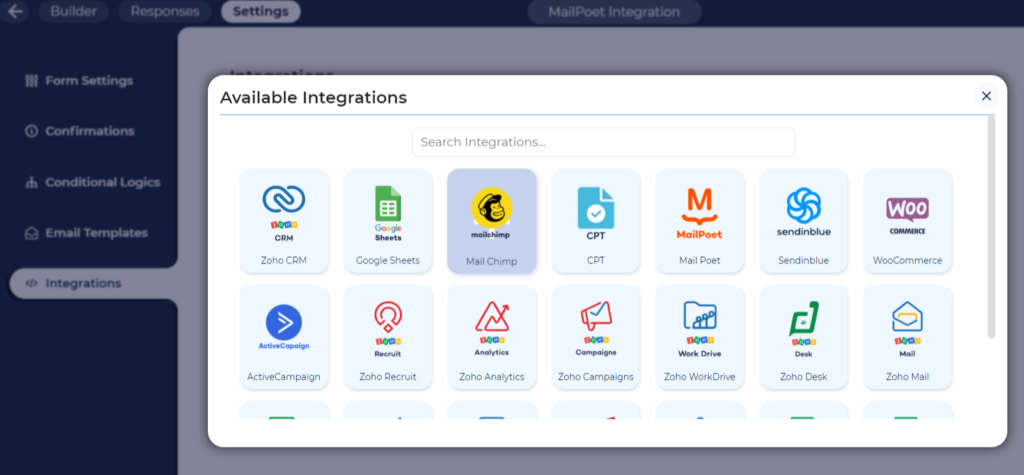
Version 3.3 introduced a redesigned integrations screen, reusable connected accounts, field auto-mapping, and draft preservation for unfinished integration setups. Version 3.3.1 also improved webhook rejection messages so administrators can see why WordPress blocked a URL instead of receiving a vague empty-URL error.
Good form software is not only about collecting data. Bit Form stores submissions inside WordPress and gives administrators a table for reviewing, filtering, searching and exporting entries. This is useful for support requests, applications, quote forms, surveys, registrations and any workflow where the submission itself remains a business record.

Pro extends this with front-end data views and editing, form abandonment, partial submissions and draft behavior. These features matter more for portals, onboarding, membership workflows and long application forms where users may need to return later.
Free includes basic show/hide conditional logic. Pro adds more granular behaviors such as enable/disable, set values, read-only states, dynamic labels/helper text, AND/OR groups, nested conditions, Else If branches and Else branches. That is enough to build quote forms, booking request flows, product selectors and application forms where different answers should produce different paths.

Recent 3.3.x releases also improved how hidden values are handled. Administrators can choose to discard values from fields hidden by conditional logic so stale answers do not leak into entries, emails, PDFs or integrations.

Multistep forms split a long form into manageable sections, while conversational forms present questions in a more guided sequence. These layouts are useful for onboarding, qualification, surveys, applications and quote requests where showing every field at once would feel heavy.

Free is strong enough for many production sites. You get unlimited forms and submissions, responsive forms, 38+ fields, multistep forms, basic conditional logic, entries, email notifications, templates, file uploads, custom JS/CSS, major captcha systems, webhooks and many integrations.
Pro is justified when the form becomes part of a deeper business process. The main reasons to upgrade are payment fields, advanced conditional logic, advanced file uploads, PDF generation, authentication forms, email OTP, front-end data views/editing, abandonment, landing forms, double opt-in, signatures and advanced date-time controls.
Pricing checked October 16, 2026. Starter Annual is currently $25/year promotional for one site, with $39 shown as the regular price. Starter Lifetime is $99 one time for one site, with $132 shown as the regular price. Agency Annual is $79/year for unlimited sites, compared with a $132 regular price, while Agency Lifetime is currently $199 one time for unlimited sites, with $665 displayed as the regular price.
Paid plans advertise full feature access, and the practical difference is mainly site allowance plus annual versus lifetime licensing. The pricing page also lists a 14-day money-back guarantee.
WPForms has a larger mainstream ecosystem and polished beginner onboarding. Fluent Forms is a close competitor for users who want a generous free edition and deep integrations. Gravity Forms remains a strong choice for established professional ecosystems, especially where third-party add-ons and developer familiarity matter.
Bit Form’s strongest argument is value density. Many capabilities are available without separate add-ons, the free version is unusually capable, and the paid plans remain inexpensive compared with several major form builders.
Because Bit Form can store entries, uploaded files, IP addresses, payment-related fields, user-registration data, and integration payloads, administrators should decide what really needs to be retained. A form used for a simple contact request does not need the same retention policy as an application portal or onboarding system. Disable entry storage when it is unnecessary, limit access to entries by role, and avoid collecting sensitive information unless the business process genuinely requires it.
Version 3.3.2 tightened several security behaviors, including password masking, stricter captcha handling, server-side option validation, safer IP handling, and stronger file validation. Those changes are meaningful for public forms because form endpoints are exposed to untrusted visitors by design. Keeping Bit Form current should therefore be part of the security policy, not only a way to receive new features.
Choose Bit Form when your requirements go beyond a contact form but you still want one cohesive builder. It is a strong fit when you need entries, conditional fields, integrations, uploads, multistep flows, conversational forms, or future payment/PDF/authentication features without replacing the form system later. If your project already depends on a specialist Gravity Forms or WPForms add-on that Bit Form cannot match, staying with that established ecosystem can be the safer decision.
Bit Form can stay lightweight on a simple contact form, but a complex production form may include calculations, repeaters, uploads, multiple integrations, conditional branches, payments, and large entry tables. Those workloads behave differently from a five-field contact form. Test the real production structure on your hosting, especially on mobile and slower devices. If a form performs many external integrations after submission, separate the visitor-facing success experience from downstream processing so a slow CRM or spreadsheet connection does not make the form feel broken.
Bit Form is one of the more complete low-cost WordPress form builders. The free version can handle serious production forms, while Pro adds the features that turn forms into business workflows: payments, PDFs, authentication, advanced conditions, front-end data access and abandonment recovery.
I would shortlist it for agencies and site owners who value broad functionality without assembling a stack of paid add-ons. I would choose another form platform when a project depends heavily on a specific third-party ecosystem, a specialist add-on, or an enterprise workflow already standardized around another builder.
Yes. Bit Form has a substantial free edition with unlimited forms and submissions, 38+ free fields, multistep forms, basic conditional logic, entries, email notifications, anti-spam tools and many integrations.
The current WordPress.org release reviewed here is Bit Form 3.3.3, released October 13, 2026.
Yes. Bit Form Pro includes payment fields for Stripe, PayPal, Razorpay and Mollie.
Yes. Free includes basic show/hide logic. Pro adds advanced actions, nested rules, AND/OR groups, Else If branches and more granular field control.
Yes. Bit Form includes a large integration library covering Google Sheets, CRMs, email tools, automation platforms, webhooks and other WordPress plugins.
Yes. Entries can be reviewed, filtered and exported in the WordPress dashboard. Pro adds more advanced front-end data views and editing workflows.
As checked October 16, 2026, the promotional Starter Annual price is $25/year for one site, and Starter Lifetime is $99 one time.
Builds contact, payment, and custom WordPress forms with a drag-and-drop editor, letting users create forms without coding markup.
Builds contact, payment, survey, registration, and workflow forms with conditional logic, reporting, AI, and integrations.
Builds advanced WordPress forms with conditional logic, payments, entry management, integrations, and developer-focused workflows.
Log in or create an account to continue.