
Best ValueFreemium
Build WordPress-native automations with triggers, actions, filters, dynamic tags, logs, AI-assisted workflow creation, and optional specialist add-ons.

Bit Integrations is a WordPress-native automation connector built for direct data transfer between plugins and external apps. Its strongest use case is straightforward automation such as sending a form submission to Google Sheets, syncing WooCommerce data to a CRM, creating a subscriber in an email platform, or passing WordPress events to another service through a webhook or API.
I would choose it when the automation can be expressed cleanly as a trigger, an action, field mapping, and optional conditions. If one trigger needs a long chain of branches, loops, delays, AI decisions, or approval steps, Bit Flows is the more natural product from the same company.
Best for: WordPress sites that need frequent direct integrations between forms, eCommerce, LMS, CRM, email, spreadsheets, webhooks, and external APIs.
Current release reviewed: 2.10.8, released October 12, 2026.
Active installs: 20,000+ on WordPress.org.
Free version: Yes. Free includes working triggers and actions, while Pro unlocks the complete premium event and integration catalog.
Paid pricing: Current promotion starts at $35/year for one site or $99 lifetime for one site.

| Area | What Bit Integrations can do | Availability |
|---|---|---|
| Trigger-to-action automation | Start from a WordPress plugin event and send data to another WordPress plugin or external platform | Free and Pro, depending on the exact event |
| Field mapping | Match incoming trigger fields to destination fields, custom fields, and supported dynamic values | Core feature |
| Conditional logic | Run an integration only when field values meet AND/OR rules and comparison operators | Core feature |
| Smart Tags | Insert date/time, logged-in user, post, author, site, visitor, and boolean values into supported mappings | Current versions |
| Webhooks | Receive external webhook data or send data to an outgoing webhook with parameters, headers, body values, and dynamic paths | Available in supported workflows |
| Custom API | Connect services through GET, POST, PUT, PATCH, and DELETE requests with API key, bearer-token, or basic authentication | Advanced integration capability |
| Connections | Authorize an app once and reuse the same saved credentials across multiple integrations | Current connection manager |
| Timeline logs | Inspect successful and failed runs, search/filter logs, and re-execute previous integration attempts | Current versions |
| Failure alerts | Email the site administrator when an integration fails | Available in settings |
| Unlimited transfers | Paid plans do not use a per-task or per-record billing model | Paid plans |
A Bit Integrations automation starts by choosing what event should trigger the integration. That could be a form submission, WooCommerce event, LMS activity, CRM change, webhook request, or another supported WordPress event. You then choose the destination app and action that should receive the data.
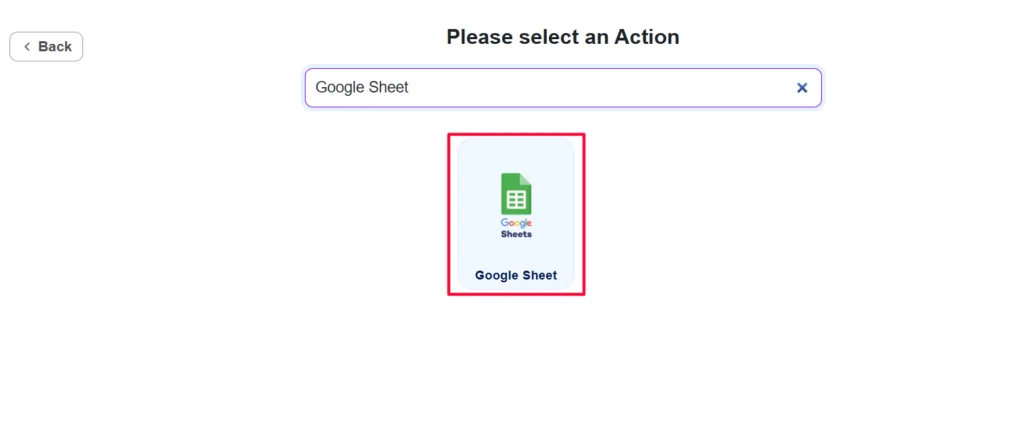
This design is easier to manage when the business rule is direct. For example, when a WC Affiliate event occurs, send selected fields to Google Sheets. You do not need to draw a flowchart to express that relationship. The trade-off is that this is not intended to replace a workflow orchestrator when the automation has many dependent steps.
The trigger and action names are only the beginning. The real setup work is deciding which source field should populate each destination field. Bit Integrations exposes trigger data on one side and the selected action’s fields on the other so you can map the values explicitly.

This matters most when destination fields are required, when the receiving app expects a specific data type, or when custom fields are involved. Recent versions have also improved nested trigger labels and added Smart Tags for values such as current date/time, logged-in user data, post information, site details, visitor information, and true/false values.
I would always test the mapping with a real submission before depending on it. A successful authorization does not prove that the correct email, product ID, user ID, amount, or custom field is reaching the destination.
Conditional logic lets you decide whether an integration should run based on the incoming data. Supported operators include equality, null checks, contains, starts with, ends with, and numeric comparisons, while AND and OR logic can combine several rules.
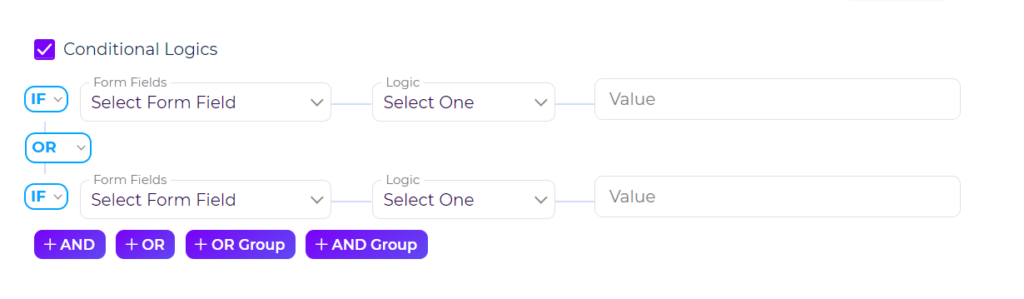
For example, a CRM action could run only when a lead selects a particular service, or a spreadsheet action could run only when an order exceeds a value threshold. This is still a direct trigger-to-action model, but it prevents the destination from receiving data that does not belong there.
A large integration catalog is useful, but every business eventually has a service that is not in the list. Bit Integrations can send data through outgoing webhooks or build a Custom API request when the external service exposes an endpoint.
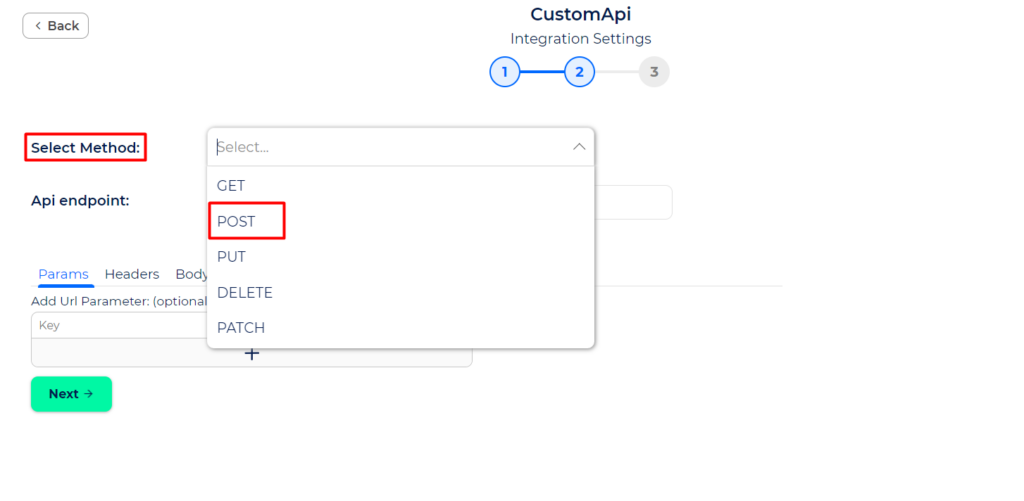
Custom API supports common HTTP methods and authentication approaches including API key, bearer token, and basic authentication. You can configure an endpoint, headers, query values, request body, raw JSON, and mapped fields. Current releases also support dynamic URL path variables, making it easier to target endpoints where an ID or resource name is part of the path.
Webhook and API flexibility also raises the security bar. The official documentation warns that webhook access should be restricted and monitored. API credentials should use the least privilege required, and any externally supplied payload should be treated as untrusted data.
Version 2.10.0 introduced a centralized connection manager. Instead of authorizing the same service separately every time, you can save a connection once and reuse it across integrations. The manager shows linked integrations and allows connection editing from one place.
Version 2.10.2 also changed credential presentation so API keys, tokens, and secrets are hidden behind dots with an explicit reveal control. OAuth callbacks now return through a dedicated site callback URL, which improves compatibility with providers that reject less specific redirect URLs.
Bit Integrations records execution history so you can see whether a transfer succeeded or failed. The current Timeline supports server-side status filtering, search, configurable columns, re-execution, and nested re-run history.

A security change in 2.10.7 also matters here: when an administrator re-executes a log, the integration now runs as the user who made the original submission rather than inheriting the administrator’s identity. That reduces the chance that a retry gains permissions the original event did not have.
Settings can automatically remove old logs after a defined retention period and can email the administrator when an integration fails. I would enable failure alerts for any integration tied to lead capture, orders, billing, memberships, or other business-critical data.
The free plugin is a real integration product, not just a UI demo. It includes supported free triggers and actions, mapping, conditions, and direct automation workflows. Pro unlocks the complete paid trigger/action catalog and advanced integrations that are marked Pro throughout the official changelog and documentation.
The practical way to decide is to write down the exact trigger and exact action first. Two apps can both appear in the catalog while the event you need is only available in Pro. Check the event-level availability before designing the rest of the automation.
| Capability | Free | Pro |
|---|---|---|
| Direct trigger-to-action integrations | Yes, supported free events | Yes |
| Field mapping | Yes | Yes |
| Conditional logic | Yes | Yes |
| Timeline/logging | Yes | Yes |
| Premium plugin triggers/actions | Limited | Yes |
| All paid integration events | No | Yes |
| Unlimited data transfers | Subject to free event coverage | Yes, no task-credit billing |
| Support and updates | Community/free channel | Included with paid license |
Pricing checked October 15, 2026. Starter Annual is currently promoted at $35/year for one site, with $39 displayed as the regular price. Starter Lifetime is $99 one time during the current promotion, with $132 shown as the regular price.
Agency Annual is currently $99/year for unlimited sites, with $132 displayed as the regular price. Agency Lifetime is currently promoted at $299 one time for unlimited sites, with $665 shown as the regular price. Paid plans include all features and unlimited data transfers; the main difference is site allowance and annual versus lifetime licensing.
Bit Flows is the obvious alternative when you need a visual multi-step process with routers, loops, delays, AI Agent, MCP, or Human in the Loop. Bit Integrations is simpler when the job is mainly moving data from one event to one destination.
Uncanny Automator and AutomatorWP are broader WordPress automation platforms with recipe-style workflows and large ecosystems. Bit Integrations differentiates itself through its direct integration model, extensive connector catalog, API/webhook tooling, and paid plans that advertise unlimited data transfer rather than task credits.
Bit Integrations is strongest when WordPress automation is fundamentally about dependable data transfer. The trigger-action model stays easier to understand than a large workflow graph, while field mapping, conditions, Smart Tags, webhooks, Custom API, reusable connections, logs, and retries provide enough depth for serious integrations.
I would shortlist it for WordPress businesses that connect forms, WooCommerce, LMS plugins, CRMs, spreadsheets, email tools, and external APIs at meaningful volume. I would choose Bit Flows or another workflow-first tool when the process itself, rather than the data transfer, requires many sequential decisions and branches.
Yes. Bit Integrations has a free WordPress.org version with working triggers and actions. Pro expands the available premium events and integration coverage.
The current WordPress.org release is Bit Integrations 2.10.8, released October 12, 2026.
Paid plans currently advertise unlimited data transfers and do not use a per-task credit model.
Yes. Outgoing webhooks and Custom API requests can connect compatible external services that provide webhook endpoints or APIs.
Yes. Current Timeline functionality supports re-execution and keeps nested rerun history so you can review previous attempts.
Bit Integrations is optimized for direct trigger-to-action data transfer. Bit Flows is a visual multi-step workflow builder with branching, loops, delays, AI Agent, MCP, and human approval tools.
As checked October 15, 2026, the current promotion starts at $35/year or $99 lifetime for one site. Unlimited-site pricing is $99/year or $299 lifetime during the current promotion.
Build WordPress-native automations with triggers, actions, filters, dynamic tags, logs, AI-assisted workflow creation, and optional specialist add-ons.
Build multi-step WordPress automations with a visual workflow canvas, AI Agent, routers, APIs, webhooks, MCP, human approvals, logs, and hundreds…
Connect WordPress plugins and external apps with no-code recipes, AI-assisted site tasks, advanced workflow logic, and an AI-first page builder.
Log in or create an account to continue.