



An out-of-stock product does not have to end the buying journey. A good WooCommerce waitlist plugin captures the customer’s intent, remembers the exact product or variation, and brings that shopper back when inventory returns.
I care most about reliable email queues, variation support, subscriber management, demand reporting, guest signups, unsubscribe controls, and whether the plugin can handle a popular restock without trying to send thousands of messages in one request.
These five cover the strongest current approaches. If you are selling a product before launch rather than waiting for stock to return, see our WooCommerce pre-order plugins. For the broader store stack, compare our best WooCommerce plugins.
TL;DR
- Back In Stock Notifications for WooCommerce by Woo: best official option for scalable restock alerts, demand data, variation support, and Action Scheduler delivery.
- Back In Stock Notifier for WooCommerce: best free-first option for large waitlists, fair sending, email throttling, and modern restock workflows.
- YITH WooCommerce Waitlist: best for stores already using the YITH ecosystem and wanting a familiar waitlist workflow.
- Waitlist WooCommerce by Xootix: best for customizable popup or inline signup forms, email logs, and flexible visibility rules.
- Back in Stock and Price Alert by Addify: best when you want restock alerts and price-change alerts in the same plugin.
Quick Comparison
| Plugin | Best for | Free version | Standout feature |
|---|---|---|---|
| Back In Stock Notifications by Woo | Official scalable alerts | No | Action Scheduler + demand insights |
| Back In Stock Notifier | Free high-volume restock alerts | Yes | Fair sending and throttling |
| YITH WooCommerce Waitlist | YITH ecosystem stores | Yes | Simple waitlist integration |
| Waitlist WooCommerce | Custom signup forms | Yes | Popup/inline forms and logs |
| Back in Stock and Price Alert | Stock + price alerts | No | Restock and price-change notifications |
How I Chose These Plugins
I compared variation support, guest signups, subscriber management, sending reliability, background queues, email customization, unsubscribe handling, reporting, current maintenance, and whether the plugin gives store owners useful demand data instead of only sending a message.
1. Back In Stock Notifications for WooCommerce – Best Official Option
Back In Stock Notifications for WooCommerce by Woo is the strongest premium choice when you want the waitlist system to follow WooCommerce conventions closely.
It adds signup forms to sold-out simple products and variations, stores demand data, exports subscribers, and sends restock emails through Action Scheduler. That background processing matters on popular products because the plugin does not need to deliver every email inside one page request.
Key features
- Back-in-stock signup forms for products and variations
- Automated restock emails
- Action Scheduler background sending
- Demand and notification dashboard
- CSV subscriber export
- Product Bundles and block checkout compatibility
Pros: Official Woo extension, scalable delivery, strong variation handling, and useful demand data.
Cons: Premium-only and does not itself guarantee email deliverability if the store’s mail setup is weak.
Best for: Established WooCommerce stores that want a supported official waitlist system with reliable background sending.
Pricing: Currently $59 per year.
2. Back In Stock Notifier for WooCommerce – Best Free-First High-Volume Option

Back In Stock Notifier for WooCommerce is one of the most capable free-first restock tools in the directory and has a large active install base.
The current releases focus heavily on sending reliability. Background processing, fair first-come-first-served notifications, and email speed limits make it especially interesting for stores that expect long waitlists on limited restocks.
Key features
- Automatic restock signup forms
- Background email processing
- Fair sending based on available stock
- Email speed limiting
- Subscriber filters and management
- Spam protection and form customization options
Pros: Strong free functionality, active development, and unusually thoughtful handling of large notification batches.
Cons: Some advanced workflow and add-on features are commercial.
Best for: Stores that need a capable free waitlist system or expect popular products to generate large subscriber lists.
Pricing: Free core plugin with optional Pro/add-on features.
3. YITH WooCommerce Waitlist – Best for YITH Ecosystem Stores
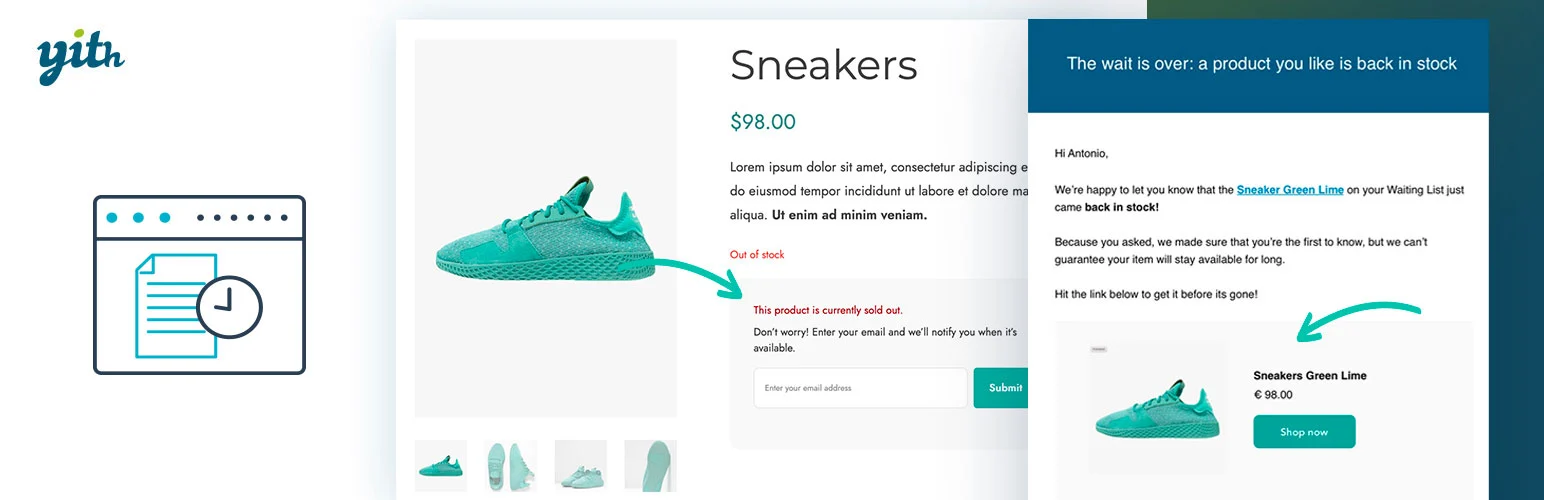
YITH WooCommerce Waitlist provides a familiar waitlist workflow for stores already using YITH products and is actively updated for current WordPress and WooCommerce versions.
I would choose it when consistency with other YITH extensions matters. It keeps the signup and notification process inside an ecosystem that many WooCommerce stores already use for wishlist, pre-order, subscription, and product merchandising features.
Key features
- Waitlist signup on unavailable products
- Back-in-stock customer emails
- Simple and variable product support
- Waitlist subscriber management
- Current WooCommerce compatibility updates
- Premium options for deeper YITH workflows
Pros: Actively maintained, familiar YITH interface, and easy fit for stores already invested in YITH plugins.
Cons: Less compelling if you do not use the YITH ecosystem and want advanced free sending controls.
Best for: WooCommerce stores already using YITH products and wanting a consistent waitlist system.
Pricing: Free version available with a commercial premium edition.
4. Waitlist WooCommerce by Xootix – Best for Custom Signup Forms

Waitlist WooCommerce by Xootix gives more presentation control than many simple restock plugins. It supports popup or inline forms, guest or registered-user rules, customizable fields, visibility rules, and an email log.
I would use it when the waitlist form itself needs to fit a specific product-page design or collect more than a bare email address.
Key features
- Popup and inline waitlist forms
- Guest and registered-user controls
- Customizable form fields
- Product and stock-status visibility rules
- Email log
- Subscriber and demand tracking
Pros: Flexible front-end presentation, useful form controls, and a practical email log.
Cons: Smaller install base than the two leading free/official options and some advanced features require Pro.
Best for: Stores that care about custom waitlist forms and visibility rules as much as the notification itself.
Pricing: Free core plugin with a commercial Pro edition.
5. Back in Stock and Price Alert for WooCommerce – Best for Stock + Price Alerts
Back in Stock and Price Alert for WooCommerce by Addify adds a second high-intent notification type: price changes.
That makes it useful when customers hesitate because of both availability and price. You can configure stock alerts, price-drop or price-increase alerts, subscriber management, category/product rules, and minimum stock thresholds.
Key features
- Back-in-stock notifications
- Price-drop and price-increase alerts
- Product and category targeting
- Subscriber management grid
- Minimum stock thresholds
- Customizable forms and email messages
Pros: Combines stock and pricing intent signals in one extension.
Cons: Premium-only and unnecessary if the store only wants a basic free restock form.
Best for: Stores where price-sensitive shoppers are as important as customers waiting for inventory.
Pricing: Currently $49 per year.
Which WooCommerce Waitlist Plugin Should You Choose?
Use Woo’s Back In Stock Notifications when official integration and demand reporting matter most. Use Back In Stock Notifier when you want the strongest free-first sending workflow. YITH is a natural fit for YITH-heavy stores, Xootix offers more form control, and Addify is the better choice if price alerts matter too.
Whichever plugin you choose, test email delivery with your real SMTP setup. A perfect waitlist is useless if a large restock batch lands in spam or exceeds the sending limits of your hosting provider.
Conclusion
A waitlist plugin should turn stockouts into recoverable demand. Woo’s official extension is the cleanest premium choice, while Back In Stock Notifier gives free users an unusually capable sending system. The best option is the one that handles your variation structure, subscriber volume, and email infrastructure without making restock communication a manual job.
Frequently Asked Questions
What is the best WooCommerce waitlist plugin?
Woo’s Back In Stock Notifications is the strongest official premium option. Back In Stock Notifier is the strongest free-first choice for high-volume restock alerts.
Can customers join a waitlist for product variations?
Yes. The leading plugins support sold-out variations, which is important for sizes, colors, and other variable products.
Do WooCommerce waitlist plugins send emails automatically?
Yes. They monitor stock changes and send restock notifications to subscribers when the product or variation becomes available again.
Can I use waitlist data to plan inventory?
Yes. Subscriber counts are a useful demand signal. Some premium plugins provide dedicated dashboards or exports to help prioritize restocking.
Why are back-in-stock emails not reaching customers?
The waitlist plugin controls the trigger, but deliverability depends on your WordPress mail setup, SMTP provider, sending limits, DNS authentication, and recipient filtering.

