



When a WordPress email goes missing, the first question is not always “Is SMTP broken?” Sometimes the site generated the message correctly and the problem happened later. An email log gives you evidence: recipient, subject, headers, timestamp, status, source, and often the ability to resend or inspect the message.
I treat email logging as a debugging and audit layer. SMTP improves delivery; logging tells you what WordPress attempted to send. On WooCommerce, membership, booking, and form sites, that record can save a lot of guesswork when a customer says they never received an email.
These five focus on logging first. If delivery itself is unreliable, see our WordPress SMTP plugins. For broader admin auditing, compare our WordPress activity log plugins.
TL;DR
- WP Mail Logging: best overall for a mature, widely used email log with search, viewing, and resend support.
- Check & Log Email: best when you want email logging plus quick send tests and header overrides for troubleshooting.
- Email Log by WebFactory: best lightweight dedicated log for admins who mainly need a searchable record of outgoing mail.
- WP Mail Catcher: best for a lightweight log with a clean debugging workflow and message backup focus.
- WP Mail Log by WPVibes: best smaller alternative with resend, forwarding, and actively maintained log-management features.
Quick Comparison
| Plugin | Best for | Resend | Free version |
|---|---|---|---|
| WP Mail Logging | General email auditing | Yes | Yes |
| Check & Log Email | Logging + mail tests | Varies by feature | Yes |
| Email Log | Lightweight audit log | Depends on edition/features | Yes |
| WP Mail Catcher | Debugging and backup | Yes | Yes |
| WP Mail Log | Log + resend/forward | Yes | Yes |
How I Chose These Plugins
I compared current maintenance, log detail, search and filtering, resend tools, privacy considerations, automatic cleanup, error visibility, and whether the plugin stays useful even when the site already uses a separate SMTP provider.
1. WP Mail Logging – Best Overall

WP Mail Logging is the safest general recommendation because it has a very large install base and focuses directly on recording WordPress email activity.
It logs messages generated through WordPress, lets administrators inspect the email details, and supports resend workflows. I would use it on ecommerce and membership sites where having a historical record matters as much as debugging a one-off problem.
Key features
- Logs outgoing WordPress emails
- View recipient, subject, message, and headers
- Search and filter logs
- Resend logged emails
- Useful for WooCommerce and form debugging
- Admin-focused audit history
Pros: Mature, widely used, simple to understand, and useful even if SMTP is handled by another plugin.
Cons: Email logs can contain personal data, so retention and access should be managed carefully.
Best for: Most WordPress sites that want a reliable historical record of outgoing transactional emails.
Pricing: Free core plugin.
2. Check & Log Email – Best for Logging Plus Send Tests

Check & Log Email is especially useful during troubleshooting because it combines logging with quick test-email tools.
I would use it when I need to answer two questions quickly: did WordPress generate the email, and can the site send a test message right now? Header overrides and carbon-copy options can also help during debugging or staging work.
Key features
- Outgoing email log
- Test email sending
- Header override options
- Carbon-copy controls
- Useful delivery diagnostics
- Simple WordPress admin interface
Pros: Excellent troubleshooting utility because it combines logging and immediate send tests.
Cons: Broader debugging controls can be more than you need if the only goal is passive logging.
Best for: Developers, support teams, and site owners actively diagnosing email problems.
Pricing: Free core plugin.
3. Email Log by WebFactory – Best Lightweight Dedicated Log

Email Log by WebFactory is a focused alternative with a large active install base and current WordPress compatibility.
I would choose it for a site that wants a straightforward admin record of outgoing email without adopting a larger SMTP or deliverability platform. The narrower scope keeps the mental model simple for support staff.
Key features
- Logs outgoing wp_mail messages
- Message detail view
- Searchable admin history
- Useful for debugging and auditing
- Lightweight dedicated workflow
- Current WordPress compatibility
Pros: Focused and easy to add to sites that already have their mail transport configured.
Cons: Fewer advanced resend and deliverability features than broader mail suites.
Best for: Sites that only need a simple email audit trail.
Pricing: Free core plugin.
4. WP Mail Catcher – Best Lightweight Debugging Log
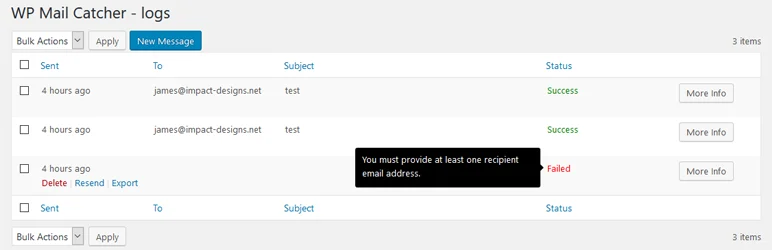
WP Mail Catcher is a compact logging plugin that focuses on retaining a readable record of WordPress emails for debugging and backup.
I like it on development and support-heavy sites where the main need is to inspect what WordPress generated without adding a large email-delivery interface.
Key features
- Captures outgoing WordPress emails
- Searchable log history
- Message inspection
- Useful for debugging lost transactional emails
- Lightweight plugin footprint
- Resend-oriented workflow
Pros: Lightweight and well suited to troubleshooting without replacing your SMTP configuration.
Cons: Smaller ecosystem and fewer reporting features than major SMTP/logging suites.
Best for: Developers and smaller sites that want a clean debugging history.
Pricing: Free core plugin.
5. WP Mail Log by WPVibes – Best for Resend and Forwarding

WP Mail Log by WPVibes has been actively updated in 2026 and combines logging with resend and forwarding tools.
I would consider it when support staff regularly need to re-send a customer email or forward a copy for review. Its recent releases have also focused on filtering, query performance, and safer handling of log data.
Key features
- Automatic outgoing email log
- Resend logged messages
- Forward email copies
- Date and pagination filters
- Auditing and debugging history
- Active 2026 maintenance
Pros: Practical resend/forward workflow and recent maintenance.
Cons: Smaller active install base than WP Mail Logging or Check & Log Email.
Best for: Support teams that want logging plus simple resend and forwarding actions.
Pricing: Free.
Which WordPress Email Log Plugin Should You Choose?
WP Mail Logging is the safest all-round choice. Check & Log Email is stronger during active troubleshooting, Email Log keeps the workflow simple, WP Mail Catcher stays lightweight, and WP Mail Log is useful when resend and forwarding are regular support tasks.
Do not keep logs forever by default. Transactional emails can contain names, addresses, order details, password-reset links, and other personal data. Restrict log access to trusted administrators and set a reasonable retention period where the plugin supports it.
Conclusion
Email logs replace guesswork with evidence. WP Mail Logging is my first choice for a general audit trail, Check & Log Email is excellent during troubleshooting, and the smaller dedicated tools work well when you want a lighter admin experience. Pair logging with a reliable SMTP or email API setup if the actual problem is delivery.
Frequently Asked Questions
What is the best WordPress email log plugin?
WP Mail Logging is the strongest general-purpose choice here. Check & Log Email is better if you also need quick test-email tools while troubleshooting.
Is an email log plugin the same as an SMTP plugin?
No. SMTP changes how WordPress delivers email. A log records what WordPress attempted to send. Many sites benefit from using both layers.
Can an email log tell me whether the recipient received the message?
Not always. A log can confirm that WordPress generated or handed off the message. Final inbox delivery depends on the mail provider, DNS authentication, spam filtering, and recipient server.
Can I resend a logged WordPress email?
Yes. Several plugins in this list support resend workflows, which can be useful for order confirmations, password emails, and support troubleshooting.
Are WordPress email logs a privacy risk?
They can contain personal or transactional data. Limit administrator access, use reasonable retention periods, and avoid keeping sensitive logs longer than necessary.

