



WordPress menu visibility plugins let you show or hide navigation items based on login status, user roles, dates, or other conditions. They are useful for membership sites, customer portals, private dashboards, course sites, WooCommerce accounts, and any site where every visitor should not see the same navigation.
The best option depends on how complex your rules are. Some plugins focus only on logged-in versus logged-out users. Others add role-based conditions, date windows, custom user data, or block-editor visibility controls.
If you need to manage the underlying roles themselves, see our WordPress user role and permission plugin roundup. For larger navigation structures, our WordPress mega menu plugin guide covers menu design and layout.
TL;DR
- User Menus: best overall for login state, user roles, login/logout links, and personalized menu labels.
- Nav Menu Roles: best for flexible role-based visibility with filters and membership-plugin integration.
- IF Menu Visibility: best lightweight option for logged-in, logged-out, or always-visible rules.
- Hide Menu Items by Role: best for explicit show/hide rules across multiple roles and login states.
- Shed Menu: best for combining role, login-status, and date-range conditions, including conditional Gutenberg blocks.
Quick Comparison
| Plugin | Best for | Conditions | Free version |
|---|---|---|---|
| User Menus | General membership navigation | Login state + user roles | Yes |
| Nav Menu Roles | Flexible role integrations | Login state + roles + filters | Yes |
| IF Menu Visibility | Simple visibility rules | Logged in / logged out / everyone | Yes |
| Hide Menu Items by Role | Role-based show/hide logic | Roles + login state | Yes |
| Shed Menu | Role + date conditions | Roles + login state + dates | Yes |
How I Chose These Plugins
I compared current maintenance, WordPress compatibility, user-role support, logged-in and logged-out rules, custom conditions, menu-editor integration, block-theme limitations, performance approach, and whether each plugin makes the visibility logic understandable for site administrators.
1. User Menus – Best Overall

User Menus is the strongest general-purpose choice for sites with logged-in users. It adds visibility settings directly to WordPress menu items and lets you choose whether a link appears for everyone, logged-out users, logged-in users, or selected user roles.
It also goes beyond simple hiding. You can insert user data such as a display name or avatar into menu labels and add login, register, and logout links with redirects. That makes it useful for memberships, account areas, communities, and customer portals.
Key features
- Show items to everyone, logged-in users, or logged-out users
- Include or exclude specific WordPress roles
- Display user name, email, avatar, and other account data in menu labels
- Add login, register, and logout menu links
- Configure redirects for account links
- Works inside the standard WordPress menu editor
Best for: membership sites, customer portals, communities, and account-based navigation
Keep in mind: Hiding a menu item does not secure the destination page. Protect restricted content separately with proper access-control rules.
2. Nav Menu Roles – Best for Flexible Role Integration
Nav Menu Roles is a mature role-based visibility plugin with a flexible developer layer. It can show menu items to logged-in users, logged-out users, or specific WordPress roles.
Its filters make it especially useful when a membership or custom application needs conditions beyond the default roles. The plugin documentation includes ways to extend visibility checks through custom user meta, capabilities, and third-party membership logic.
Key features
- Role-based navigation visibility
- Logged-in and logged-out conditions
- Custom filters for additional conditions
- Compatibility patterns for membership plugins
- Standard WordPress menu integration
- Long-established plugin with a large install base
Best for: role-driven sites that may need custom membership or capability integrations
Keep in mind: Themes or plugins that replace the menu-editor walker can interfere with visibility fields, so test it if your site uses a heavily customized menu system.
3. IF Menu Visibility – Best Lightweight Option
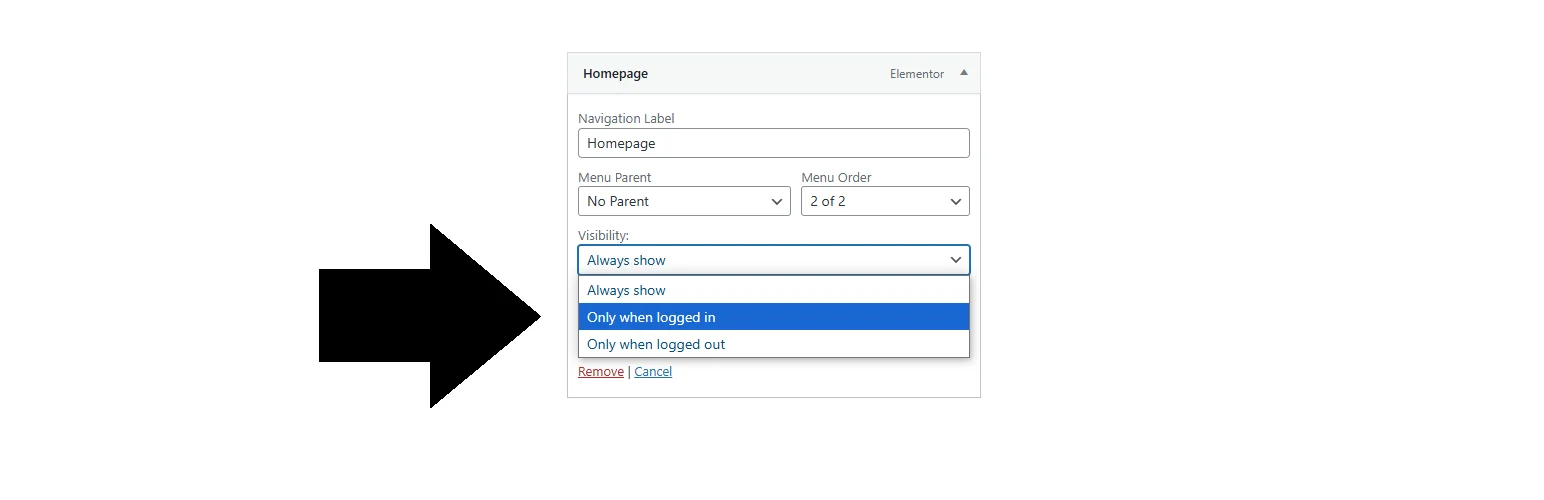
IF Menu Visibility takes a deliberately narrow approach. Each menu item can be set to show for everyone, logged-in users, or logged-out users.
The plugin uses the existing Appearance > Menus workflow and avoids external libraries. It is a good fit when the only condition you need is authentication state and adding a larger role engine would be unnecessary.
Key features
- Logged-in visibility
- Logged-out visibility
- Always-visible option
- Simple menu-editor interface
- No external libraries
- Small, focused feature set
Best for: simple sites that only need login-state navigation rules
Keep in mind: It does not provide the deeper role-specific and personalization features of User Menus or Nav Menu Roles.
4. Hide Menu Items by Role – Best for Explicit Role Show/Hide Rules
Hide Menu Items by Role gives administrators direct control over both sides of role logic. You can hide an item from selected roles or switch to a show-only mode for selected roles.
Login-state visibility is handled separately with Everyone, Logged-in only, and Logged-out only options. That makes the rules easier to read when a site has several roles and the navigation differs significantly between them.
Key features
- Hide from selected roles
- Show only to selected roles
- Multiple-role selection
- Logged-in and logged-out controls
- Uses WordPress core filters
- No jQuery dependency for visibility processing
Best for: sites with several user roles and clear allow/deny navigation rules
Keep in mind: As with all menu-hiding tools, visibility is presentation logic, not a replacement for permission checks on the destination content.
5. Shed Menu – Best for Role and Date Conditions
Shed Menu is a newer option that combines three conditions: login status, user roles, and a date range. Conditions are optional and can be combined, making it useful for temporary campaigns, scheduled member navigation, and event-specific links.
It also includes a Gutenberg conditional block that can show or hide groups of blocks using the same logic. Standard menu items are configured inside Appearance > Menus, while developers can use its helper function in custom themes.
Key features
- Login-status conditions
- Standard and custom user roles
- Start and end date/time conditions
- Conditional Gutenberg block
- Standard menu-editor integration
- Server-side processing without external services
Best for: campaigns, memberships, and sites that need navigation rules tied to dates as well as users
Keep in mind: Block-theme Navigation blocks have different internals, so the plugin recommends using its conditional block where per-item menu metadata is not available.
Which WordPress Menu Visibility Plugin Should You Choose?
User Menus is the best starting point for most account-based WordPress sites because it combines role visibility with login links and personalized user data. Nav Menu Roles is stronger when you expect custom membership integrations or developer-defined conditions.
Choose IF Menu Visibility when login state is the only rule you need. Hide Menu Items by Role is clearer for complex role allow/deny lists, while Shed Menu stands out when date scheduling or conditional Gutenberg content matters.
Conclusion
Menu visibility is most useful when it makes navigation clearer without pretending to be security. User Menus is the best general choice, Nav Menu Roles fits flexible role logic, IF Menu Visibility keeps simple login rules lightweight, and Shed Menu adds useful scheduling. Always pair hidden links with real access control when the destination contains restricted content.
Frequently Asked Questions
What is the best WordPress menu visibility plugin?
User Menus is the best all-round option in this list for most membership and account-based sites because it combines login-state rules, user roles, user data, and login/logout links.
Can I hide WordPress menu items by user role?
Yes. User Menus, Nav Menu Roles, Hide Menu Items by Role, and Shed Menu can apply role-based visibility rules to navigation items.
Does hiding a menu item protect the page?
No. Menu visibility only controls whether the navigation link is shown. Use a membership, permission, or content-restriction system to block unauthorized access to the actual page or endpoint.
Can I show different menu links to logged-in and logged-out users?
Yes. All five plugins in this roundup support authentication-state rules in some form, so you can create separate navigation experiences for guests and signed-in users.
Can WordPress menu items be scheduled by date?
Yes. Shed Menu supports start and end date/time conditions, which is useful for temporary promotions, registration windows, events, and scheduled member links.

