



WordPress revisions are useful until they solve the wrong problem. Core revisions help you compare and restore earlier content, but they do not give a team an approval queue, scheduled updates to already-published posts, per-post-type revision limits, or an easy way to clean years of old history.
I separate revision plugins into three jobs: editorial revision workflows, storage control, and cleanup. Mixing those goals can lead to the wrong plugin. A publisher who needs editors to approve changes has a completely different requirement from a site owner who only wants to stop revision tables from growing forever.
These five plugins cover those different jobs without duplicating the same feature set. If you mainly need to clone an entire page before editing it, see our WordPress duplicate post and page plugins. If revisions are already contributing to database bloat, compare our WordPress database optimization plugins.
TL;DR
- PublishPress Revisions: best for editorial teams that need to submit, approve, reject, schedule, and compare changes to published content.
- WP Revisions Control: best lightweight option for setting different revision limits for posts, pages, and custom post types.
- Simple Revisions Delete: best for manually or bulk deleting old revisions when cleanup is the main goal.
- Simple Revision Control: best for a simple no-code interface to limit how many revisions each post type keeps.
- WP Document Revisions: best for teams that need version control for uploaded documents and files, not only normal post content.
Quick Comparison
| Plugin | Best for | Main approach | Pricing |
|---|---|---|---|
| PublishPress Revisions | Editorial approval workflows | Submit, approve, schedule changes | Free; Pro in PublishPress bundle |
| WP Revisions Control | Revision limits | Per-post-type storage limits | Free |
| Simple Revisions Delete | Revision cleanup | Delete selected or bulk revisions | Free |
| Simple Revision Control | Simple revision caps | Limit revisions by post type | Free |
| WP Document Revisions | File version control | Revision history for documents | Free |
How I Chose These Plugins
I focused on active maintenance, compatibility with modern WordPress, whether the plugin solves a genuinely different revision problem, recovery safety, and how clearly it exposes the workflow to editors. Current plugin status and public pricing were checked in September 2026.
1. PublishPress Revisions – Best for Editorial Approval Workflows
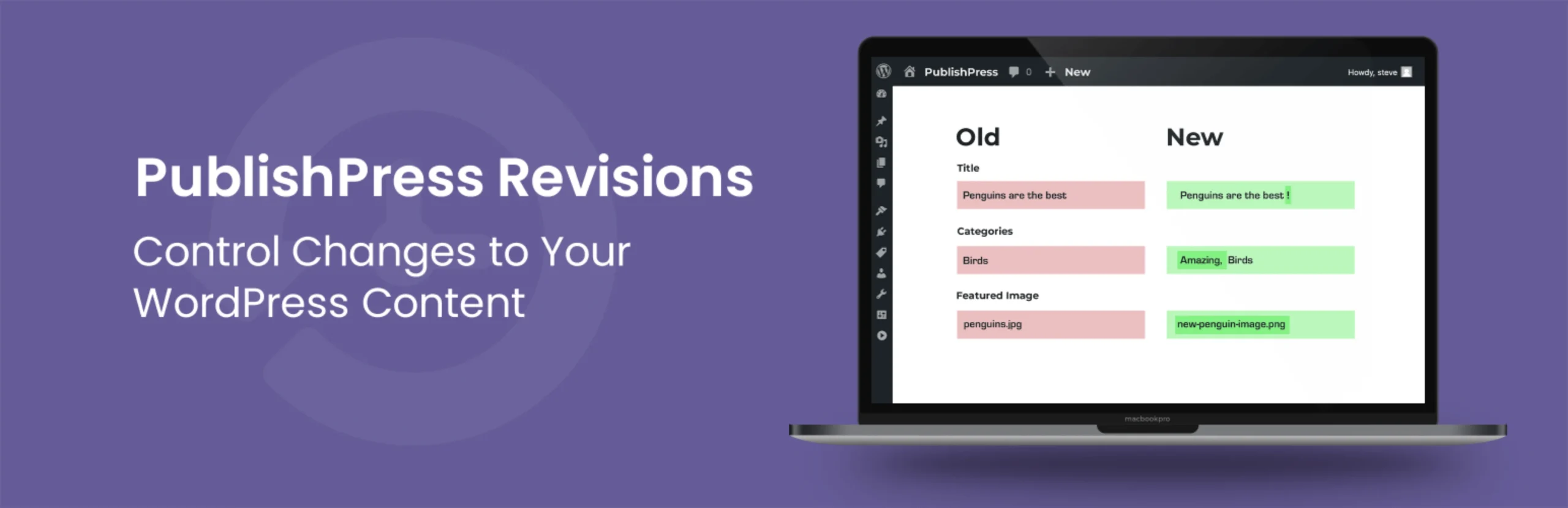
PublishPress Revisions goes far beyond WordPress core revision history. It lets contributors create changes to already-published content without immediately replacing the live version. Those changes can move through approval, rejection, comparison, and scheduling workflows.
This is the option I would choose for a newsroom, documentation team, agency, or regulated content workflow. WordPress 7.x already makes visual revision comparison better, but PublishPress adds the workflow layer that core does not provide: pending revisions, moderation, future publication, permissions, and notifications.
Key features
- Submit changes to published content as pending revisions
- Approve or reject revision requests
- Schedule approved revisions for future publication
- Preview and compare revisions
- Revision permissions and moderation controls
- Pro integrations for ACF, Elementor, WooCommerce, WPML, and more
Pros: The strongest editorial workflow in this list, actively maintained, and much safer than letting every contributor update live content directly.
Cons: Overkill if you only want to keep fewer database revisions.
Best for: Editorial teams, agencies, documentation sites, and organizations where published changes need review or scheduling.
Pricing: Free version available. Revisions Pro is included in the PublishPress plugin bundle, currently starting at $129 per year for one site.
2. WP Revisions Control – Best for Setting Revision Limits
WP Revisions Control is for a much simpler problem: WordPress keeps more revisions than you want. The plugin lets you define how many revisions should be retained for each supported post type rather than relying on one global code constant.
I like this approach when revision history is still useful but unlimited storage is unnecessary. A frequently edited documentation site may need more history than a static landing page, so per-post-type limits make more sense than disabling revisions globally.
Key features
- Set revision limits per post type
- Works with posts, pages, and supported custom post types
- Keeps WordPress core revision workflow intact
- Simple settings interface
- No code or wp-config.php editing required
- Useful for controlling long-term database growth
Pros: Focused, free, lightweight, and easier to manage than a hard-coded global revision constant.
Cons: It does not add approval, scheduling, or advanced editorial revision workflows.
Best for: Site owners who want to keep revision history but cap how much each content type stores.
Pricing: Free.
3. Simple Revisions Delete – Best for Manual and Bulk Cleanup

Simple Revisions Delete focuses on removing revision history rather than changing how revisions are created. It adds controls for deleting revisions from the editor and through bulk actions.
This is useful when the site already has a large history and you want a deliberate cleanup process. I prefer a visible cleanup tool over an aggressive automatic deletion rule when editors occasionally need to keep important historical versions.
Key features
- Delete all revisions for an individual post
- Bulk revision deletion
- Controls in block and classic editing workflows
- Focused revision-cleanup workflow
- No broader optimization suite required
- Useful before database maintenance or migrations
Pros: Straightforward, free, and gives editors control over when revision history is removed.
Cons: Cleanup is the main feature, so it does not solve workflow or future revision-limit requirements by itself.
Best for: Existing sites with accumulated revision history that need targeted cleanup.
Pricing: Free.
4. Simple Revision Control – Best Simple No-Code Revision Cap

Simple Revision Control gives you a settings-based way to limit how many revisions WordPress retains for different post types. It is conceptually similar to WP Revisions Control, but it is another actively maintained option with a straightforward administrative interface.
I would use it when the requirement is operational rather than editorial: keep five or ten useful versions, avoid unlimited history, and leave the rest of WordPress revisions alone.
Key features
- Configure revision limits by post type
- No wp-config.php editing required
- Keeps recent revision history available
- Simple administrative settings
- Works with normal WordPress revision storage
- Actively maintained in 2026
Pros: Free, easy to understand, and useful for non-technical administrators.
Cons: Duplicates some of the core use case of WP Revisions Control and does not add approval workflows.
Best for: Sites that want a simple revision-retention policy without adding a larger editorial plugin.
Pricing: Free.
5. WP Document Revisions – Best for Document Version Control
WP Document Revisions solves a related but different revision problem: versioning uploaded documents and files. Teams can store documents, track revisions, and collaborate around file versions rather than only normal posts and pages.
I would not install it just to manage blog-post history. It becomes interesting when WordPress is acting as a lightweight document-management system for policies, spreadsheets, PDFs, project files, or other frequently updated assets.
Key features
- Version control for uploaded documents
- Document change history
- Team-oriented document management
- Supports many file formats
- Revision notes and change tracking
- Useful for internal document workflows
Pros: Extends the revision concept to files and documents, which normal post-revision plugins do not handle well.
Cons: It is a document-management plugin, not the best choice for ordinary page and post revision limits.
Best for: Teams managing frequently revised PDFs, office files, policies, and internal documents through WordPress.
Pricing: Free.
Which One Should You Choose?
Use PublishPress Revisions when people need to review changes before they replace live content. Use WP Revisions Control or Simple Revision Control when the problem is storage limits. Use Simple Revisions Delete when old history already needs cleanup. Choose WP Document Revisions only when files and documents need their own version history.
Do not delete revisions just because the database contains a lot of them. First confirm whether editors rely on that history, take a backup, and decide how much rollback depth is actually useful. Revision storage is cheap compared with losing the one version you later need to restore.
Conclusion
Revision management is really three separate problems: approving changes, controlling storage, and cleaning old history. PublishPress Revisions is the clear choice for editorial workflow. WP Revisions Control and Simple Revision Control handle retention, Simple Revisions Delete handles cleanup, and WP Document Revisions extends version history to uploaded files. Choose the smallest tool that matches the revision problem you actually have.
Frequently Asked Questions
What is the best WordPress revision plugin?
PublishPress Revisions is the strongest choice for editorial approval and scheduled content updates. For simple revision limits, WP Revisions Control is a better lightweight option.
Does WordPress need a revision plugin?
Not always. WordPress core already stores and restores revisions. A plugin becomes useful when you need approval workflows, scheduled revisions, custom retention limits, easier cleanup, or document versioning.
Do too many WordPress revisions slow down a site?
A large revision history increases database size and can make some administrative or backup operations heavier. On most sites, the practical goal is sensible retention rather than disabling revisions completely.
Can I limit WordPress revisions without editing wp-config.php?
Yes. WP Revisions Control and Simple Revision Control provide settings interfaces for limiting stored revisions without editing code.
Should I delete all old WordPress revisions?
Only after confirming you no longer need them and taking a backup. Keeping a reasonable number of recent revisions is useful for recovery and editorial accountability.

