



“Purchase order plugin” can mean two different things in WooCommerce. Some stores need procurement software to create supplier POs and receive stock. Others need a checkout payment method where B2B customers submit a PO number and pay later. The four options below cover both use cases, so choose based on whether the purchase order is going to your supplier or coming from your customer.
TL;DR
PurchaseDesk is the strongest option here for supplier procurement and goods receiving. WC-Manager covers purchase orders alongside suppliers and multi-warehouse inventory. GazChap and B2B Invoice Payment Method solve the opposite problem: accepting customer purchase orders at checkout.
Quick comparison
| Plugin | Best for | PO direction | Key strength |
|---|---|---|---|
| PurchaseDesk | Supplier procurement | Store → supplier | POs, receiving, stock and COGS |
| WC-Manager Purchase Orders | Multi-warehouse purchasing | Store → supplier | Purchasing tied to warehouses |
| GazChap Purchase Order Gateway | Simple B2B PO checkout | Customer → store | PO number and invoice details |
| B2B Invoice Payment Method | Role-controlled invoice checkout | Customer → store | User-role and shipping restrictions |
How I evaluated these purchase order plugins
I separated procurement tools from customer-side PO payment gateways before comparing features. For procurement, the important criteria were suppliers, PO states, partial receiving, stock updates, COGS, and warehouse integration. For checkout POs, I looked at PO-number capture, invoice/payment behavior, role restrictions, email/order visibility, and whether the plugin actually generates invoices or only records the purchase-order reference.
1. PurchaseDesk – Best for supplier purchase orders
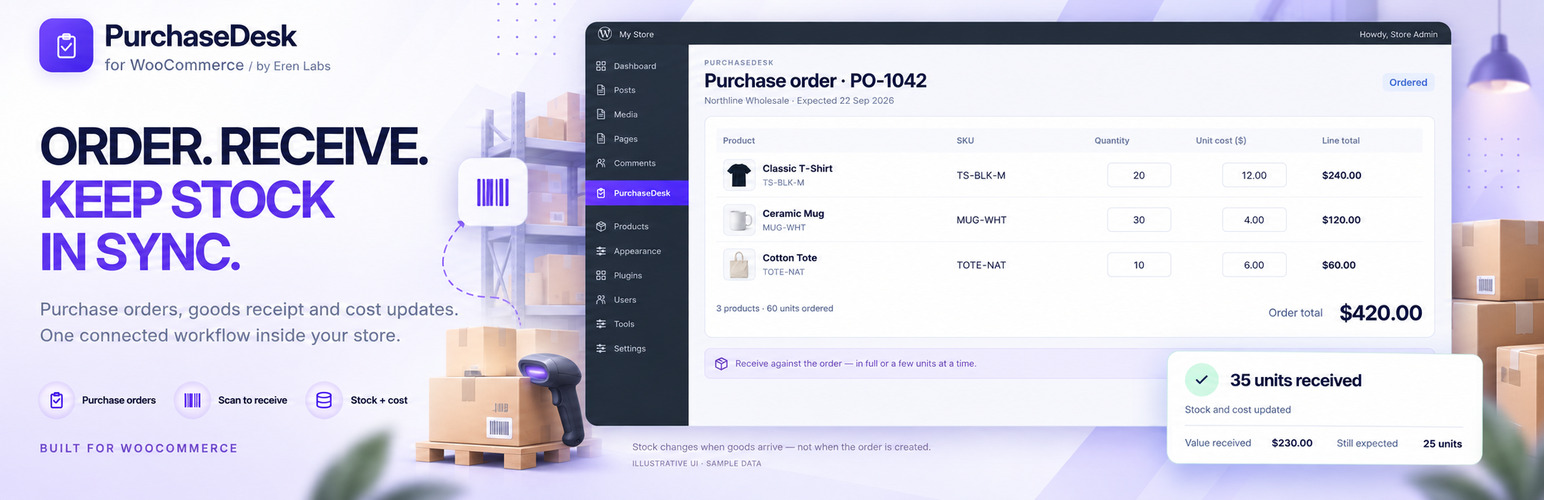
PurchaseDesk handles the purchasing side of inventory. Store staff can create suppliers, raise purchase orders, add catalog items by SKU or barcode, receive goods partially or in full, and update WooCommerce stock as products arrive. It also connects receiving with cost-of-goods data.
- Supplier records with contact and lead-time details.
- Purchase orders with draft, ordered, partially received, and received states.
- Partial goods receiving with stock updates.
- Reorder points, supplier SKUs, and default order quantities.
- COGS updates and receipt history.
Best for: WooCommerce stores buying physical inventory from suppliers. Pricing: the core purchasing workflow is available free; PurchaseDesk Pro adds features such as weighted-average costing, reports, draft POs from reorder lists, and printable POs.
2. WC-Manager Purchase Orders – Best for multi-warehouse procurement
The WC-Manager plugin includes procurement modules for suppliers, warehouses, and purchase orders. Purchase orders can be created and moved through send, cancel, and receive actions, while receiving can update WooCommerce stock and warehouse quantities.
- Supplier directory.
- Warehouse records.
- Purchase order creation and receiving.
- WooCommerce stock updates.
- REST endpoints for procurement data and WC-Manager dashboard integration.
Best for: stores that want purchasing tied to a broader multi-location inventory workflow. Limitation: it is broader than a standalone PO tool, so evaluate the complete inventory model rather than installing it only for one checkout field.
3. GazChap’s WooCommerce Purchase Order Payment Gateway – Best simple B2B PO checkout
GazChap solves customer-side purchase orders. It adds an offline WooCommerce payment gateway that can ask for a PO number and invoice address, store those details on the order, include them in email notifications, and expose PO data through the WooCommerce REST API.
- Purchase Order payment gateway.
- Optional or required PO number.
- Optional invoice postal address.
- PO information in emails and order admin.
- PO fields available through the REST API.
Best for: B2B stores that simply need customers to submit a purchase order reference instead of paying immediately. Limitation: the plugin explicitly does not generate the invoice itself. Pricing: free on WordPress.org.
4. B2B Invoice Payment Method for WooCommerce – Best for role-controlled invoice checkout
B2B Invoice Payment Method adds an invoice-style checkout gateway for customers who should be allowed to place an order without immediate payment. It can generate invoice numbers, include a purchase order reference, and restrict the gateway by user role or shipping method.
- Invoice payment gateway for WooCommerce.
- Purchase order information in order emails.
- Gateway restrictions by user role.
- Shipping-method controls.
- Compatibility positioning for wholesale/B2B workflows.
Best for: wholesale stores that need more checkout eligibility controls than a basic PO-number field. Pricing: a free WordPress.org version is available, with commercial upgrades/support offered by the developer.
Procurement PO vs customer PO: choose the right plugin type
If you are sending a PO to a supplier because you need more inventory, use a procurement plugin such as PurchaseDesk or WC-Manager. If a business customer sends a PO number to your store so it can be invoiced later, use a purchase-order payment gateway. These workflows share the same term but solve different problems. Stores with complex stock operations may also want to compare WooCommerce stock management plugins.
Final Take
PurchaseDesk is the most focused procurement option in this group, while WC-Manager is better suited to purchasing tied to warehouses. For customer-side B2B purchase orders, GazChap is the simpler gateway and B2B Invoice Payment Method adds more eligibility controls. Define which side of the transaction you mean by “purchase order” before choosing a plugin.
FAQs
Can WooCommerce create supplier purchase orders by default?
WooCommerce focuses on customer orders. Supplier purchase orders, receiving, and procurement normally require an extension or a separate inventory system.
Can customers enter a PO number at WooCommerce checkout?
Yes. Purchase-order payment gateway plugins can add a PO number field and store that reference with the order.
What is the difference between a purchase order and an invoice?
A purchase order is typically issued by the buyer to authorize a purchase. An invoice is issued by the seller to request payment. Some B2B WooCommerce workflows connect the two.
Do purchase-order plugins update inventory?
Procurement-focused plugins can update stock when goods are received. Checkout PO gateways generally do not manage supplier receiving; they record the customer-side purchase order instead.

