



Product tables work well when customers already know what they want and need to scan, filter and order many items quickly. That makes them especially useful for wholesale catalogs, restaurant menus, spare parts and stores with large product ranges.
TL;DR
Barn2 WooCommerce Product Table is my premium pick for polished order forms. Woo Product Table is the strongest free-first mature option. Product Table Builder offers a visual table builder, WPC Product Table is lightweight, JustTables is simple, and Ninja Tables Pro works well when you also need general-purpose data tables.
Quick comparison
| Plugin | Best for | Pricing model |
|---|---|---|
| WooCommerce Product Table by Barn2 | Best premium product table | Premium plugin |
| Woo Product Table | Best mature free-first option | Free + Pro |
| Product Table Builder for WooCommerce | Best visual table builder | Free + Pro |
| WPC Product Table | Best lightweight WPClever option | Free + Premium |
| JustTables | Best simple product table plugin | Free + Pro |
| Ninja Tables Pro | Best for mixed data and WooCommerce tables | Free core + Pro |
How I chose these plugins
I focused on product querying, columns, variations, filtering, add-to-cart behavior, bulk ordering, mobile usability, shortcode/block flexibility and whether the table can replace slow product-by-product browsing.
1. WooCommerce Product Table by Barn2 — Best premium product table
Barn2’s Product Table is built specifically for searchable WooCommerce order forms. It supports custom columns, product variations, filters, add-to-cart controls and large catalogs, with optional integration with Barn2 Product Filters.
Key features
- Searchable product tables
- Custom product columns
- Variation handling
- Add-to-cart from table
- Filter integration
- Responsive table layouts
Pros
- Polished ecommerce-focused workflow
- Strong for wholesale and quick-order catalogs
- Good documentation and support
Cons
- Premium-only
- Advanced filtering can add another plugin cost
Pricing
Barn2 sells WooCommerce Product Table as a premium plugin, with annual and lifetime plans. Check the live pricing page for the current one-site price and bundle discounts.
2. Woo Product Table — Best mature free-first option

Woo Product Table provides searchable, filterable product tables and supports variation-oriented ordering. It has a long WordPress.org history and is commonly used for restaurant menus, B2B lists and fast product ordering.
Key features
- Custom table columns
- Search and filters
- Variation support
- Add-to-cart controls
- Shortcodes
- Pro customization options
Pros
- Free version is useful
- Large review history
- Flexible for quick-order layouts
Cons
- Many advanced controls are in Pro
- Settings can feel dense on complex tables
Pricing
A free WordPress.org version is available with a separate Pro upgrade. Verify current Pro pricing on the developer site.
3. Product Table Builder for WooCommerce — Best visual table builder
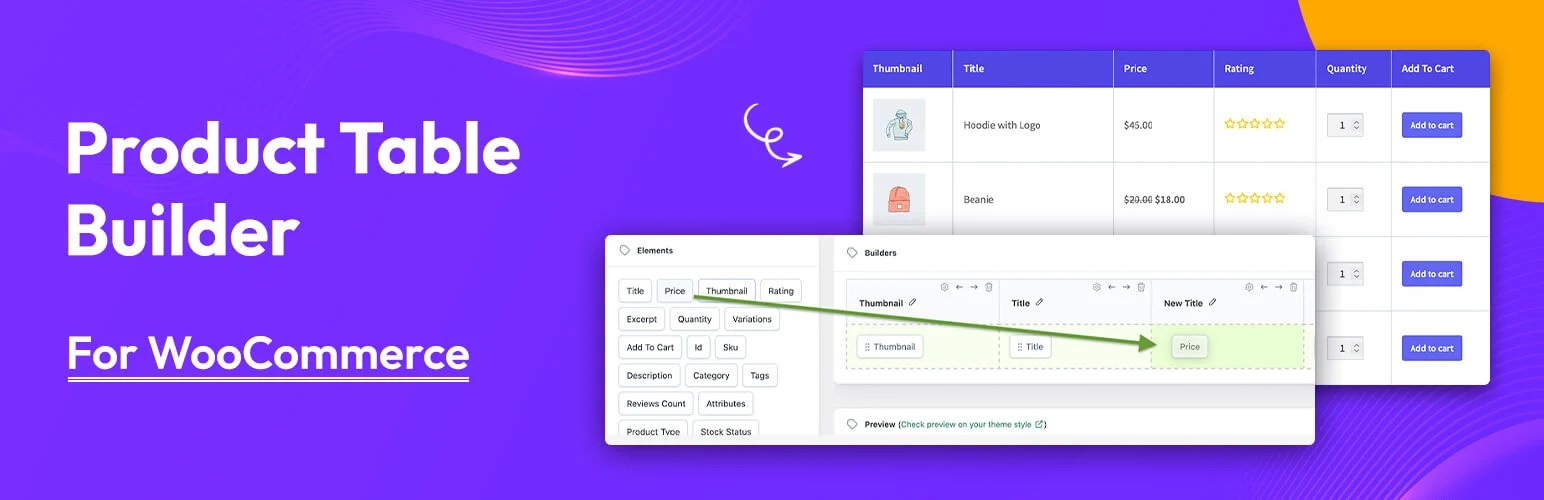
Product Table Builder uses a drag-and-drop approach for table columns and includes query controls, search, filtering, sorting, pagination and add-to-cart in the free version.
Key features
- Drag-and-drop table builder
- Query builder
- Search and filters
- Sorting and pagination
- Add to cart
- Product variation display
Pros
- Visual building workflow
- Useful free feature set
- Unlimited tables
Cons
- Mobile-responsive table features are positioned in Pro
- Newer ecosystem than long-established competitors
Pricing
The Lite version is free. Pro adds advanced columns, queries, responsive controls and import/export; check current Pro pricing before purchase.
4. WPC Product Table — Best lightweight WPClever option

WPC Product Table provides configurable WooCommerce product tables and fits naturally with other WPClever store plugins. It is useful for stores that want a lighter alternative without a large table-building suite.
Key features
- Product table layouts
- Custom columns
- Product search
- Add-to-cart controls
- WooCommerce compatibility
- WPClever ecosystem integration
Pros
- Lightweight approach
- Free core available
- Actively maintained for current WooCommerce versions
Cons
- Smaller table feature set than specialist premium products
- Advanced styling can require premium controls
Pricing
The core plugin is free on WordPress.org, with a premium upgrade available from WPClever.
5. JustTables — Best simple product table plugin

JustTables focuses on displaying WooCommerce products in sortable tables without adding a large ecommerce framework. It is a practical choice for smaller catalogs that need a straightforward table view.
Key features
- WooCommerce product tables
- Search and sorting
- Custom columns
- Product information display
- Add-to-cart support
- Responsive options
Pros
- Straightforward setup
- Maintained for recent WordPress/WooCommerce
- Free version available
Cons
- Less specialized for complex wholesale ordering
- Advanced design controls depend on the paid edition
Pricing
JustTables has a free WordPress.org plugin and a paid version from its developer. Check the live pricing for current license terms.
6. Ninja Tables Pro — Best for mixed data and WooCommerce tables
Ninja Tables is primarily a general WordPress table builder, but its Pro version can be useful when a site needs WooCommerce product tables alongside CSV, Google Sheets or other data-table workflows.
Key features
- Visual table building
- Search and sorting
- Responsive controls
- WooCommerce integration in Pro
- External data integrations
- Advanced styling
Pros
- Useful beyond ecommerce
- Flexible table design tools
- Good fit for sites already using WPManageNinja products
Cons
- WooCommerce is not the only focus
- Product-ordering workflow is less specialized than Barn2
Pricing
Ninja Tables has a free core plugin. WooCommerce-oriented and other advanced functionality is part of paid plans; verify current WPManageNinja pricing.
Related reading: WooCommerce product filter plugins and WooCommerce product search plugins.
Which one should you choose?
For a serious wholesale or quick-order store, start with Barn2 or Woo Product Table. Choose Product Table Builder when visual column design matters, WPC Product Table or JustTables for simpler needs, and Ninja Tables Pro when WooCommerce tables are only one part of a broader data-table requirement.
Conclusion
The best WooCommerce product table plugin is the one that reduces clicks without making the catalog harder to understand. Test variation selection and mobile ordering carefully because those are the two places table layouts often fail.
Frequently Asked Questions
Are product tables good for every WooCommerce store?
No. They work best for repeat buyers, wholesale catalogs, food ordering, parts and large inventories. Visual lifestyle products often benefit more from normal product grids.
Can customers add multiple products from a table?
Many product-table plugins support quick ordering and add-to-cart controls. Bulk add behavior varies by plugin and configuration.
Do WooCommerce product tables support variations?
Most specialist product-table plugins support variations, but the display can be dropdowns, separate rows or custom controls. Test the exact workflow you need.
Will a product table replace my shop page?
It can, but you can also use tables only on selected landing pages, categories or wholesale sections while keeping the normal WooCommerce shop.

